Spring 3.1 M1: Introducing @Profile |
|

Introduction
In my earlier post announcing Spring 3.1 M1, I discussed the new bean definition profiles feature as applied when using Spring <beans/> XML to configure the container. Today we'll introduce the new @Profile annotation and see how this same feature can be applied when using @Configuration classes instead of XML. Along the way we'll cover some best practices for designing @Configuration classes.
Recall @Configuration
For those unfamiliar with @Configuration classes, you can think of them as a pure-Java equivalent to Spring <beans/> XML files. We've blogged about this featureset before, and the reference documentation covers it well. You may want to revisit those resources if you need an introduction or a refresher.
As we'll see in this and subsequent posts, much attention has been given to the @Configuration approach in Spring 3.1 in order to round it out and make it a truly first-class option for those who wish to configure their applications without XML. Today's post will cover just one of these enhancements: the new @Profile annotation.
As with the previous post, I've worked up a brief sample where you can follow along and try things out for yourself. You can find it at https://github.com/cbeams/spring-3.1-profiles-java and all the details for getting set up are in the README. This sample contains both the XML-based configuration covered in the last post, as well as @Configuration classes, in the com.bank.config.xml and com.bank.config.code packages, respectively. The IntegrationTests JUnit test case has been duplicated for each package; this should help you compare and contrast the two styles of bootstrapping the container.
From XML to @Configuration
Let's dive in! Our task is simple: take the XML-based application shown previously and port it to an @Configuration style. We started the last post with an XML configuration looking like the following:
<beans xmlns="http://www.springframework.org/schema/beans" xmlns:xsi="http://www.w3.org/2001/XMLSchema-instance" xmlns:jdbc="http://www.springframework.org/schema/jdbc" xsi:schemaLocation="..."> <bean id="transferService" class="com.bank.service.internal.DefaultTransferService"> <constructor-arg ref="accountRepository"/> <constructor-arg ref="feePolicy"/> </bean> <bean id="accountRepository" class="com.bank.repository.internal.JdbcAccountRepository"> <constructor-arg ref="dataSource"/> </bean> <bean id="feePolicy" class="com.bank.service.internal.ZeroFeePolicy"/> <jdbc:embedded-database id="dataSource"> <jdbc:script location="classpath:com/bank/config/sql/schema.sql"/> <jdbc:script location="classpath:com/bank/config/sql/test-data.sql"/> </jdbc:embedded-database> </beans>
And this is straightforward to port into a @Configuration class:
src/main/com/bank/config/code/TransferServiceConfig.java
@Configuration
public class TransferServiceConfig {
@Bean
public TransferService transferService() {
return new DefaultTransferService(accountRepository(), feePolicy());
}
@Bean
public AccountRepository accountRepository() {
return new JdbcAccountRepository(dataSource());
}
@Bean
public FeePolicy feePolicy() {
return new ZeroFeePolicy();
}
@Bean
public DataSource dataSource() {
return new EmbeddedDatabaseBuilder()
.setType(EmbeddedDatabaseType.HSQL)
.addScript("classpath:com/bank/config/sql/schema.sql")
.addScript("classpath:com/bank/config/sql/test-data.sql")
.build();
}
}
Note: The EmbeddedDatabaseBuilder is the component that underlies the <jdbc:embedded-database/> element originally used in the XML. As you can see, it's quite convenient for use within a @Bean method.
At this point, our @Configuration-based unit test would pass with the green bar:
src/test/com/bank/config/code/IntegrationTests.java
public class IntegrationTests {
@Test
public void transferTenDollars() throws InsufficientFundsException {
AnnotationConfigApplicationContext ctx = new AnnotationConfigApplicationContext();
ctx.register(TransferServiceConfig.class);
ctx.refresh();
TransferService transferService = ctx.getBean(TransferService.class);
AccountRepository accountRepository = ctx.getBean(AccountRepository.class);
assertThat(accountRepository.findById("A123").getBalance(), equalTo(100.00));
assertThat(accountRepository.findById("C456").getBalance(), equalTo(0.00));
transferService.transfer(10.00, "A123", "C456");
assertThat(accountRepository.findById("A123").getBalance(), equalTo(90.00));
assertThat(accountRepository.findById("C456").getBalance(), equalTo(10.00));
}
}
AnnotationConfigApplicationContext is used above, which allows for direct registration of @Configuration and other @Component-annotated classes. This leaves us with a string-free and type-safe way of configuring the container. There's no XML, which is great, but at this point our application suffers from the same problem we saw in the first post: when the application is deployed into production, a standalone datasource won't make sense. It will need to be looked up from JNDI.
This is no problem. Let's break the embedded- and JNDI-based datasources out into their own dedicated @Configuration classes:
src/main/com/bank/config/code/StandaloneDataConfig.java
@Configuration
@Profile("dev")
public class StandaloneDataConfig {
@Bean
public DataSource dataSource() {
return new EmbeddedDatabaseBuilder()
.setType(EmbeddedDatabaseType.HSQL)
.addScript("classpath:com/bank/config/sql/schema.sql")
.addScript("classpath:com/bank/config/sql/test-data.sql")
.build();
}
}
src/main/com/bank/config/code/JndiDataConfig.java
@Configuration
@Profile("production")
public class JndiDataConfig {
@Bean
public DataSource dataSource() throws Exception {
Context ctx = new InitialContext();
return (DataSource) ctx.lookup("java:comp/env/jdbc/datasource");
}
}
At this point we have declared the two different DataSource beans within their own @Profile-annotated @Configuration classes. Just as with XML, these classes and the @Bean methods within them will be skipped or processed based on which Spring profiles are currently active. However, before we can see that in action, we first need to finish our refactoring. We've split out the two possible DataSource beans but how can we reference them method from within TransferServiceConfig — specifically it's accountRepository() method? We have a couple of options, and both begin with understanding that @Configuration classes are candidates for @Autowired injection. This is because, in the end, @Configuration objects are managed as "just another Spring bean" in the container. Let's take a look:
src/main/com/bank/config/code/TransferServiceConfig.java
@Configuration
public class TransferServiceConfig {
@Autowired DataSource dataSource;
@Bean
public TransferService transferService() {
return new DefaultTransferService(accountRepository(), feePolicy());
}
@Bean
public AccountRepository accountRepository() {
return new JdbcAccountRepository(dataSource);
}
@Bean
public FeePolicy feePolicy() {
return new ZeroFeePolicy();
}
}
With the use of the @Autowired annotation above, we've asked the Spring container to inject the bean of type DataSource for us, regardless of where it was declared — in XML, in a @Configuration class, or otherwise. Then in the accountRepository() method, the injected dataSource field is simply referenced. This is one way of acheiving modularity between @Configuration classes, and is conceptually not unlike ref-style references between two <bean> elements declared in different XML files.
The final step in our refactoring is be to update the unit test to bootstrap not only TransferServiceConfig, but also the JNDI and standalone @Configuration variants of our DataSource bean:
src/test/com/bank/config/code/IntegrationTests.java
public class IntegrationTests {
@Test
public void transferTenDollars() throws InsufficientFundsException {
AnnotationConfigApplicationContext ctx = new AnnotationConfigApplicationContext();
ctx.getEnvironment().setActiveProfiles("dev");
ctx.register(TransferServiceConfig.class, StandaloneDataConfig.class, JndiDataConfig.class);
ctx.refresh();
// proceed with assertions as above ...
}
}
Now all of our @Configuration classes are available to the container at bootstrap time, and based on the profiles active ("dev" in this case), @Profile-annotated classes and their beans will be processed or skipped. As a quick note, you could avoid listing out each @Configuration class above and instead tell AnnotationConfigApplicationContext to simply scan the entire .config package, detecting all of our classes in one fell swoop. This is the loose equivalent of loading Spring XML files based on a wildcard (e.g., **/*-config.xml):
AnnotationConfigApplicationContext ctx = new AnnotationConfigApplicationContext();
ctx.getEnvironment().setActiveProfiles("dev");
ctx.scan("com.bank.config.code"); // find and register all @Configuration classes within
ctx.refresh();
However you choose to register your @Configuration classes, at this point our task is complete! We've ported our configuration from Spring <beans/> XML to @Configuration classes and bootstrapped the container directly from those classes using AnnotationConfigApplicationContext.
Further improving @Configuration class structure
Everything works in our application and the JUnit bar is green, but there's still room for improvement. Recall how a DataSource bean was @Autowired into TransferServiceConfig? This works well, but it's not terribly clear where the bean came from. As mentioned above, it could be from XML, or from any other @Configuration class. The technique I'll describe below introduces object-oriented configuration and should further our goals of having a natural Java-based configuration — one that can take full advantage of the power of your IDE.
If we think about StandaloneDataConfig and JndiDataConfig, they're really two clases of the same kind, in that they both declare a method with the following signature:
public DataSource dataSource();
All that's missing, it seems, is an interface unifying the two. Let's introduce one — we'll see why shortly below:
src/main/com/bank/config/code/DataConfig.java
interface DataConfig {
DataSource dataSource();
}
And of course update the two @Configuration classes to implement this new interface:
@Configuration
public class StandaloneDataConfig implements DataConfig { ... }
@Configuration
public class JndiDataConfig implements DataConfig { ... }
What does this buy us? Just like we @Autowired the DataSource bean directly into TransferServiceConfig, we an also inject @Configuration instances themselves. Let's see this in action:
src/main/com/bank/config/code/TransferServiceConfig.java
@Configuration
public class TransferServiceConfig {
@Autowired DataConfig dataConfig;
// ...
@Bean
public AccountRepository accountRepository() {
return new JdbcAccountRepository(dataConfig.dataSource());
}
// ...
}
This allows us full navigability through the codebase using the IDE. The screenshot below shows the result of pressing CTRL-T on the invocation of dataConfig.dataSource() to get a "Quick Hierarchy" hover:
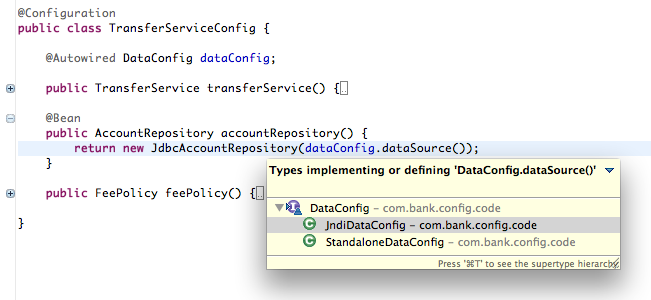
It's now very easy to ask the question "where was the DataSource bean defined?" and have the answer constrained to a set of types implementing DataConfig. Not bad if we're trying to do things in a way that is as familiar and useful to Java developers as possible.
More advanced use of @Profile
Worth a quick mention is that like many Spring annotations, @Profile may be used as a meta-annotation. This means that you may define your own custom annotations, mark them with @Profile, and Spring will still detect the presence of the @Profile annotation as if it had been declared directly.
package com.bank.annotation;
@Target(ElementType.TYPE)
@Retention(RetentionPolicy.RUNTIME)
@Profile("dev")
pubilc @interface Dev {
}
This allows us to mark our @Component classes with the new custom @Dev annotation, rather than being required to use Spring's @Profile:
@Dev @Component
public class MyDevService { ... }
Or, from the examples above, marking our StandaloneDataConfig with @Dev would work too:
@Dev @Configuration
public class StandaloneDataConfig { ... }
Summary
Spring 3.1's bean definition profiles feature is supported fully across the XML and @Configuration styles. Whichever style you prefer, we hope you'll find profiles useful. Keep the feedback coming, as it'll have direct impact on 3.1 M2 which is just around the corner. In the next post we'll take a deeper look at Spring's new Environment abstraction and how it helps with regard to managing configuration properties in your applications. Stay tuned!
Similar Posts
- Spring 3.1 M1: Introducing FeatureSpecification support
- Spring 3.1 M2: Testing with @Configuration Classes and Profiles
- Configuration Simplifications in Spring 3.0
- Spring Framework 3.1 M1 released
- The new bean() pointcut


AndyC says:
Added on February 14th, 2011 at 7:33 amChris, in the refactored config where the dataSource is @Autowired, should the dataSource method have been removed? I'm guessing it could stay as a "default" config, but would get overridden when another config provides a definition in an active profile?
Matthew Adams says:
Added on February 14th, 2011 at 11:04 amHi Chris,
I took a look at AnnotationConfigApplicationContext, and it had the autoregistration & classpath scanning constructor overloads that I though it would. However, there are not other overloads to tell it which profile names to honor as well. Perhaps more overloads are appropriate on AnnotationConfigApplicationContext (and other constructors?) to allow for autoregistration or classpath scanning **with** profile names. Given that both existing constructors use varargs syntax, maybe this ought to be the sigs of the new constructors:
public AnnotationConfigApplicationContext(String profile, String… paths) { … }
public AnnotationConfigApplicationContext(String[] profiles, String… paths) { … }
public AnnotationConfigApplicationContext(String profile, Class… classes) { … }
public AnnotationConfigApplicationContext(String[] profiles, Class… classes) { … }
Too much? Just right?
-matthew
Matthew Adams says:
Added on February 14th, 2011 at 11:08 am@AndyC, I tripped on that one, too. At first, I thought, "Wow. The bean can autowire itself via the dataSource() method." Then I thought that might make the universe implode (again?). Andy's description seems like a reasonable expectation. Can you confirm & clarify?
-matthew
Chance says:
Added on February 14th, 2011 at 4:08 pmI assume this will work?
@Named @Profile("dev")
public MyClass { … }
Derrek says:
Added on February 15th, 2011 at 10:53 amThe old JavaConfig project had @ResourceBundles and @ExternalValue annotations to access properties from an external properties file by the java configuration. I can't seem to find those classes in the spring-framework downloadable. Where'd those go? Is there a better way to accomplish this?
Keith Donald (blog author) says:
Added on February 15th, 2011 at 11:47 amAndy,
Yes, that was a typo–the DataSource should have been removed. Chris is in a remote location without reliable Internet at the moment, so I went in and updated the post.
Keith
Ricardo says:
Added on February 17th, 2011 at 1:39 pmHi Chris,
I really like this addition to the framework. It might be interesting to see in the future an extension of this functionality in order to provide way to set a particular bean type into a specific environment (or role), opposed to having to choose it globally for all beans. I know it is not such a wide use case, but I had to do something like that once when creating a control panel for an application's test harness with lots of external dependencies. Kind of a switchboard to choose a combination of real and mocked components in runtime, for integration testing.
I ended up using a custom TargetSource to select the beans, which worked great, but the resulting application context XML was quite bulky. To be able to do something like that leveraging this new profiles feature would be great.
Ricardo
Rafał Jamróz says:
Added on February 22nd, 2011 at 11:02 amI'm thinking about using profiles in my application. How do you activate a profile in a spring-mvc application using XML configuration?
Rafał
Chris Beams (blog author) says:
Added on March 10th, 2011 at 11:58 pm@Matthew – further constructor overloads are probably not worth it, given this can be done programmatically through ctx.getEnvironment().setActiveProfiles(…). Any reason this won't suffice?
@Chance – yes. @Named / @Component in conjunction with @Profile should work as expected.
@Ricardo – feel free to add a feature request for this (and reference this comment thread); please provide as much background on the use case as possible so we can evaluate whether it can possibly be a general-purpose need.
@Rafal – see my previous post regarding use of the new 'profiles' attribute in XML.
Maciej Gorączka says:
Added on May 24th, 2011 at 2:13 amHi Chris,
In your test classes when you are describing new mechanism behind @Profile annotation you are using explicit context creation:
AnnotationConfigApplicationContext ctx = new AnnotationConfigApplicationContext();
ctx.getEnvironment().setActiveProfiles("dev");
ctx.register(TransferServiceConfig.class, StandaloneDataConfig.class, JndiDataConfig.class);
ctx.refresh();
Are you considering implementing the ability to run tests in JUnit4.5>/Spring3 manner. I mean like this:
@RunWith(SpringJUnit4ClassRunner.class)
@ContextConfiguration(loader = UnitTestAnnotationConfigContextLoader.class,
locations = {"/com/somecuttingedgeproject/configuration/database"})
@TestExecutionListeners({DependencyInjectionTestExecutionListener.class})
public class CheckDatabaseConfigTest {
@Autowired
private RelationalDatabaseConfig relationalDatabaseConfig;
@Autowired
private DatabaseFeatureConfig databaseFeatureConfig;
@Test
public void testConfigurationAutowiring() {
assertTrue(relationalDatabaseConfig instanceof H2InMemoryConfig);
}
}
I wrote this simple custom loader:
public class UnitTestAnnotationConfigContextLoader implements ContextLoader {
public static final String UNIT_TESTING_PROFILE = "unittesting";
public ApplicationContext loadContext(String… locations) throws Exception {
AnnotationConfigApplicationContext context = new AnnotationConfigApplicationContext();
context.getEnvironment().setActiveProfiles(UNIT_TESTING_PROFILE);
context.scan(locations);
context.refresh();
return context;
}
public String[] processLocations(Class clazz, String… locations) {
return locations;
}
}
Are there any plans for anything similar, or to provide such a functionality in another way in M2?
Maciek
Chris Beams (blog author) says:
Added on May 24th, 2011 at 2:32 am@Maciek,
The short answer is "yes" – we have full support for @Configuration on the way in TestContext for 3.1 M2, including profile activation. Watch http://jira.springframework.org/browse/SPR-6184 to be notified of changes on this front. It's worth taking the snapshots for a spin right now. You'll see that @ContextConfiguration already supports a 'classes' attribute and there is now an AnnotationConfigContextLoader available (which will actually be enabled automatically by M2, but for now you may still need to supply it explicitly to the 'loader' attribute). Enjoy, and let us know (via JIRA) how it goes!
martin says:
Added on August 14th, 2011 at 9:31 amthe framework is too complicated now, you added it too much feature, not a lightweight tools
Chance says:
Added on August 16th, 2011 at 1:38 amAre you kidding? Being able to configure Spring in java is a godsend. The day I never have to look at another XML config file will be the happiest day of my life. What a hassle it was having to add the URL to the XML schema for every Spring feature you needed. It's too bad it uses the JavaConfig syntax but I guess they had to find some use for that.
Sergei Barinov says:
Added on September 1st, 2011 at 6:52 amChris,
Thanks for your posts. Currently, I'm working on a project, where I experiment on Spring 3.1 features. I'm using @Profile annotations for my configuration.
Can you clarify how can I use @Scheduled annotation with setting the cron expression from active profile properties?
Previously, I used XML approach, and @Scheduled(cron=${cron.expr}) worked for me.
Chris Beams (blog author) says:
Added on September 3rd, 2011 at 2:19 pm@Sergei,
If you are using PropertySourcesPlaceholderConfigurer (as opposed to the traditional PropertyPlaceholderConfigurer), your ${…} expressions will be picked up and resolved against the Environment's current set of PropertySource objects. You can contribute PropertySources using the @PropertySource annotation on @Configuration classes. In conjunction with @Profile at the @Configuration class level, you can determine which property sources are contributed, and therefore which values are replaced in your ${…} cron expressions.
Jean Seurin says:
Added on November 22nd, 2011 at 7:19 amChris,
I want to be able to read Spring active profile values from system environment (as opposed to Java environment properties passed with -D).
I can't find a way to set the variable value I want to read. is there a way to change AbstractEnvironment.ACTIVE_PROFILES_PROPERTY_NAME value?
One reason if that I can't actually set variable containing "." with bash (so spring.profiles.active doesn't do). Would be curious to know how you do that btw.
Another is that I would need to have one variable dedicated per application, so that I could activate different profile through System variable for several application on the same machine.
Am I simply better off with an ApplicationContextInitializer and something like:
AbstractEnvironment env = (AbstractEnvironment) applicationContext.getEnvironment();
env.setActiveProfiles(System.getenv().get("SPRING_ACTIVE_PROFILE"));
Chris Beams (blog author) says:
Added on November 22nd, 2011 at 3:02 pm@Jean,
This is an important point. Indeed, the bash shell does not allow for '.' in identifiers, e.g. variable names. See this post for a discussion: http://www.linuxquestions.org/questions/linux-general-1/is-it-possible-to-set-an-environment-variable-name-containing-a-period-in-bash-724256/. See also the Bash man page.
On the other hand, tcsh does allow it:
% setenv spring.profiles.active p1,p2
% set | grep spring.profiles.active
_ setenv spring.profiles.active p1,p2
However, bash the most commonly used shell, and it is important that we accomodate it. I've created https://jira.springsource.org/browse/SPR-8869 to track this; please watch it and post any further comments there.
cphi says:
Added on March 27th, 2012 at 9:40 pmChris -
I have a multi-module Maven project setup, sth like: persistence (dao), services (common services), web-services (jaxws).
Say I define a DAO interface and a couple of implementations. Each implementation is annotated with @Profile or stereotype (e.g., @Dev).
Now I have a service interface and a couple of impls that delegate to their respective DAO impls. Again each is annotated with @Profile.
The web service impl delegates to a specific service impl via the service interface.
Now I want to setup configuration to drive all this.
While it's straight-forward to follow your example just for DAOs. Now I want to use them in services. Do I have to create a separate configuration for each profile I want to support?
Sth like
@Dev
@Configuration
@Import(value={MockDaoConfig.class})
public class DevServiceConfig {
@Inject
private DaoConfig daoConfig;
@Bean
public SomeService {
return new TestService(daoConfig.someDao());
}
}
@Prd
@Configuration
@Import(value{RealDaoConfig.class})
class PrdServiceConfig {
@Inject
private DaoConfig daoConfig;
@Bean
public SomeService {
return new RealService(daoConfig.someDao());
}
}
Or maybe I opt for @ComponentScan, and stereotyping each @Repository, @Component, or @Service?
Thoughts?
Chris Beams (blog author) says:
Added on March 28th, 2012 at 2:18 am@cphi,
You might also consider registering nested @Configuration classes for prod/test-specific beans. See the "With nested @Configuration classes" section of http://static.springsource.org/spring-framework/docs/current/javadoc-api/org/springframework/context/annotation/Configuration.html
This will cut down on the need for creating separate top-level @Configuration classes just to use @Profile.
Cheers,
- Chris
Jonathan Martin says:
Added on October 31st, 2012 at 1:38 pmGreat article! I've been able to setup my JUnit tests using the profile feature and it works great.
Is it possible to change the active profiles after application initialization? For example, I’d like to have a GUI on my web app where I can dynamically change the profile. Wouldn't this require an application context refresh? Also, would there be any pitfalls with this approach?
Thanks,
Jonathan
Oskar says:
Added on November 18th, 2012 at 11:51 pmHi Chris! Thanks for this article and for the great presentation you held at Öredev in Sweden. I'm really enjoying the new features in Spring 3.x!
Chris Beams (blog author) says:
Added on November 19th, 2012 at 12:26 am@Jonathan, you're correct—profile-switching applies at application bootstrap (i.e. refresh) time only.
@Oskar, thanks—glad to hear!
Marina says:
Added on January 27th, 2013 at 1:28 amHi Chris
thank you for your blog.
What if we define profiles for lazy beans and then switch active profiles dynamically (upon the user choice), do we still need to refresh application context?
thanks, Marina
mj says:
Added on March 12th, 2013 at 6:58 pmExcellent write!
It really helps.
Thanks a lot Chris
Marcin says:
Added on March 27th, 2013 at 9:23 amThis is great. I am currently working on the project that's doing all of the above.
We have a situation that we have multiple versions of bean implementation. We are basically running multiple web applications on the same server. All jars are in shared folder on server so they are available to each application. Some of the application are using old version of artifacts.
The problem is that spring is looking through entire class path to inject beans. So, even if I put all jars inside war, spring is still looking in shared location since it's on each application's classpath.
My question:
1. Is there any way to tell Spring to use specific class loader?
2. How do you feel about using @Profile to version beans? My understand of @Profile is that it's mainly for different environment/runtime. However, is there any concern, using profiles for bean versions?
Thanks
Chris Beams (blog author) says:
Added on March 27th, 2013 at 11:24 pm@Marcin, regarding 'versioning beans', I assume you mean using one version of a bean class instead of another version. Assuming that the fully-qualified names of these classes are the same (but just living in different jars), then @Profile (or @Qualifier, for that matter) probably won't be of much help to you, simply because from a class loading perspective, there will be only one variant of the class visible at the application level anyway.
Regarding telling spring to use a specific class loader: yes, you can. See the #setClassLoader method, available from all ApplicationContext implementations.
Marcin says:
Added on March 28th, 2013 at 6:54 amChris,
Thanks for fast reply.
You are correct with your assumptions.
I didn't realized there is seClassLoader method
What if my Spring context is created based on multiple jars, leaving in different classloaders? I don't want to rely on runtime configuration of my server. I was hoping that in that case, @Profile would be helpful. It would serve similar purpose (or even better) than OSGI. The client (my application) will be responsible of injecting specific version(s) of class (beans) on runtime. On compile time, I wouldn't really care about implementation.
What do you think?