Spring Android and Maven (Part 2) |
|

In Spring Android and Maven (Part 1), I described how to build an Android application from the command-line using Maven. In this post, I will show you how to build an Android application with Maven dependency management from the Eclipse IDE. The application will also showcase the latest features in Spring Android 1.0.0.M2, which was released this week.
Overview
The Maven Android Plugin lets you build your Android applications with Maven and benefit from dependency management. Google's Android Development Tools (ADT) plugin allows you to develop and build Android applications within the Eclipse IDE. To get Maven dependency management within Eclipse, the Maven Integration for Android Development Tools plugin is required, which integrates m2eclipse, the ADT Plugin, and the Maven Android Plugin. This post will show you how to install this plugin and use it to get Maven-based dependency management working in the Eclipse IDE.
The specific versions of each component used in this post are listed below:
- Android SDK Revision 9
- Maven Android Plugin 2.8.4
- SpringSource Tool Suite 2.5.2 (Eclipse 3.6.1)
- ADT Plugin for Eclipse 9.0.0
- Maven Integration for Eclipse 0.12.0
- Maven Integration for Android Development Tools 0.2.4
Configure Eclipse
Before building or compiling any code, we need to install and configure the required Eclipse plugins. In Part 1 I discussed installing the Android SDK, so I will assume you have already done so. However, if you have not, then you will need to install it before continuing. Additionally, you will need to have already installed Eclipse 3.5 or newer. In this example I am using SpringSource Tool Suite 2.5.2 which is based on Eclipse 3.6.1.
There are three Eclipse plugins that need to be installed, the ADT Plugin for Eclipse, Maven Integration for Eclipse, and Maven Integration for Android Development Tools. You have two options for installing these plugins, either by using the Eclipse Marketplace Client, or by manually installing each plugin.
Installing Plugins using the Eclipse Marketplace Client
Depending on your version of Eclipse, you may already have the Eclipse Marketplace Client installed. The Marketplace Client will simplify the plugin installation, because it will transitively include any required plugins.
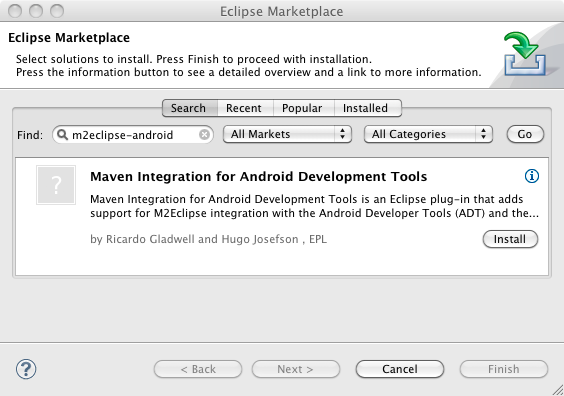
- Open the Eclipse Marketplace Client by selecting Help -> Eclipse Marketplace…
- Enter m2eclipse-android in the Find: field, and click the Go button.
- Click the Install button next to Maven Integration for Android Development Tools.

- Click the Next button to confirm the selected features. Note that Android Development Tools and Maven Integration for Eclipse are dependencies.

- Accept the license agreements and click the Finish button to complete the installation.
- After you restart Eclipse, you need to set the Android SDK Location as specified in the ADT Plugin installation in the next section.
Manual Plugin Installation
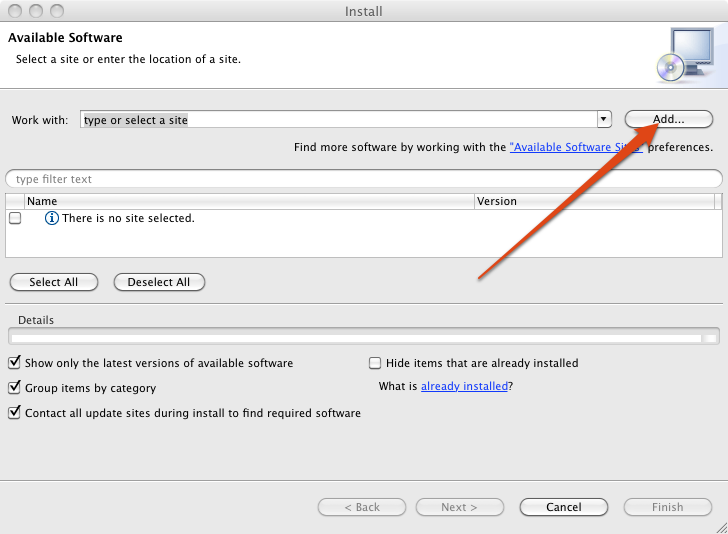
The alternative to using the Marketplace Client is to manually install each plugin. If you installed the plugins from the Marketplace, then you can skip down to the Sample Android Application section. For each plugin, from the Eclipse Help menu, select Install New Software… and click the Add… button.
ADT Plugin for Eclipse
The first step is to install the ADT (Android Developer Tools) Plugin for Eclipse. This is the official plugin provided by Google for developing Android applications. If you already have the ADT Plugin installed, then verify you have the latest version by running Check for Updates from the Eclipse Help menu.
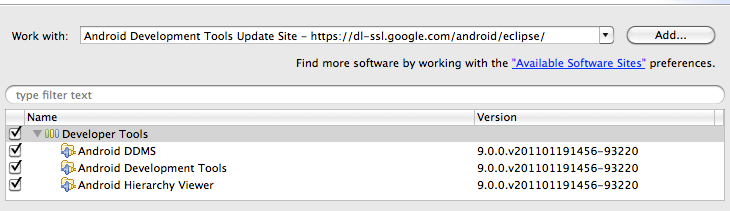
- Enter ADT Plugin for the Name, and the following URL for the Location. Click OK to continue.
https://dl-ssl.google.com/android/eclipse
- In the Available Software dialog, select the checkbox next to Developer Tools and click Next.

- In the next window, you'll see a list of the tools to be downloaded. Click Next.
- Read and accept the license agreements, then click Finish.
- When the installation completes, restart Eclipse.
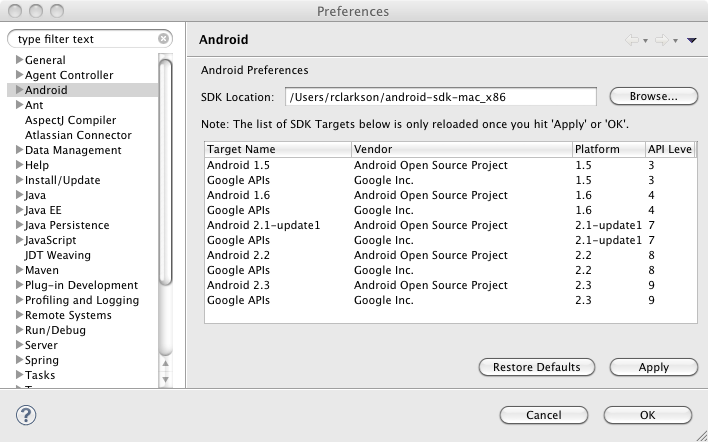
- After Eclipse restarts, set the Android SDK Location by selecting Preferences from the Eclipse menu and selecting Android in the left column. On my machine, the SDK folder is located in my profile folder. Once the location is configured you should see a list of SDK Targets.

Note: If you have any trouble with the ADT installation, the Android web site can provide additional information.
Maven Integration for Eclipse
The next step is to install the m2eclipse plugin. STS 2.5.2 comes with this plugin. However, if you have a previous release, or if you already have the plugin installed, you need to verify you have the latest version. The Maven Integration for Android Development Tools requires version 0.12.0 or higher.
- Enter m2eclipse Core Update Site for the Name, and the following URL for the Location. Click OK to continue.
http://m2eclipse.sonatype.org/sites/m2e
- In the Available Software dialog, select the checkbox next to Maven Integration for Eclipse and click Next.

- In the next window, you'll see a list of the components to be downloaded. Click Next.
- Read and agree to the terms of the Eclipse Public License v1.0, then click Finish.
- When the installation completes, restart Eclipse.
Maven Integration for Android Development Tools
We've got one more plugin to install, and this is the one that brings all this functionality together. After you have set up the Android SDK and configured the ADT Plugin in Eclipse, install the Maven Integration for Android Development Tools plugin.
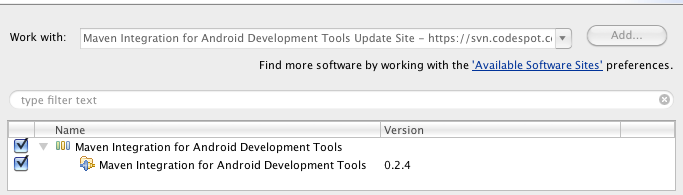
- From the Eclipse Help menu, select Install New Software… and click the Add… button
- Enter Maven Integration for Android Development Tools Update Site for the Name, and the following URL for the Location. Click OK to continue.
https://svn.codespot.com/a/eclipselabs.org/m2eclipse-android-integration/updates/m2eclipse-android-integration/
- In the Available Software dialog, select the checkbox next to Maven Integration for Android Development Tools and click Next.

- In the next window, you'll see a list of the components to be downloaded. Click Next.
- Read and accept the license agreements, then click Finish.
- When the installation completes, restart Eclipse.
Sample Android Application
Now that we have all the necessary plugins installed and configured, we are ready to try out our setup with a sample Android application. We will use the same sample app created for the Part 1 blog post, however the sample app has been updated to run on the latest Android platform SDK, 2.3.1 API Level 9. If you do not have this SDK platform installed, you will need to do so before building the sample code.
Fetch the Sample Project
Run the following command to clone the Spring Mobile samples repository.
$ git clone git://git.springsource.org/spring-mobile/samples.git spring-mobile-samples
If the git:// URL is not accessible, you may need to try the alternate URL for the samples repository.
$ git clone http://http.git.springsource.org/spring-mobile/samples.git spring-mobile-samples
Before opening the source code in Eclipse, navigate to the spring-android-showcase/client project directory and verify the project builds with the Android Maven Plugin.
$ mvn clean install
Open the Project in Eclipse
Assuming that the project built from the command line successfully, we are ready to open the project in Eclipse.
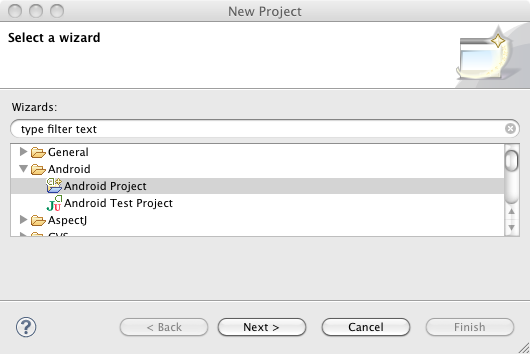
- From the Eclipse File menu, select select New and Project…
- Select the Android Project wizard from the Android folder and click Next. If the Android wizard is not available, then the ADT Plugin has not been installed.

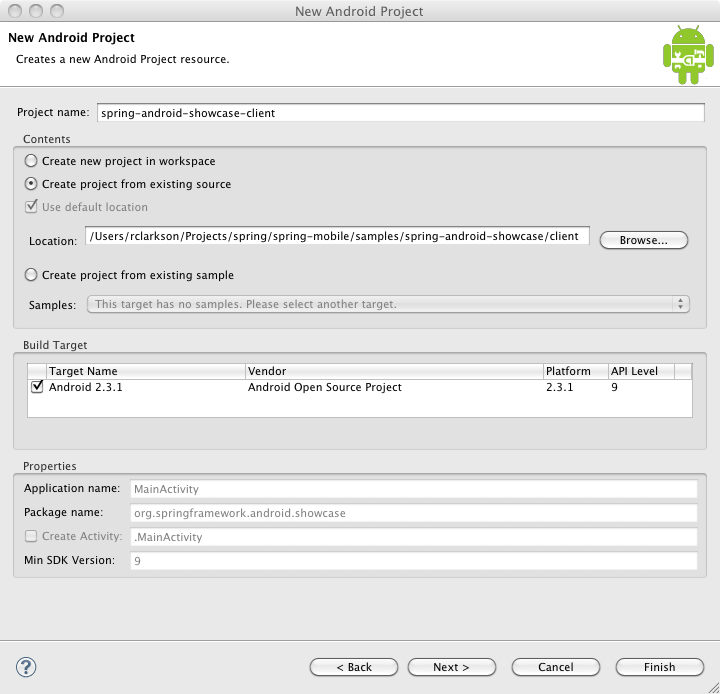
- In the New Android Project window, enter spring-android-showcase-client for the Project name. Select Create project from existing source, and browse to the Location of the sample client. Click Finish to add the project to Eclipse.

Enabling Maven Dependency Management
The sample project is now loaded into Eclipse. The first thing you will notice is the big red 'X' over the project in the Package Explorer, which indicates it currently does not build. Since we have yet to configure Maven for this project, this is expected behavior.
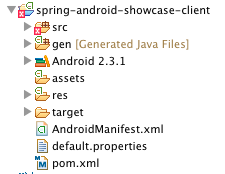
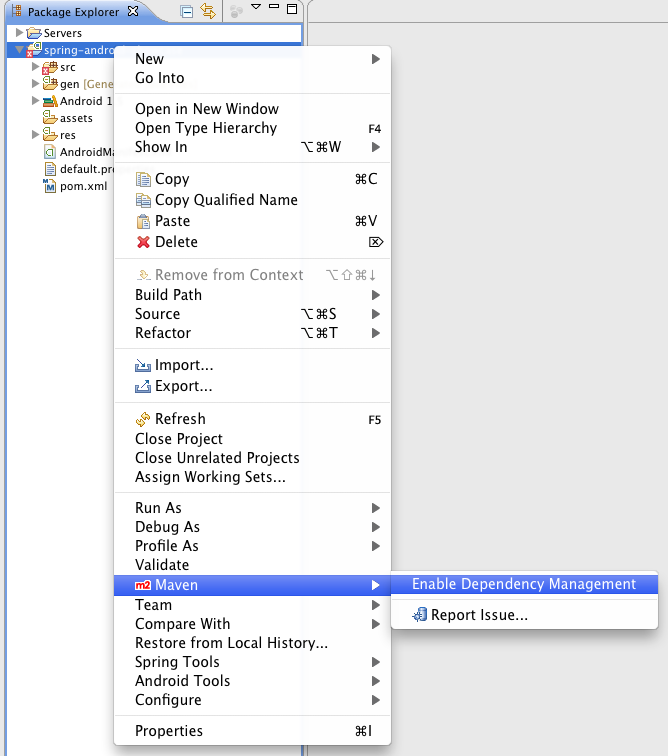
To enable Maven dependency management, right-click on the spring-android-showcase-client in the Package Explorer, and select Maven -> Enable Dependency Management from the context menu.
The sample project already includes the following Maven POM file. If you did not have an existing POM in your project, Eclipse would have prompted you to create one. Note the use of the maven-android-plugin and maven-compiler plugin in the build section.
<project xmlns="http://maven.apache.org/POM/4.0.0" xmlns:xsi="http://www.w3.org/2001/XMLSchema-instance"
xsi:schemaLocation="http://maven.apache.org/POM/4.0.0 http://maven.apache.org/xsd/maven-4.0.0.xsd">
<modelVersion>4.0.0</modelVersion>
<groupId>org.springframework.android</groupId>
<artifactId>spring-android-showcase-client</artifactId>
<version>1.0.0.BUILD-SNAPSHOT</version>
<packaging>apk</packaging>
<name>spring-android-showcase-client</name>
<url>http://www.springsource.org</url>
<organization>
<name>SpringSource</name>
<url>http://www.springsource.org</url>
</organization>
<properties>
<android-platform>9</android-platform>
<android-emulator>9</android-emulator>
<maven-android-plugin-version>2.8.4</maven-android-plugin-version>
<maven-compiler-plugin-version>2.3.2</maven-compiler-plugin-version>
<android-version>2.3.1</android-version>
<spring-android-version>1.0.0.M2</spring-android-version>
<jackson-version>1.7.2</jackson-version>
<simple-version>2.4.1</simple-version>
<android-rome-version>1.0.0-r2</android-rome-version>
</properties>
<build>
<sourceDirectory>src</sourceDirectory>
<finalName>${project.artifactId}</finalName>
<plugins>
<plugin>
<groupId>com.jayway.maven.plugins.android.generation2</groupId>
<artifactId>maven-android-plugin</artifactId>
<version>${maven-android-plugin-version}</version>
<configuration>
<sdk>
<platform>${android-platform}</platform>
</sdk>
<emulator>
<avd>${android-emulator}</avd>
</emulator>
<deleteConflictingFiles>true</deleteConflictingFiles>
<undeployBeforeDeploy>true</undeployBeforeDeploy>
</configuration>
<extensions>true</extensions>
</plugin>
<plugin>
<artifactId>maven-compiler-plugin</artifactId>
<version>${maven-compiler-plugin-version}</version>
</plugin>
</plugins>
</build>
<dependencies>
<dependency>
<groupId>com.google.android</groupId>
<artifactId>android</artifactId>
<version>${android-version}</version>
<scope>provided</scope>
</dependency>
<dependency>
<groupId>org.springframework.android</groupId>
<artifactId>spring-android-rest-template</artifactId>
<version>${spring-android-version}</version>
</dependency>
<dependency>
<!-- Using Jackson for JSON marshaling -->
<groupId>org.codehaus.jackson</groupId>
<artifactId>jackson-mapper-asl</artifactId>
<version>${jackson-version}</version>
</dependency>
<dependency>
<!-- Using Simple for XML marshaling -->
<groupId>org.simpleframework</groupId>
<artifactId>simple-xml</artifactId>
<version>${simple-version}</version>
<exclusions>
<exclusion>
<artifactId>stax</artifactId>
<groupId>stax</groupId>
</exclusion>
<exclusion>
<artifactId>stax-api</artifactId>
<groupId>stax</groupId>
</exclusion>
</exclusions>
</dependency>
<dependency>
<!-- Using ROME for RSS and ATOM feeds -->
<groupId>com.google.code.android-rome-feed-reader</groupId>
<artifactId>android-rome-feed-reader</artifactId>
<version>${android-rome-version}</version>
</dependency>
</dependencies>
<repositories>
<!-- For developing with Android ROME Feed Reader -->
<repository>
<id>android-rome-feed-reader-repository</id>
<name>Android ROME Feed Reader Repository</name>
<url>https://android-rome-feed-reader.googlecode.com/svn/maven2/releases</url>
</repository>
<!-- For testing against latest Spring snapshots -->
<repository>
<id>org.springframework.maven.snapshot</id>
<name>Spring Maven Snapshot Repository</name>
<url>http://maven.springframework.org/snapshot</url>
<releases><enabled>false</enabled></releases>
<snapshots><enabled>true</enabled></snapshots>
</repository>
<!-- For developing against latest Spring milestones -->
<repository>
<id>org.springframework.maven.milestone</id>
<name>Spring Maven Milestone Repository</name>
<url>http://maven.springframework.org/milestone</url>
<snapshots><enabled>false</enabled></snapshots>
</repository>
</repositories>
</project>
Maven will now update the required dependencies and Eclipse should successfully build the project. Once Eclipse is finished building the project, you should now see the Maven Dependencies classpath container in the Package Explorer window.
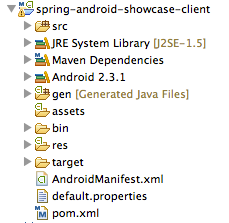
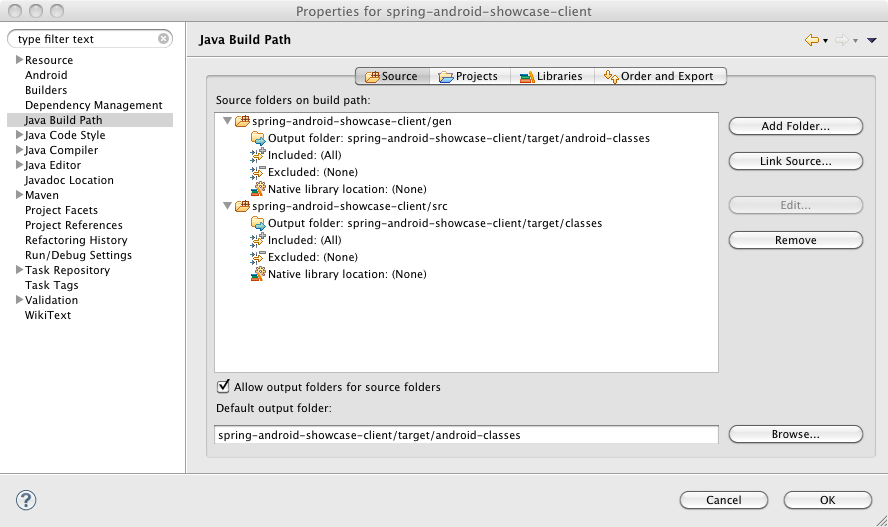
There are a couple things to note. First you may see there is a bin folder in the project. You can see from the Java Build Path properties (below) that the default output folder is the Target folder. So it is safe to remove the bin folder.
Second, you may also notice that there is a JRE System Library classpath container that was added to the project. Since we are building an Android app that utilizes the Android JVM you should not need to reference the JRE. If you have created a new Android app in Eclipse with the ADT, you know that it does not add a classpath container for the JRE. I have discussed this with the Maven Integration for Android Development Tools developer, Ricardo Gladwell, and he created a ticket to research the issue. I have removed the JRE from the sample project without any obvious, negative effects. But you may want to keep watch on that issue for more information.
Start the Spring Android Showcase Sample App
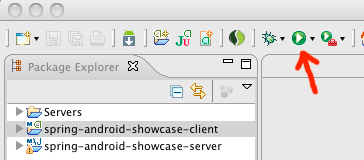
To run the sample application, simply select the spring-android-showcase-client in the Package Explorer, and click the Run button. The Maven POM file in the sample client is configured to look for an Android Virtual Device (AVD) named "9". As mentioned earlier, the samples project has been updated to run on the Android Platform SDK 2.3.1. You need to have an AVD configured for this platform for the samples to run.
The first time you run the app, you should see something like the following in the Eclipse console:
[2011-02-08 14:00:49 - spring-android-showcase-client] ------------------------------
[2011-02-08 14:00:49 - spring-android-showcase-client] Android Launch!
[2011-02-08 14:00:49 - spring-android-showcase-client] adb is running normally.
[2011-02-08 14:00:49 - spring-android-showcase-client] Performing org.springframework.android.showcase.MainActivity activity launch
[2011-02-08 14:00:49 - spring-android-showcase-client] Automatic Target Mode: launching new emulator with compatible AVD '9'
[2011-02-08 14:00:49 - spring-android-showcase-client] Launching a new emulator with Virtual Device '9'
[2011-02-08 14:00:50 - Emulator] 2011-02-08 14:00:50.936 emulator[5951:903] Warning once: This application, or a library it uses, is using NSQuickDrawView, which has been deprecated. Apps should cease use of QuickDraw and move to Quartz.
[2011-02-08 14:00:50 - spring-android-showcase-client] New emulator found: emulator-5554
[2011-02-08 14:00:50 - spring-android-showcase-client] Waiting for HOME ('android.process.acore') to be launched...
[2011-02-08 14:01:21 - spring-android-showcase-client] HOME is up on device 'emulator-5554'
[2011-02-08 14:01:21 - spring-android-showcase-client] Uploading spring-android-showcase-client.apk onto device 'emulator-5554'
[2011-02-08 14:01:23 - spring-android-showcase-client] Installing spring-android-showcase-client.apk...
[2011-02-08 14:01:50 - spring-android-showcase-client] Success!
[2011-02-08 14:01:50 - spring-android-showcase-client] Starting activity org.springframework.android.showcase.MainActivity on device emulator-5554
[2011-02-08 14:01:52 - spring-android-showcase-client] ActivityManager: Starting: Intent { act=android.intent.action.MAIN cat=[android.intent.category.LAUNCHER] cmp=org.springframework.android.showcase/.MainActivity }
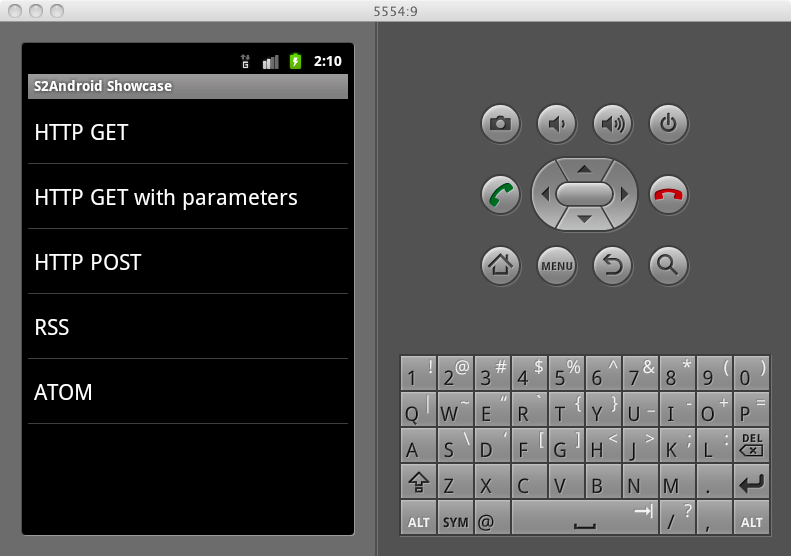
The AVD will start and display the locked screen. Slide the green lock from left to right to "open" the Android device. Once opened, the app should now display:
Conclusions
In this post we've reviewed how to build a sample Android application in Eclipse that utilizes Maven dependency management. To accomplish this, we've used Eclipse, the Android Development Tools (ADT) Plugin for Eclipse, the Maven Android Plugin, the Maven Integration for Android Development Tools plugin, and the Maven Integration for Eclipse (m2eclipse) plugin. There are a lot of pieces involved, but once you have everything configured, it is easy to build and deploy to the Android emulator. If you are using third party libraries within your Android application, you should consider using these tools to help manage those dependencies.
Similar Posts
- Updated Maven Support for Android Projects
- Spring Android and Maven (Part 1)
- Maven PAR Plugin 1.0.0.M1
- First Eclipse Gemini Blueprint Milestone Ships
- Upgrading Maven integration for SpringSource Tool Suite 2.8.0


Piwaï says:
Added on February 9th, 2011 at 11:29 amGreat article, once again!
There is actually a faster way to import the project into Maven. In Eclipse :
File > Import > Maven > Existing Maven Project > Next
Browse to the your local clone of the project ([...]/samples/spring-android-showcase/client)
=> Finish. You can run your application.
It seems faster to me, and notice that the bin folder is not created
You still have to remove JRE System Library classpath container from the build path.
Great article, by the way!
Roy Clarkson (blog author) says:
Added on February 9th, 2011 at 12:14 pm@Piwai thanks for the feedback! You make good points. One thing I wanted to illustrate was enabling dependency management on an existing Android project. I know the scenario described in the post does not exactly match that, since I already had a POM created. I'll update the post to incorporate your suggestions.
JoakimE says:
Added on February 9th, 2011 at 12:26 pmThe maven-android-plugin m2eclipse integration is available on the Eclipse Marketplace.
Just choose that, and the (ADT) Google Android Development Tools eclipse plugin and m2eclipse plugin both get pulled in transitively.
Roy Clarkson (blog author) says:
Added on February 9th, 2011 at 12:52 pm@JoakimE Yes, that's a great simplification. I'll add that to the post. Thanks!
Jochen Szostek says:
Added on February 11th, 2011 at 4:04 pmNice article, runs nicely in both emulator as on my nexus, though I can't always seem to get (read: see) a response from the requests.
Though I'm very happy being able to use Maven to build Android apps using RESTful web services quite easily now. Thanks!
Kind regards,
Jochen
Praveen George says:
Added on February 12th, 2011 at 1:57 pmI just completed the environment setup , and thank you Roy for the great post and spring folks for the sample application. This makes it quite easy to develop/deploy apps. What i would love to see is probably get the ijetty android port also added to the spring android plugin. That way i can embed an http server in my app. The advantage is i can put a web archive which uses rest ful web services and deploy that onto my mobile device. Will offload all the presentation logic to the client.
Jochen Szostek says:
Added on February 13th, 2011 at 7:23 amI totally agree with George that this might be quite interesting…if it kind of fits in the stack roadmap of course.
Another awesome feature jetty can provide is bridging hardware features to web apps. (as far as this isn't concerned being some kind of unsafe sandbox hack)
Roy Clarkson (blog author) says:
Added on February 14th, 2011 at 7:44 pm@Praveen @Jochen That is an interesting idea, to include a Jetty instance in your application. We haven't considered that yet, but it may be something that we can research for future inclusion in the project. Thanks!
Roy Clarkson (blog author) says:
Added on February 15th, 2011 at 11:38 amGreetings, just wanted to pass along that version 0.2.5 the Maven Integration for Android Development Tools was recently released. See the project page for details: http://code.google.com/a/eclipselabs.org/p/m2eclipse-android-integration/
Barry says:
Added on February 16th, 2011 at 7:18 pmgit:// is blocked in my company, so I had to use http://http.git.springsource.org/spring-mobile/samples.git instead. It would be helpful to include the URL in the post for others in a similar situation.
The other cool thing you might want to include is Eclipse's integration with DDMS. I've been using Run As -> Maven build with "clean package android:deploy" since moving to android-maven-plugin, so "Debug as -> Android Application" no longer works for me. The fix is quite easy though. Just open DDMS and select the running process to debug. The following two screenshots show debug in action,
https://s3.amazonaws.com/barryku/android/ddms2.png
https://s3.amazonaws.com/barryku/android/ddms1.png
Roy Clarkson (blog author) says:
Added on February 17th, 2011 at 11:19 am@Barry I've added the alternate url to the post. I'm sure some others will have the same issue. That's a great point about debugging too. You do have to adjust your workflow when using these plugins. As you noticed, I didn't touch on any testing or debugging in this post. I'm planning another post that will focus more on that. Thanks for the feedback and suggestions!
Barry Ku says:
Added on February 17th, 2011 at 7:15 pmGreat, I am looking forward more posts on using Spring with Android. There's one question I am not sure if it belongs here, but will try anyway.
Is there a way to share Spring Android JARs across apk's? An app I converted to Spring grew from under 200K to over 1.75MB. I looked at library project, but it's meant for sharing during development, and still gets packaged into apk. I'd like to use Spring for all my Android apps that need accessing rest services, so it would be really nice if I can share one copy across apps.
Ricardo says:
Added on February 19th, 2011 at 11:47 amPlease note that you can now create Maven Android projects in Eclipse using the Maven Android quick start archetype created by Clement Escoffier:
https://code.google.com/a/eclipselabs.org/p/m2eclipse-android-integration/wiki/GettingStarted?ts=1298133961&updated=GettingStarted#2._Create_Eclipse_Project
Roy Clarkson (blog author) says:
Added on February 22nd, 2011 at 10:23 am@Barry I'm not aware of a way to share across multiple apps. As you mentioned, the library project is a way to deploy common code within multiple apps. The Maven approach described in this blog post is an alternative to that. Using Maven for Android projects poses challenges, since a particular library might have a large dependency hierarchy. That is something that I've noticed as well, is that your app size can grow quickly, if you aren't paying attention to all the dependencies being included. One of the goals of the Spring Android project is to keep as small of a footprint as possible.
Zoltan says:
Added on February 23rd, 2011 at 5:05 pmGreat post!
One thing: when I remove the JRE System Library classpath container from the Spring Android Showcase Sample App I get the following error message:
the hierarchy of the type SyndFeedListAdapter is inconsistent
I am using the latest Maven Integration for Android Development Tools, version 0.2.5.
Do you also have this issue?
David Motta says:
Added on May 11th, 2011 at 5:05 pmVer un manual en español Restfull con Spring Android
http://www.android-peru.com/Connecting-RESTful-Web-Services-Android-Spring-Rest
Siba padhy says:
Added on May 12th, 2011 at 9:56 pmGreat Article. To download the samples we can use GIT plugin for eclipse to directly fetch from the git repo making it a one step process.
Sanat says:
Added on May 23rd, 2011 at 5:09 amI am building my android project with Maven Dependency but it returns NoClassDefFoundError as org.springframework.web.client.RestTemplate, But I already added all related files, Please suggest me for this problem.
Roy Clarkson (blog author) says:
Added on May 29th, 2011 at 10:27 am@Zoltan, yes I've seen that issue when a project builds. I just checked, and a new issue has been recently opened against the Android ROME library.
http://code.google.com/p/android-rome-feed-reader/issues/detail?id=3
Marco says:
Added on June 17th, 2011 at 5:17 pmHi!
Great article!
Do you know if it is possible to use android as client side of spring remote?
Thank you!
Naveen Gayar says:
Added on July 26th, 2011 at 2:58 amDid Spring Android consider View Activity Model Framework into consideration?
Clayton Passos says:
Added on August 11th, 2011 at 2:01 pmI found a bug in milestone 4.
se você trabalhar com jackson de forma a ler um objeto ocorrerá o erro abaixo, mas se usar o mesmo código pra ler dois objetos, não ocorre o erro
08-11 18:46:33.732: DEBUG/dalvikvm(360): GC_FOR_MALLOC freed 7635 objects / 350144 bytes in 270ms
08-11 18:46:34.022: ERROR/CategoriaAsyncListActivity(360): I/O error: Can not deserialize instance of java.util.List out of START_OBJECT token
08-11 18:46:34.022: ERROR/CategoriaAsyncListActivity(360): at [Source: org.apache.http.conn.EofSensorInputStream@44f45128; line: 1, column: 2] (through reference chain: com.impact.client.tablet.model.CategoriaRest["categoria"]); nested exception is org.codehaus.jackson.map.JsonMappingException: Can not deserialize instance of java.util.List out of START_OBJECT token
08-11 18:46:34.022: ERROR/CategoriaAsyncListActivity(360): at [Source: org.apache.http.conn.EofSensorInputStream@44f45128; line: 1, column: 2] (through reference chain: com.impact.client.tablet.model.CategoriaRest["categoria"])
08-11 18:46:34.022: ERROR/CategoriaAsyncListActivity(360): org.springframework.web.client.ResourceAccessException: I/O error: Can not deserialize instance of java.util.List out of START_OBJECT token
08-11 18:46:34.022: ERROR/CategoriaAsyncListActivity(360): at [Source: org.apache.http.conn.EofSensorInputStream@44f45128; line: 1, column: 2] (through reference chain: com.impact.client.tablet.model.CategoriaRest["categoria"]); nested exception is org.codehaus.jackson.map.JsonMappingException: Can not deserialize instance of java.util.List out of START_OBJECT token
08-11 18:46:34.022: ERROR/CategoriaAsyncListActivity(360): at [Source: org.apache.http.conn.EofSensorInputStream@44f45128; line: 1, column: 2] (through reference chain: com.impact.client.tablet.model.CategoriaRest["categoria"])
08-11 18:46:34.022: ERROR/CategoriaAsyncListActivity(360): at org.springframework.web.client.RestTemplate.doExecute(RestTemplate.java:477)
08-11 18:46:34.022: ERROR/CategoriaAsyncListActivity(360): at org.springframework.web.client.RestTemplate.execute(RestTemplate.java:425)
08-11 18:46:34.022: ERROR/CategoriaAsyncListActivity(360): at org.springframework.web.client.RestTemplate.exchange(RestTemplate.java:401)
08-11 18:46:34.022: ERROR/CategoriaAsyncListActivity(360): at com.impact.client.tablet.controller.categoria.CategoriaAsyncListActivity$DownloadCategoriasTask.doInBackground(CategoriaAsyncListActivity.java:81)
08-11 18:46:34.022: ERROR/CategoriaAsyncListActivity(360): at com.impact.client.tablet.controller.categoria.CategoriaAsyncListActivity$DownloadCategoriasTask.doInBackground(CategoriaAsyncListActivity.java:1)
08-11 18:46:34.022: ERROR/CategoriaAsyncListActivity(360): at android.os.AsyncTask$2.call(AsyncTask.java:185)
08-11 18:46:34.022: ERROR/CategoriaAsyncListActivity(360): at java.util.concurrent.FutureTask$Sync.innerRun(FutureTask.java:305)
08-11 18:46:34.022: ERROR/CategoriaAsyncListActivity(360): at java.util.concurrent.FutureTask.run(FutureTask.java:137)
08-11 18:46:34.022: ERROR/CategoriaAsyncListActivity(360): at java.util.concurrent.ThreadPoolExecutor.runWorker(ThreadPoolExecutor.java:1068)
08-11 18:46:34.022: ERROR/CategoriaAsyncListActivity(360): at java.util.concurrent.ThreadPoolExecutor$Worker.run(ThreadPoolExecutor.java:561)
08-11 18:46:34.022: ERROR/CategoriaAsyncListActivity(360): at java.lang.Thread.run(Thread.java:1096)
08-11 18:46:34.022: ERROR/CategoriaAsyncListActivity(360): Caused by: org.codehaus.jackson.map.JsonMappingException: Can not deserialize instance of java.util.List out of START_OBJECT token
08-11 18:46:34.022: ERROR/CategoriaAsyncListActivity(360): at [Source: org.apache.http.conn.EofSensorInputStream@44f45128; line: 1, column: 2] (through reference chain: com.impact.client.tablet.model.CategoriaRest["categoria"])
08-11 18:46:34.022: ERROR/CategoriaAsyncListActivity(360): at org.codehaus.jackson.map.deser.StdDeserializationContext.mappingException(StdDeserializationContext.java:198)
08-11 18:46:34.022: ERROR/CategoriaAsyncListActivity(360): at org.codehaus.jackson.map.deser.CollectionDeserializer.handleNonArray(CollectionDeserializer.java:149)
08-11 18:46:34.022: ERROR/CategoriaAsyncListActivity(360): at org.codehaus.jackson.map.deser.CollectionDeserializer.deserialize(CollectionDeserializer.java:107)
08-11 18:46:34.022: ERROR/CategoriaAsyncListActivity(360): at org.codehaus.jackson.map.deser.CollectionDeserializer.deserialize(CollectionDeserializer.java:97)
08-11 18:46:34.022: ERROR/CategoriaAsyncListActivity(360): at org.codehaus.jackson.map.deser.CollectionDeserializer.deserialize(CollectionDeserializer.java:26)
08-11 18:46:34.022: ERROR/CategoriaAsyncListActivity(360): at org.codehaus.jackson.map.deser.SettableBeanProperty.deserialize(SettableBeanProperty.java:252)
08-11 18:46:34.022: ERROR/CategoriaAsyncListActivity(360): at org.codehaus.jackson.map.deser.SettableBeanProperty$MethodProperty.deserializeAndSet(SettableBeanProperty.java:356)
08-11 18:46:34.022: ERROR/CategoriaAsyncListActivity(360): at org.codehaus.jackson.map.deser.BeanDeserializer.deserializeFromObject(BeanDeserializer.java:494)
08-11 18:46:34.022: ERROR/CategoriaAsyncListActivity(360): at org.codehaus.jackson.map.deser.BeanDeserializer.deserialize(BeanDeserializer.java:350)
08-11 18:46:34.022: ERROR/CategoriaAsyncListActivity(360): at org.codehaus.jackson.map.ObjectMapper._readMapAndClose(ObjectMapper.java:2395)
08-11 18:46:34.022: ERROR/CategoriaAsyncListActivity(360): at org.codehaus.jackson.map.ObjectMapper.readValue(ObjectMapper.java:1655)
08-11 18:46:34.022: ERROR/CategoriaAsyncListActivity(360): at org.springframework.http.converter.json.MappingJacksonHttpMessageConverter.readInternal(MappingJacksonHttpMessageConverter.java:146)
08-11 18:46:34.022: ERROR/CategoriaAsyncListActivity(360): at org.springframework.http.converter.AbstractHttpMessageConverter.read(AbstractHttpMessageConverter.java:148)
08-11 18:46:34.022: ERROR/CategoriaAsyncListActivity(360): at org.springframework.web.client.HttpMessageConverterExtractor.extractData(HttpMessageConverterExtractor.java:68)
08-11 18:46:34.022: ERROR/CategoriaAsyncListActivity(360): at org.springframework.web.client.RestTemplate$ResponseEntityResponseExtractor.extractData(RestTemplate.java:642)
08-11 18:46:34.022: ERROR/CategoriaAsyncListActivity(360): at org.springframework.web.client.RestTemplate
08-11 18:46:50.982: DEBUG/SntpClient(58): request time failed: java.net.SocketException: Address family not supported by protocol
MM says:
Added on September 18th, 2011 at 12:07 pm09-18 17:06:38.097: ERROR/dalvikvm(358): Could not find class 'org.springframework.social.facebook.api.FacebookApi', referenced from method org.springframework.android.showcase.MainApplication.getFacebookConnectionFactory
09-18 17:06:53.157: ERROR/AndroidRuntime(358): java.lang.NoClassDefFoundError: org.springframework.social.connect.support.ConnectionFactoryRegistry
Jacob Dixon says:
Added on October 6th, 2011 at 6:22 amThis IDE seems very useful for developer point of view as it makes the work much more simpler by providing such a huge functionality. Also the steps included to add plugins in Eclipse and to configure it are also very easy to understand and implement it.Great work and I do appreciate it.
guddu says:
Added on December 26th, 2011 at 9:24 amNice article/blog… thanks
lan63 says:
Added on November 2nd, 2012 at 11:21 amI have a positive experience on the Android platform for porting applications built on the frameworks- Spring(core, mvc), hibernate, AOP, aspectj, db-h2, dwr, jetty. I would be happy to continue the development of cooperation in this field with you.