Get ahead
VMware offers training and certification to turbo-charge your progress.
Learn moreSpring Security is well-known for being highly customizable, so for my first attempt at working with Google App Engine, I decided to create a simple application which would explore the use of GAE features by implementing some core Spring Security interfaces. In this article we'll see how to:
You should already be familiar with deploying applications to GAE. It doesn't take long to get a basic application up and running and you'll find lots of guidance on this on the GAE website.
The registered users are stored as GAE datastore entities. On first authenticating, new users are redirected to a registration page where they can enter their name. Once registered, user accounts can be flagged as "disabled" in the datastore and the user won't be allowed to use the app, even though they have authenticated through GAE.
The filter delegates the authentication decision to the AuthenticationManager which is configured with a list of AuthenticationProvider beans, any one of which may authenticate the user, or raise an exception if the authentication fails.
In the case of a form-based login, the AuthenticationEntryPoint simply redirects the user to the login page. The authentication filter (UsernamePasswordAuthenticationFilter in this case) extracts the username and password from the submitted POST request. They are stored in an Authentication object and passed to an AuthenticationProvider which will typically compare the user's password with one stored in a database or LDAP server.
That's the basic interaction between the components. How might this apply to a GAE application?
import com.google.appengine.api.users.UserService;
import com.google.appengine.api.users.UserServiceFactory;

public class GoogleAccountsAuthenticationEntryPoint implements AuthenticationEntryPoint {
  public void commence(HttpServletRequest request, HttpServletResponse response, AuthenticationException authException)
      throws IOException, ServletException {
    UserService userService = UserServiceFactory.getUserService();

    response.sendRedirect(userService.createLoginURL(request.getRequestURI()));
  }
}
If we add this to our configuration, using the specific hook that the Spring Security namespace provides for this purpose, we have something like this:
<b:beans xmlns="http://www.springframework.org/schema/security"
        xmlns:b="http://www.springframework.org/schema/beans"
        xmlns:xsi="http://www.w3.org/2001/XMLSchema-instance"
        xsi:schemaLocation="http://www.springframework.org/schema/beans http://www.springframework.org/schema/beans/spring-beans-3.0.xsd
        http://www.springframework.org/schema/security http://www.springframework.org/schema/security/spring-security-3.1.xsd">

    <http use-expressions="true" entry-point-ref="gaeEntryPoint">
        <intercept-url pattern="/" access="permitAll" />
        <intercept-url pattern="/**" access="hasRole('USER')" />
    </http>

    <b:bean id="gaeEntryPoint" class="samples.gae.security.GoogleAccountsAuthenticationEntryPoint" />
    ...
</b:beans>
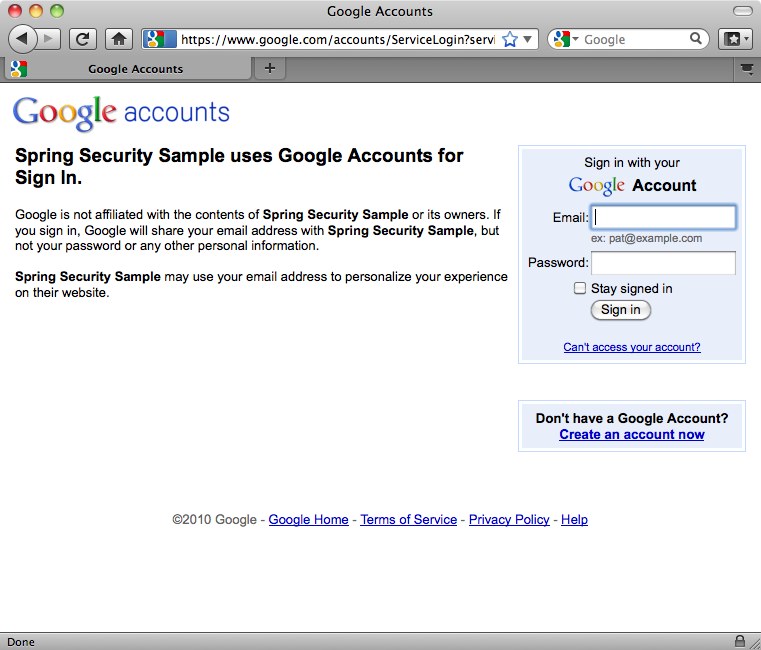
Here we've configured all URLs to require the "USER" role, except for the webapp root. The user will be redirected to the Google Accounts login screen when they first attempt to access any other page:
public class GaeAuthenticationFilter extends GenericFilterBean {
  private static final String REGISTRATION_URL = "/register.htm";
  private AuthenticationDetailsSource ads = new WebAuthenticationDetailsSource();
  private AuthenticationManager authenticationManager;
  private AuthenticationFailureHandler failureHandler = new SimpleUrlAuthenticationFailureHandler();

  public void doFilter(ServletRequest request, ServletResponse response, FilterChain chain) throws IOException, ServletException {
    Authentication authentication = SecurityContextHolder.getContext().getAuthentication();

    if (authentication == null) {
      // User isn't authenticated. Check if there is a Google Accounts user
      User googleUser = UserServiceFactory.getUserService().getCurrentUser();

      if (googleUser != null) {
        // User has returned after authenticating through GAE. Need to authenticate to Spring Security.
        PreAuthenticatedAuthenticationToken token = new PreAuthenticatedAuthenticationToken(googleUser, null);
        token.setDetails(ads.buildDetails(request));

        try {
          authentication = authenticationManager.authenticate(token);
          // Setup the security context
          SecurityContextHolder.getContext().setAuthentication(authentication);
          // Send new users to the registration page.
          if (authentication.getAuthorities().contains(AppRole.NEW_USER)) {
            ((HttpServletResponse) response).sendRedirect(REGISTRATION_URL);
              return;
          }
        } catch (AuthenticationException e) {
         // Authentication information was rejected by the authentication manager
          failureHandler.onAuthenticationFailure((HttpServletRequest)request, (HttpServletResponse)response, e);
          return;
        }
      }
    }

    chain.doFilter(request, response);
  }

  public void setAuthenticationManager(AuthenticationManager authenticationManager) {
    this.authenticationManager = authenticationManager;
  }

  public void setFailureHandler(AuthenticationFailureHandler failureHandler) {
    this.failureHandler = failureHandler;
  }
}
We've implemented the filter from scratch, making it simpler to understand and avoiding the complication of inheriting from existing classes. If a user is currently unauthenticated (from Spring Security's perspective), the filter checks for the existence of a GAE user (again making use of the GAE UserService). If one is found, then it packages it up in a suitable authentication token object (Spring Security's PreAuthenticatedAuthenticationToken is used here for convenience) and passes it to the AuthenticationManager to be authenticated by Spring Security. New users are redirected to the registration page at this point.
The AuthenticationProvider implementation interacts with a UserRegistry to store and retrieve GaeUser objects (both specific to this sample):
public interface UserRegistry {
  GaeUser findUser(String userId);
  void registerUser(GaeUser newUser);
  void removeUser(String userId);
}
public class GaeUser implements Serializable {
  private final String userId;
  private final String email;
  private final String nickname;
  private final String forename;
  private final String surname;
  private final Set<AppRole> authorities;
  private final boolean enabled;

// Constructors and accessors omitted
...
The userId is the unique ID assigned by Google Accounts. Email and nickname are also obtained from the GAE user. Forename and surname are entered in the registration form. The enabled flag is set to "true" unless it is modified directly through the GAE datastore administration console. AppRole is an implementation of Spring Security's GrantedAuthority as an enum:
public enum AppRole implements GrantedAuthority {
    ADMIN (0),
    NEW_USER (1),
    USER (2);

    private int bit;

    AppRole(int bit) {
        this.bit = bit;
    }

    public String getAuthority() {
        return toString();
    }
}
The roles are assigned as described above. The AuthenticationProvider then looks like this:
public class GoogleAccountsAuthenticationProvider implements AuthenticationProvider {
    private UserRegistry userRegistry;

    public Authentication authenticate(Authentication authentication) throws AuthenticationException {
        User googleUser = (User) authentication.getPrincipal();

        GaeUser user = userRegistry.findUser(googleUser.getUserId());

        if (user == null) {
            // User not in registry. Needs to register
            user = new GaeUser(googleUser.getUserId(), googleUser.getNickname(), googleUser.getEmail());
        }

        if (!user.isEnabled()) {
            throw new DisabledException("Account is disabled");
        }

        return new GaeUserAuthentication(user, authentication.getDetails());
    }

    public final boolean supports(Class<?> authentication) {
        return PreAuthenticatedAuthenticationToken.class.isAssignableFrom(authentication);
    }

    public void setUserRegistry(UserRegistry userRegistry) {
        this.userRegistry = userRegistry;
    }
}
The GaeUserAuthentication class is a very simple implementation of Spring Security's Authentication interface, which takes the GaeUser object as the principal. If you've customized Spring Security a bit before, you might be wondering why we haven't implemented a UserDetailsService at any point here and why the principal isn't a UserDetails instance. The simple answer is that you don't have to — Spring Security doesn't generally mind what the type of the object is and here we've chosen to implement the AuthenticationProvider interface directly as the simplest option.
import com.google.appengine.api.datastore.*;
import org.springframework.security.core.GrantedAuthority;
import samples.gae.security.AppRole;
import java.util.*;

public class GaeDatastoreUserRegistry implements UserRegistry {
    private static final String USER_TYPE = "GaeUser";
    private static final String USER_FORENAME = "forename";
    private static final String USER_SURNAME = "surname";
    private static final String USER_NICKNAME = "nickname";
    private static final String USER_EMAIL = "email";
    private static final String USER_ENABLED = "enabled";
    private static final String USER_AUTHORITIES = "authorities";

    public GaeUser findUser(String userId) {
        Key key = KeyFactory.createKey(USER_TYPE, userId);
        DatastoreService datastore = DatastoreServiceFactory.getDatastoreService();

        try {
            Entity user = datastore.get(key);

            long binaryAuthorities = (Long)user.getProperty(USER_AUTHORITIES);
            Set<AppRole> roles = EnumSet.noneOf(AppRole.class);

            for (AppRole r : AppRole.values()) {
                if ((binaryAuthorities & (1 << r.getBit())) != 0) {
                    roles.add(r);
                }
            }

            GaeUser gaeUser = new GaeUser(
                    user.getKey().getName(),
                    (String)user.getProperty(USER_NICKNAME),
                    (String)user.getProperty(USER_EMAIL),
                    (String)user.getProperty(USER_FORENAME),
                    (String)user.getProperty(USER_SURNAME),
                    roles,
                    (Boolean)user.getProperty(USER_ENABLED));

            return gaeUser;

        } catch (EntityNotFoundException e) {
            logger.debug(userId + " not found in datastore");
            return null;
        }
    }

    public void registerUser(GaeUser newUser) {
        Key key = KeyFactory.createKey(USER_TYPE, newUser.getUserId());
        Entity user = new Entity(key);
        user.setProperty(USER_EMAIL, newUser.getEmail());
        user.setProperty(USER_NICKNAME, newUser.getNickname());
        user.setProperty(USER_FORENAME, newUser.getForename());
        user.setProperty(USER_SURNAME, newUser.getSurname());
        user.setUnindexedProperty(USER_ENABLED, newUser.isEnabled());

        Collection<? extends GrantedAuthority> roles = newUser.getAuthorities();

        long binaryAuthorities = 0;

        for (GrantedAuthority r : roles) {
            binaryAuthorities |= 1 << ((AppRole)r).getBit();
        }

        user.setUnindexedProperty(USER_AUTHORITIES, binaryAuthorities);

        DatastoreService datastore = DatastoreServiceFactory.getDatastoreService();
        datastore.put(user);
    }

    public void removeUser(String userId) {
        DatastoreService datastore = DatastoreServiceFactory.getDatastoreService();
        Key key = KeyFactory.createKey(USER_TYPE, userId);

        datastore.delete(key);
    }
}
As, we've already mentioned, the sample uses an enum for the application roles. The roles (authorities) assigned to a user are stored as an EnumSet. EnumSets are very resource efficient and a user's roles can be stored as a single long value, allowing for a simpler interaction with the datastore API. We've assigned a separate "bit" property to each role for this purpose.
The user registration controller contains the following method which handles the submission of the registration form.
    @Autowired
    private UserRegistry registry;

    @RequestMapping(method = RequestMethod.POST)
    public String register(@Valid RegistrationForm form, BindingResult result) {
        if (result.hasErrors()) {
            return null;
        }

        Authentication authentication = SecurityContextHolder.getContext().getAuthentication();
        GaeUser currentUser = (GaeUser)authentication.getPrincipal();
        Set<AppRole> roles = EnumSet.of(AppRole.USER);

        if (UserServiceFactory.getUserService().isUserAdmin()) {
            roles.add(AppRole.ADMIN);
        }

        GaeUser user = new GaeUser(currentUser.getUserId(), currentUser.getNickname(), currentUser.getEmail(),
                form.getForename(), form.getSurname(), roles, true);

        registry.registerUser(user);

        // Update the context with the full authentication
        SecurityContextHolder.getContext().setAuthentication(new GaeUserAuthentication(user, authentication.getDetails()));

        return "redirect:/home.htm";
    }
The user is created with the supplied forename and surname and a new set of roles is created. This may also include the "ADMIN" role if GAE indicates that the current user is an administrator for the application. This is then stored in the user registry and the security context is populated with an updated Authentication object to make sure that Spring Security is aware of the new role information and applies its access-control constrainst accordingly.
The security application context now looks like this:
    <http use-expressions="true" entry-point-ref="gaeEntryPoint">
        <intercept-url pattern="/" access="permitAll" />
        <intercept-url pattern="/register.htm*" access="hasRole('NEW_USER')" />
        <intercept-url pattern="/**" access="hasRole('USER')" />
        <custom-filter position="PRE_AUTH_FILTER" ref="gaeFilter" />
    </http>

    <b:bean id="gaeEntryPoint" class="samples.gae.security.GoogleAccountsAuthenticationEntryPoint" />

    <b:bean id="gaeFilter" class="samples.gae.security.GaeAuthenticationFilter">
        <b:property name="authenticationManager" ref="authenticationManager"/>
    </b:bean>

    <authentication-manager alias="authenticationManager">
        <authentication-provider ref="gaeAuthenticationProvider"/>
    </authentication-manager>

    <b:bean id="gaeAuthenticationProvider" class="samples.gae.security.GoogleAccountsAuthenticationProvider">
        <b:property name="userRegistry" ref="userRegistry" />
    </b:bean>

    <b:bean id="userRegistry" class="samples.gae.users.GaeDatastoreUserRegistry" />
You can see we've inserted our filter using the custom-filter namespace element, declared the provider and user registry and wired them all up. We've also added a URL for the registration controller, which is accessible to new users.
Spring Security has shown over the years that it is flexible enough to add value in many different scenarios and deployment within Google App Engine is no exception. It's also worth remembering that implementing some of the interfaces yourself (as we've done here) is often a better approach than trying to use an existing class that doesn't quite fit. You may end up with a cleaner solution which better matches your requirements.
The focus here has been on how to use the Google App Engine APIs from within a Spring Security-enabled application. We haven't covered all the other details of how the application works, but I'd encourage you to have a look at the code and see for yourself. If you're a GAE expert then suggestions for improvement are always welcome!
The sample code is already in the 3.1 codebase, so you can check it out from our git repository. A first milestone of Spring Security 3.1 should also be released later this month.

VMware offers training and certification to turbo-charge your progress.
Learn moreTanzu Spring Runtime offers support and binaries for OpenJDK™, Spring, and Apache Tomcat® in one simple subscription.
Learn moreCheck out all the upcoming events in the Spring community.
View all