Blogs

SpringSource Blog

Using SpringSource Tool Suite 2.3.3.M1 with Roo and GWT

Christian Dupuis

By now, most of you probably have heard about the announcements at Google I/O around Spring, Roo, STS and GWT. Ben and Rod covered this in their respective blog posts recently. If you missed the keynote I strongly recommend to watch the recording on YouTube to catch up (the relevant section starts at 1:09:00 into the recording).

Today I'd like to provide some detailed steps and instructions on how you can use Roo and STS to create your first GWT application.

Installation

Before we can fire up the Roo shell and start typing commands, we need to download and install all pre-requisites. Although a lot of components are involved in building advanced single-page applications that can run on the cloud, you really only need to download the STS 2.3.3.M1 bundle for your operating system. The STS installation includes Roo 1.1.0.M1, tc Server Developer Edition with Spring Insight (required to get Speed Tracer integration), Maven 2.2 and access to the Google Plugin for Eclipse (GPE).

  1. Download STS 2.3.3.M1 from springsource.com.
  2. Run the installer or extract the downloaded archive. Follow the installation instructions.
  3. Start STS and bring up the Dashboard ("Help -> Dashboard").
  4. Install the "Google Plugin for Eclipse" and the "DataNucleus Plugin" from the Dashboard's Extension tab.
  5. Restart when prompted.

Create GWT scaffold Application

After installing STS we are ready to start up Roo and create our app. If you want to take a look at the application that was used during the keynote follow these steps:

  1. At your operating system command prompt, create a new empty directory and change into it.
  2. Start Roo 1.1.0.M1 by typing "roo" and pressing enter. Take a look at the version number that Roo displays in the shell banner when started. It should read "1.1.0.M1 [rev 3a0b8a3]". For your convenience Roo has been installed along-side STS in the same folder.
  3. Enter "script expenses.roo". This will run the provided Roo script and create the basic expense tracking sample application used by Ben during the keynote address.
  4. Type "quit" to exit the Roo shell.

By now you have a fully working Spring & GWT 2.1 application. Feel free to take a look around in the code Roo has produced for you. If you want to learn more about the architecture underlying this GWT application, I recommend Ray Ryan's Google I/O session. Take a look at the session recording and slides available from the I/O side.

Run Application

Thanks to Roo you can easily locally run the generated application. If you have Maven installed on your system, simply type "mvn gwt:run" at your operating system command prompt. Just ensure you're still in the same directory as you created your project in. This will launch the GWT Development Mode from which you can easily load the GWT application in your browser. In order to use GWT Development Mode you need to install the related browser plugin. Your browser will prompt you to install the plugin if it is not already installed.

Import Project into STS

In cooperation with the Google Plugin for Eclipse (GPE) team at Google we have enhanced STS so that you can easily take the created Roo project and import it into your Eclipse environment. STS will auto-configure your project so that it can be used with built-in Maven and GWT support without ever leaving your IDE.

From STS import the project using "File -> Import … -> Maven -> Existing Maven Project". This will automatically configure all required project settings, install classpath containers and launch the Roo shell.

Run Application from within STS

Using Google's GWT tools it is now very easy to launch the application from within STS. This allows you to debug your server-side code, but more interestingly your front-end GWT Java code as well. From the project's context menu select "Debug As -> Web Application". Please select the "ApplicationScaffold.html" html page to start and click "OK". Just confirm the "WAR Directory Selection" dialog to accept the default.

In the "Console" view you can now see the embedded GWT Development Mode starting. Additionally GPE's "Development Mode" view will appear making it easy to access the launched application. See below screenshot.
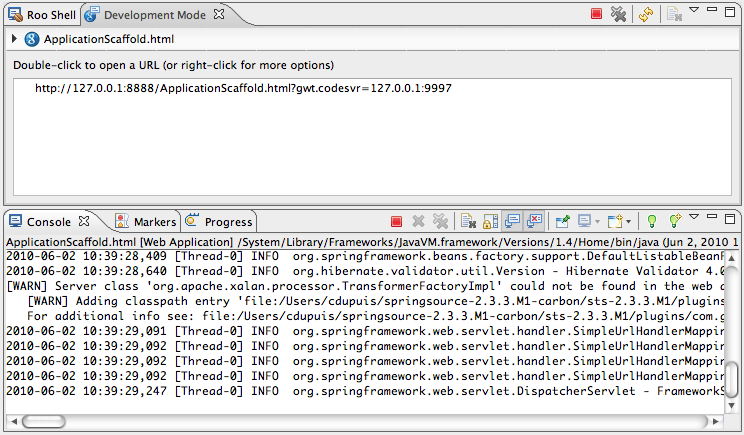
GWT Development Mode

At this point feel free to add breakpoints and use the Eclipse debugger to familiarize yourself with the generated application.

In order to try out Roo's great round-tripping support please open the "Employee" Java source file and add a new field. For example, add a "private String comment" field and save the file. Notice how Roo will instantly update the GWT application to incorporate the new field in both the UI and backend code. You can observe this from the "Roo Shell" view. Note the STS integration includes links to the files Roo edited so you can open them and see the changes.
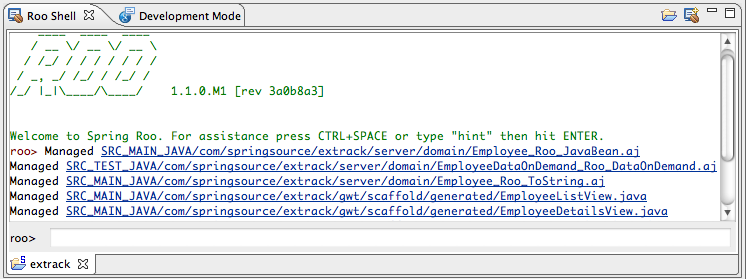
Roo Shell

In case you still have the Development Mode server running at this point, open the "Development Mode" view and click the "Refresh" icon in the view's toolbar. After taking a deep breath – around 2-3 seconds – go back to your browser and click "refresh". Navigate to the "Employee" screen and notice the newly added field on the UI. You can verify that the server code has been fully refreshed (including proper persistence) by creating a new Employee filling in the "comment" field.

Deploy to Google App Engine

We've received quite a few questions on how one can deploy the scaffolded application to Google App Engine; and if it runs on GAE. It certainly does and can be tested here.

Deployment is very straight forward and can be accomplished from within STS or from the command line. In the following section I'll show how deployment to GAE works from the command line.

  1. First you probably want to switch from the in-memory Hypersonic database used by the sample application to Google's Datastore based on BigTable. To do this launch the Roo shell from the command line and execute the following command: "persistence setup –database GOOGLE_APP_ENGINE –provider DATANUCLEUS".
  2. Next we need to specify the GAE application name. This can be done by editing the "src/main/webapp/WEB-INF/appengine-web.xml" file. Please set the application name to an existing application in your GAE account. Alternately, you could have specified the application name when typing the "persistence setup" command via the "–applicationId" option.
  3. Deploying to GAE is now simply a matter of running "mvn gwt:compile gae:deploy -DskipTests" ("-DskipTests" is only required with Roo 1.1.0.M1. This has already been fixed and won't be necessary for Roo 1.1.0.M2).

I hope those instructions and steps are helpful and will encourage even more people to try out Roo's support for GWT. Please keep in mind that GWT, Roo and STS are at Milestone 1 stage so you might in fact hit limitations or unexpected issues. In this case please post on the Spring community Roo or STS forums. We, the SpringSource and Google engineers, are happy to help and are looking forward to your feedback.

Similar Posts

Share this Post
  • Digg
  • Sphinn
  • del.icio.us
  • Facebook
  • Mixx
  • Google Bookmarks
  • DZone
  • LinkedIn
  • Slashdot
  • Technorati
  • Twitter
 

44 responses


  1. Hi Christian. I've been testing this milestone. I realized that you are using maven-gae-plugin, project that I'm commiter. That's great!. Maybe you could help us to move our artifacts to maven central repository, don't you?


  2. Hi mangar,

    Sonatype offers repository hosting for open source projects that includes syncing to Maven central. Check out this page for more details: http://nexus.sonatype.org/oss-repository-hosting.html

    Regards,
    Ollie


  3. Hi Christian,
    I noticed in the demo that there exists search capability. In the app produced by the demo script there isn't any. Can you point me to any resource that describes how search was implemented for the demo?

    Thanks,
    Sanzi


  4. When I am trying to run "Debug As -> Web Application", I get the following error.

    at com.sun.org.apache.xerces.internal.impl.XMLDocumentFragmentScannerImpl.scanStartElement(XMLDocumentFragmentScannerImpl.java:1339)
    at com.sun.org.apache.xerces.internal.impl.XMLDocumentFragmentScannerImpl$FragmentContentDriver.next(XMLDocumentFragmentScannerImpl.java:2747)
    at com.sun.org.apache.xerces.internal.impl.XMLDocumentScannerImpl.next(XMLDocumentScannerImpl.java:648)
    at com.sun.org.apache.xerces.internal.impl.XMLDocumentFragmentScannerImpl.scanDocument(XMLDocumentFragmentScannerImpl.java:510)
    at com.sun.org.apache.xerces.internal.parsers.XML11Configuration.parse(XML11Configuration.java:807)
    at com.sun.org.apache.xerces.internal.parsers.XML11Configuration.parse(XML11Configuration.java:737)
    at com.sun.org.apache.xerces.internal.parsers.XMLParser.parse(XMLParser.java:107)
    at com.sun.org.apache.xerces.internal.parsers.AbstractSAXParser.parse(AbstractSAXParser.java:1205)
    at com.sun.org.apache.xerces.internal.jaxp.SAXParserImpl$JAXPSAXParser.parse(SAXParserImpl.java:522)
    at com.google.gwt.dev.util.xml.ReflectiveParser$Impl.parse(ReflectiveParser.java:327)
    at com.google.gwt.dev.util.xml.ReflectiveParser$Impl.access$100(ReflectiveParser.java:48)
    at com.google.gwt.dev.util.xml.ReflectiveParser.parse(ReflectiveParser.java:398)
    at com.google.gwt.dev.cfg.ModuleDefLoader.nestedLoad(ModuleDefLoader.java:257)
    at com.google.gwt.dev.cfg.ModuleDefLoader$1.load(ModuleDefLoader.java:169)
    at com.google.gwt.dev.cfg.ModuleDefLoader.doLoadModule(ModuleDefLoader.java:283)
    at com.google.gwt.dev.cfg.ModuleDefLoader.loadFromClassPath(ModuleDefLoader.java:141)
    at com.google.gwt.dev.DevModeBase.loadModule(DevModeBase.java:963)
    at com.google.gwt.dev.DevMode.loadModule(DevMode.java:468)
    at com.google.gwt.dev.DevMode.doSlowStartup(DevMode.java:364)
    at com.google.gwt.dev.DevModeBase.startUp(DevModeBase.java:1057)
    at com.google.gwt.dev.DevModeBase.run(DevModeBase.java:783)
    at com.google.gwt.dev.DevMode.main(DevMode.java:275)
    [ERROR] Unexpected error while processing XML
    com.google.gwt.core.ext.UnableToCompleteException: (see previous log entries)
    at com.google.gwt.dev.util.xml.ReflectiveParser$Impl.parse(ReflectiveParser.java:351)


  5. I am using all tools from SpringSource and follow this instruction.

    at com.sun.org.apache.xerces.internal.impl.XMLDocumentFragmentScannerImpl.scanStartElement(XMLDocumentFragmentScannerImpl.java:1339)
    at com.sun.org.apache.xerces.internal.impl.XMLDocumentFragmentScannerImpl$FragmentContentDriver.next(XMLDocumentFragmentScannerImpl.java:2747)
    at com.sun.org.apache.xerces.internal.impl.XMLDocumentScannerImpl.next(XMLDocumentScannerImpl.java:648)
    at com.sun.org.apache.xerces.internal.impl.XMLDocumentFragmentScannerImpl.scanDocument(XMLDocumentFragmentScannerImpl.java:510)
    at com.sun.org.apache.xerces.internal.parsers.XML11Configuration.parse(XML11Configuration.java:807)
    at com.sun.org.apache.xerces.internal.parsers.XML11Configuration.parse(XML11Configuration.java:737)
    at com.sun.org.apache.xerces.internal.parsers.XMLParser.parse(XMLParser.java:107)
    at com.sun.org.apache.xerces.internal.parsers.AbstractSAXParser.parse(AbstractSAXParser.java:1205)
    at com.sun.org.apache.xerces.internal.jaxp.SAXParserImpl$JAXPSAXParser.parse(SAXParserImpl.java:522)
    at com.google.gwt.dev.util.xml.ReflectiveParser$Impl.parse(ReflectiveParser.java:327)
    at com.google.gwt.dev.util.xml.ReflectiveParser$Impl.access$100(ReflectiveParser.java:48)
    at com.google.gwt.dev.util.xml.ReflectiveParser.parse(ReflectiveParser.java:398)
    at com.google.gwt.dev.cfg.ModuleDefLoader.nestedLoad(ModuleDefLoader.java:257)
    at com.google.gwt.dev.cfg.ModuleDefLoader$1.load(ModuleDefLoader.java:169)
    at com.google.gwt.dev.cfg.ModuleDefLoader.doLoadModule(ModuleDefLoader.java:283)
    at com.google.gwt.dev.cfg.ModuleDefLoader.loadFromClassPath(ModuleDefLoader.java:141)
    at com.google.gwt.dev.DevModeBase.loadModule(DevModeBase.java:963)
    at com.google.gwt.dev.DevMode.loadModule(DevMode.java:468)
    at com.google.gwt.dev.DevMode.doSlowStartup(DevMode.java:364)
    at com.google.gwt.dev.DevModeBase.startUp(DevModeBase.java:1057)
    at com.google.gwt.dev.DevModeBase.run(DevModeBase.java:783)
    at com.google.gwt.dev.DevMode.main(DevMode.java:275)
    [ERROR] Unexpected error while processing XML


  6. Not to discourage the effort but I did not find a lot of value to the tool.

    Details here:
    http://blog.gandalf-lab.com/2010/06/spring-roo-and-appengine.html


  7. I have downloaded the following file and unpacked it:
    springsource-tool-suite-2.3.3.M1-e3.5.2-linux-gtk-x86_64.tar.gz

    But therein I can find no installation script.

    The "installation" link (above) brigs up a pdf that seems to refer to STS 2.3.2, but the shell script that it says to launch does not exist in the unpacked 2.3.3.M1 folders.

    How do I install 2.3.3.M1?


  8. well, i'm a great fan of google, so thanks for sharing new ideas about it


  9. Hi, I am trying to install Google App Engine Extension at SpringSoure Tool Suite but showing following error

    An error occurred while collecting items to be installed
    session context wasprofile=com.springsource.sts.ide, phase=org.eclipse.equinox.internal.provisional.p2. engine.phases.Collect, operand=, action=).

    Unable to read repository at http://google-web-toolkit.googlecode…1005191217.jar.
    Read timed out

    Unable to read repository at http://google-web-toolkit.googlecode…1005191217.jar.
    Read timed out

    but when i install GAE plugins from Help>Install New Software then it works but will it work for roo application?


  10. Dormant, I just now tried to install the GPE plugins from the Dashboard into STS 2.3.3.M1 myself. This worked fine for me. Could you please retry.

    Thanks, Christian


  11. Dear Christan,

    Great article. I only have one problem. When trying to run the scaffold app, I get the following error:
    "plugin failed to connect to hosted mode server at 127.0.0.1:9997". I do exactly as you describe. I got this error when I start the app from the command line as well as when starting it from within STS. Does anyone have any idea what to do?

    Regards,
    Gijs


  12. Dear Christian,
    When is Spring planning to release STS for Eclipse Helios 3.6?


  13. This is great, but at this point i have found some strange behavior in the STS using all this stack together. Any idea when are we getting final release of roo and sts?

    Cheers


  14. Hi All,

    I'm just new to spring source tool suit. So i need a help to create new spring batch project and how to run it. Please help me..

    Thanks in advance.


  15. Where can I find the Expense code? Seems like the current milestone doesn't have anything past create bare entities and cannot create relationships, etc.

    Any way to get the Expense app from the demo?


  16. Here is my observation after my first try of ROO:

    1. STS 2.3.3.M1 doesn't come with "Google Plugin for Eclipse" and the "DataNucleus Plugin" from the Dashboard's Extension tab. Somehow it has gone missing or just a bug.
    2. A few people reported this bug while ago on Springsource website with no reply.
    3. One person reported that he successfuly was able to get those customized plugins from nightly build.
    4. I couldn't!
    5. Disappointed in my first try of SpringRoo with all the promises and frills in Google I/O session.


  17. Mike,

    we are right in the middle of preparing the release of STS 2.3.3.M2 which caused the Dashboard Extension listing to be updated. This is the reason why – before updating to STS 2.3.3.M2 – you can't install GPE and the DN plugins from the Dashboard.

    This will be fixed as soon as we push M2 out the door.

    Thanks, Christian


  18. Thanks Christian. Looking forward to trying M2.


  19. mvn gae:deploy also needs adding the new repository for gae-deploy. I tried to add the repository into the pom.xml, as follows:

    maven-gae-plugin-repo
    maven-gae-plugin repository

    http://maven-gae-plugin.googlecode.com/svn/repository

    That also failed!


  20. I second what Mike says about the maven gae plugin. Can't get it to work on my end either.


  21. I watched the goog-io general session talk, great job. So I decided to get it running and followed your instructions. That went pretty well except I am behind a proxy and my maven install and the maven install that is downloaded with STS are different and that caused me a little grief.

    Well anyway the example project is not the same as the one that was shown during the talk. I would sure like to have the improved one to demo at a brownbag at my work. Any chance of getting the completed source?

    Thanks Rudy


  22. The google I/O has inspired me to did deeper into ROO and GWT but am having problems with the expenses example app…

    I am able to run the app (both from STS and command line) and am able to create and view Employees. But I am not able to save Reports. Getting a 'unexpected server error' in the GUI and the server error is to do with saving null value to a 'not null' field – the 'created' date field.

    Inspecting the schema that was auto-generated, the created field in the Report table is indeed marked as 'not null' but the java class definitely does not have a not null annotation. I also created my own GWT app with Roo and encounterd the same problem.

    When I switch the Database provider to Hibernate the schema gets correctly auto-generated with the date field's 'not null' flag not set.

    To summarise, I am seeing problems with Datanucleus while it auto-generates the schema where it always sets the 'not null' flag to true.

    Does anyone else see this problem?

    Please help.

    Thanks


  23. Deepak, you had no trouble at all installing? In my STS´s extensions dashboard, it doesn´t appear the datanucleous or the google plugin.

    I was waiting for the M2 to release (see Christian Dupuis message), but since you managed to get it working, maybe you can help me out a little bit.

    Any help would be appreciated.

    Thanks


  24. Luckily I had downloaded this STS Milestone 1 version quite a while back when the dashboard extensions were working okay.

    Sorry I couldn't be of much help with the above answer but if you have any questions please shout


  25. well, thanks anyway :)


  26. I just installed STS 2.3.3.M2. In the extensions tab on the dashboard I selected the DataNucleus Eclipse Plugin and Google Plugin for Eclipse. After the download process the install failed with the following:

    An error occurred while installing the items
    session context was:(profile=com.springsource.sts.ide, phase=org.eclipse.equinox.internal.p2.engine.phases.Install, operand=null –> [R]org.eclipse.jem.proxy 2.0.300.v201006080510, action=org.eclipse.equinox.internal.p2.touchpoint.eclipse.actions.InstallBundleAction).
    The artifact file for osgi.bundle,org.eclipse.jem.proxy,2.0.300.v201006080510 was not found.

    Any ideas?

    If this is a bit too heavy for this blog, I'll move it over to the forum. Thanks!


  27. i've installed roo 1.1.0M2
    i've followed the demo and created an entity, added two fields
    and generated the gwt stuff with "gwt setup" command

    then in the project dir i typed mvn gwt:run
    the application stars, but when i try to add an elem into the entity a got this error:

    DispatcherServlet.noHandlerFound(DispatcherServlet.java:968)

    from the gwt dev mod console

    00:01:13,375 [WARN] EXCEPTION
    javax.servlet.ServletException: Circular view path [resourceNotFound]: would dispatch back to the current handler URL [/app/resourceNotFound] again. Check your ViewResolver setup! (Hint: This may be the result of an unspecified view, due to default view name generation.) at org.springframework.web.servlet.view.InternalResourceView.prepareForRendering(InternalResourceView.java:292) at org.springframework.web.servlet.view.InternalResourceView.renderMergedOutputModel(InternalResourceView.java:214) at org.springframework.web.servlet.view.AbstractView.render(AbstractView.java:250) at org.springframework.web.servlet.DispatcherServlet.render(DispatcherServlet.java:1063) at org.springframework.web.servlet.DispatcherServlet.doDispatch(DispatcherServlet.java:801) at org.springframework.web.servlet.DispatcherServlet.doService(DispatcherServlet.java:719) at org.springframework.web.servlet.FrameworkServlet.processRequest(FrameworkServlet.java:644) at org.springframework.web.servlet.FrameworkServlet.doGet(FrameworkServlet.java:549) at javax.servlet.http.HttpServlet.service(HttpServlet.java:707) at javax.servlet.http.HttpServlet.service(HttpServlet.java:820) at org.mortbay.jetty.servlet.ServletHolder.handle(ServletHolder.java:487) at org.mortbay.jetty.servlet.ServletHandler.handle(ServletHandler.java:362) at org.mortbay.jetty.security.SecurityHandler.handle(SecurityHandler.java:216) at org.mortbay.jetty.servlet.SessionHandler.handle(SessionHandler.java:181) at org.mortbay.jetty.handler.ContextHandler.handle(ContextHandler.java:729) at org.mortbay.jetty.webapp.WebAppContext.handle(WebAppContext.java:405) at org.mortbay.jetty.servlet.Dispatcher.forward(Dispatcher.java:285) at org.mortbay.jetty.servlet.Dispatcher.error(Dispatcher.java:135) at org.mortbay.jetty.servlet.ErrorPageErrorHandler.handle(ErrorPageErrorHandler.java:121) at org.mortbay.jetty.Response.sendError(Response.java:274) at org.mortbay.jetty.Response.sendError(Response.java:340) at javax.servlet.http.HttpServletResponseWrapper.sendError(HttpServletResponseWrapper.java:128) at org.springframework.web.servlet.DispatcherServlet.noHandlerFound(DispatcherServlet.java:968) at org.springframework.web.servlet.DispatcherServlet.doDispatch(DispatcherServlet.java:755) at org.springframework.web.servlet.DispatcherServlet.doService(DispatcherServlet.java:719) at org.springframework.web.servlet.FrameworkServlet.processRequest(FrameworkServlet.java:644) at org.springframework.web.servlet.FrameworkServlet.doGet(FrameworkServlet.java:549) at javax.servlet.http.HttpServlet.service(HttpServlet.java:707) at javax.servlet.http.HttpServlet.service(HttpServlet.java:820) at org.mortbay.jetty.servlet.ServletHolder.handle(ServletHolder.java:487) at org.mortbay.jetty.servlet.ServletHandler.handle(ServletHandler.java:362) at org.mortbay.jetty.security.SecurityHandler.handle(SecurityHandler.java:216) at org.mortbay.jetty.servlet.SessionHandler.handle(SessionHandler.java:181) at org.mortbay.jetty.handler.ContextHandler.handle(ContextHandler.java:729) at org.mortbay.jetty.webapp.WebAppContext.handle(WebAppContext.java:405) at org.mortbay.jetty.servlet.Dispatcher.forward(Dispatcher.java:285) at org.mortbay.jetty.servlet.Dispatcher.forward(Dispatcher.java:126) at org.tuckey.web.filters.urlrewrite.NormalRewrittenUrl.doRewrite(NormalRewrittenUrl.java:195) at org.tuckey.web.filters.urlrewrite.RuleChain.handleRewrite(RuleChain.java:159) at org.tuckey.web.filters.urlrewrite.RuleChain.doRules(RuleChain.java:141) at org.tuckey.web.filters.urlrewrite.UrlRewriter.processRequest(UrlRewriter.java:90) at org.tuckey.web.filters.urlrewrite.UrlRewriteFilter.doFilter(UrlRewriteFilter.java:417) at org.mortbay.jetty.servlet.ServletHandler$CachedChain.doFilter(ServletHandler.java:1088) at org.springframework.web.filter.HiddenHttpMethodFilter.doFilterInternal(HiddenHttpMethodFilter.java:77) at org.springframework.web.filter.OncePerRequestFilter.doFilter(OncePerRequestFilter.java:76) at org.mortbay.jetty.servlet.ServletHandler$CachedChain.doFilter(ServletHandler.java:1088) at org.springframework.web.filter.CharacterEncodingFilter.doFilterInternal(CharacterEncodingFilter.java:88) at org.springframework.web.filter.OncePerRequestFilter.doFilter(OncePerRequestFilter.java:76) at org.mortbay.jetty.servlet.ServletHandler$CachedChain.doFilter(ServletHandler.java:1088) at org.springframework.orm.jpa.support.OpenEntityManagerInViewFilter.doFilterInternal(OpenEntityManagerInViewFilter.java:113) at org.springframework.web.filter.OncePerRequestFilter.doFilter(OncePerRequestFilter.java:76) at org.mortbay.jetty.servlet.ServletHandler$CachedChain.doFilter(ServletHandler.java:1088) at org.mortbay.jetty.servlet.ServletHandler.handle(ServletHandler.java:360) at org.mortbay.jetty.security.SecurityHandler.handle(SecurityHandler.java:216) at org.mortbay.jetty.servlet.SessionHandler.handle(SessionHandler.java:181) at org.mortbay.jetty.handler.ContextHandler.handle(ContextHandler.java:729) at org.mortbay.jetty.webapp.WebAppContext.handle(WebAppContext.java:405) at org.mortbay.jetty.handler.HandlerWrapper.handle(HandlerWrapper.java:152) at org.mortbay.jetty.handler.RequestLogHandler.handle(RequestLogHandler.java:49) at org.mortbay.jetty.handler.HandlerWrapper.handle(HandlerWrapper.java:152) at org.mortbay.jetty.Server.handle(Server.java:324) at org.mortbay.jetty.HttpConnection.handleRequest(HttpConnection.java:505) at org.mortbay.jetty.HttpConnection$RequestHandler.headerComplete(HttpConnection.java:829) at org.mortbay.jetty.HttpParser.parseNext(HttpParser.java:513) at org.mortbay.jetty.HttpParser.parseAvailable(HttpParser.java:211) at org.mortbay.jetty.HttpConnection.handle(HttpConnection.java:380) at org.mortbay.io.nio.SelectChannelEndPoint.run(SelectChannelEndPoint.java:395) at org.mortbay.thread.QueuedThreadPool$PoolThread.run(QueuedThreadPool.java:488)


  28. I installed STS Version: 2.3.3.M2 and was working through the 10-minute project at this link
    http://static.springsource.org/spring-roo/reference/html/intro.html#intro-first-steps

    However, when I tried to run "roo> perform tests" or "roo> perform package" (basically anything that requires maven, I get the error:
    ~.web roo> perform package
    Cannot run program "mvn.bat" (in directory "C:\p4\STS_workspace\Wazzup"): CreateProcess error=2, The system cannot find the file specified

    Why does STS keep looking for mvn.bat in my workspace project folder. Where do I configure the maven location as it is installed in my C:\maven folder.


  29. Is there a way someone can post a video-cast about the overview of Class generated by "gwt setup" command and how and what to modify, If one need to do the some simple task such as

    1. Changing the Left navigation bar, to right Navigation.
    2. Change Location of Pagination.
    3. Integration with CSS frameworks like blueprint.


  30. hi I want to learn and use the gwt please suggest me the best tutorial to read and understand meanwhile executing the examples or best material.I already learnt spring but didn't practise.


  31. STS 2.3.3.M1 doesn't appear to be on link you provide at top of post.


  32. I only recently came across Roo with GWT integration. I was excited and downloaded springsource-tool-suite-2.5.0.M3.

    Boy have I been disappointed. I understand this is only a milestone release and that the GWT is still in RC 1. But come on – is it too much to ask that the dependencies injected into the pom file by Roo still be available for download? I have tried creating a project both with the Roo shell and with the STS IDE. The Roo shell does a nice job until I run mvn gwt:run where it seems none of the gwt dependencies can be downloaded (app engine 1.3.4) and whatever it is doing with GWT doesn't seem to work because the log is full of errors where GWT classes cannot be resolved.

    On the STS side, installing GAE Plugin via the dashboard extensions fails.

    I realize that none of these are likely problems with Roo or STS but in the broader collaboration between the two organizations. But as Roo and STS are the customer facing entities here…they will catch the blame.

    At any rate, I look forward to the final release of these products and hope that the integration problems have been ironed out by then.


  33. I have tracked down what seems to be the cause of this problem. It is reported as being fixed in Roo 1.1.0.M3, but in fact.

    This bug shows up when running mvn gwt:run

    gwt roo

    cannot find symbol : class SetRecord

    https://jira.springsource.org/browse/ROO-889


  34. Hi,

    I'm using the gwt and roo, too. I'd like to know something about the UI components you used in the examples demo. In the recording at 1:36:40 you can see that the user switches between master and detail view of a record. I'm interested in the compontent used and the fading/transition of the two pages.

    How can I achieve this effect?


  35. Hi,
    I have a project possibility question.
    Do you think it is possible to create a Roo project which contains only domain layer and eventualy Service Layer, and an other project which contains GWT web layer manually coded.

    Thanks in advance for reply.
    Julien


  36. hi there,
    well i am new to SpringSource Tool suite with roo and gwt, and i am facing a problem, the applcation crashes from time to time, any idea why?
    thanks


  37. Inspecting the schema that was auto-generated, the created field in the Report table is indeed marked as 'not null' but the java class definitely does not have a not null annotation. I also created my own GWT app with Roo and encounterd the same problem.


  38. a great gift for corporate clients. The digital photo frames could be downloaded with information about the clients products. Also the digital picture frames could show how their products are processed from start to finish. The digital picture frame could also be downloaded to show the uses of the products.


  39. I was encouraged by a coworker who attended last years Google I/O to look at Roo/STS.

    I tried to follow this blog's tips from creating the expenses app to deploying it onto Google App Engine. Using the STS 2.6.1.RELEASE app with the Google and Datanucleus plugins installed it fails at the deploy step. I get an error in the ApplicationRequestFactory.java file about not being able to resolve org.springsource.roo.extrack.shared.gae.MakesGaeRequests

    Any thoughts on why this is happening? I've looked over your steps and I don't see anything that I missed doing.

    This is disappointing after spending a couple of weeks reading Roo documentation, setting up Google App Engine account, and running through the other tutorials in the Roo documentation. I had hoped to use this as the framework for a new application, but I think I'll hold off.


  40. I really liked your blog quite informative and interesting facts and figures you have discussed on your blog even the comments are very fruitful and helpful in enhancing the knowledge regarding the topic. I really liked your blog quite informative and interesting facts and figures you have


  41. aa


  42. Hi,
    I have download STS and tried to install on windows 7 with 3GB RAM. But i am getting error cannot create "Java Virtual Machine". I have already install JDK 7 and I have tried to make lots of changes in my sts.ini file but still it is not working. Another thing is that i have tried to installed same STS tool in Windows Vista it works fine and i am able to work on it.I want to know weather there is problem of compatibility with windows 7 or any other problem.


  43. Thanks for this awesome tool, just finished watching the video and I have to say that it was the longest video I have ever seen on youtube… but it was interesting watching it, learned a lot


  44. Hi,
    I tried to follow this tutorial using STS 2.8.0 RELEASE but I have errors when importing the project in eclipse.

    I figured out that there seems to be a problem with DATANUCLEUS persistence provider.
    I created a new roo project and then I gave the following command:
    > persistence setup –provider DATANUCLEUS –database GOOGLE_APP_ENGINE
    After that in eclipse I get the following maven error.

    Plugin execution not covered by lifecycle configuration: net.kindleit:maven-gae-plugin:0.8.4:unpack (execution: default, phase: validate)

    The error is related to this section of the pom.xml:

    net.kindleit
    maven-gae-plugin
    0.8.4

    1.5.1

    validate

    unpack

    Do I did something wrong or am I missing something?

    Thanks for any help.
    Andrea

3 trackbacks

Leave a Reply