Get ahead
VMware offers training and certification to turbo-charge your progress.
Learn moreSince Andy's announcement of the early alpha version of a new and improved Groovy Eclipse plugin, we have received very good feedback from early adopters out of the Groovy and Grails community. Judging from comments and twitter buzz there really is a big interest in good quality Groovy language support on the Eclipse platform. Andy and Andrew made good progress during the last weeks and are heading towards an M1 release which is not far off; check out JIRA for more details on when to expect it.
We'd like to thank everybody who tried out the early version and took time to report problems and submit feature requests. At this early stage user feedback is immensely important; not only to fix issues but also to understand what is important to Groovy users so that we can focus on the relevant features and problems.
One request that comes up very often is to add support for Grails. I'd like to use this blog to outline what we are planning in this area.
When we initially started the work to provide Groovy and Grails tooling it became clear that Grails tools will only be valuable to users if there is good and solid support for the Groovy language available. That is why we focused on the compiler and UI work for Groovy first. Because we made some significant progress in that area already it is now also time to start fleshing out Grails tooling requirements and start the work on them.
There are two basic requirements that we are working on right now:
Grails projects have a complex project classpath which is normally hidden by Grails and does not surface to the user. But what if you want to compile and work on a Grails project inside Eclipse? The classpath should be managed for you.
There are two important aspects to consider when setting up a Grails project classpath: binary library dependencies and dependencies to plugin source files like e.g. Groovy classes.
With an early prototype we can compile Graeme's semi-complex "Twitter in 40 minutes" Grails project in STS. Certainly we can also run unit and integration tests. See the following screenshot for a picture proof.
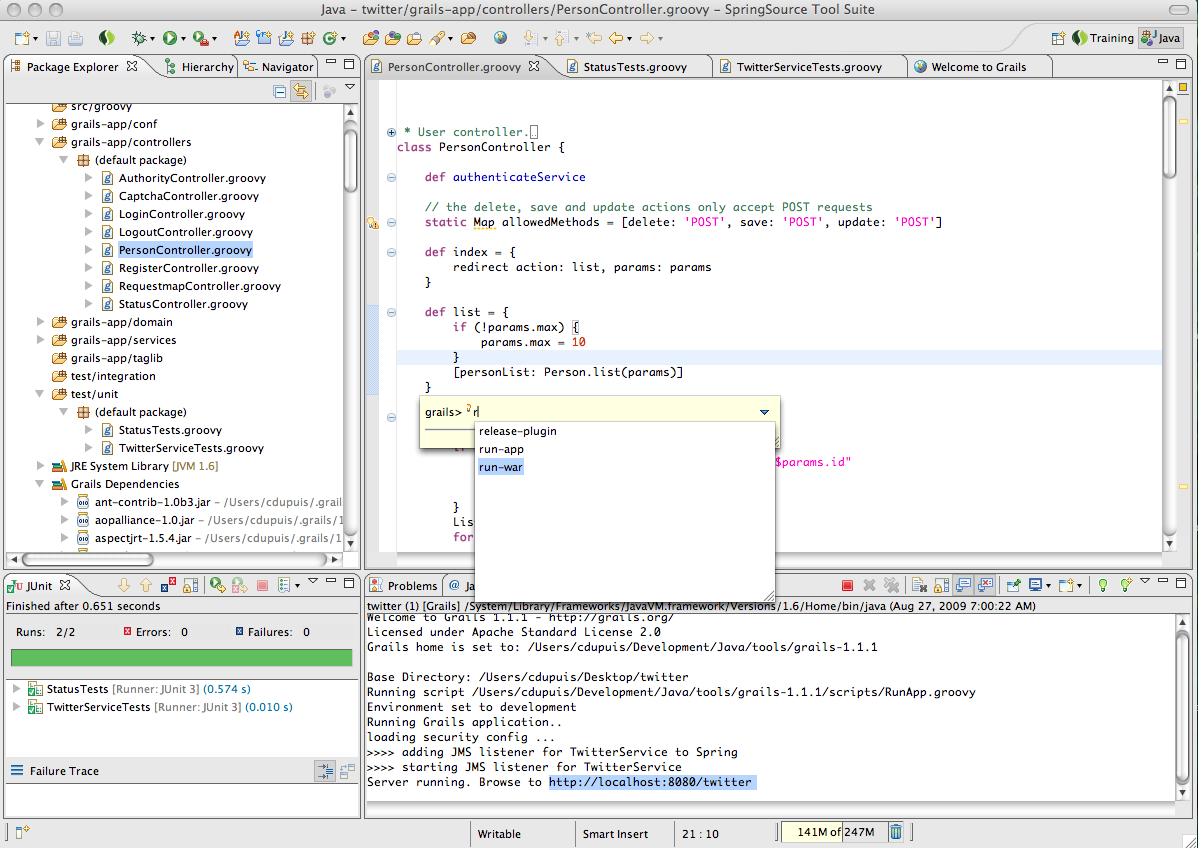
The prototype features a "Grails Dependencies" classpath container which collects general Grails dependencies but also project and global plugin JARs. Additionally all plugin source files and folders are linked into the project by using link source folders. All this is automatically driven and does not require any manual configuration. The tools understand the Grails project configuration for plugin directories and other build settings.
Another feature that people have asked for is the ability to run Grails commands inside the IDE. Once the IDE can launch Grails commands it can also automatically update and refresh the source tree in Eclipse and trigger incremental compilation and validation.
Refer to the above screenshot to see how launching Grails commands could look like.
It is our goal and commitment to make developing Grails applications even more productive with good and free developer tools. There are exciting things ahead of us and you'll see lots of interesting things coming up: one being an integrated experience for developing Grails application and deploying to CloudFoundry - all without leaving STS.
Our plan is to make a first version of the Grails tools available around SpringOne G2x in late October. Make sure to check out Andy's session on Eclipse Groovy Tooling.
At this time I'd like to encourage every Groovy and Grails user to enter requests for Grails tooling features into the STS JIRA. The input will help us prioritizing features.

VMware offers training and certification to turbo-charge your progress.
Learn moreTanzu Spring Runtime offers support and binaries for OpenJDK™, Spring, and Apache Tomcat® in one simple subscription.
Learn moreCheck out all the upcoming events in the Spring community.
View all