A Groovier Eclipse experience |
|

Update: 15-Aug-09: Comments are now closed. If you want help installing or to give feedback or ask questions, please join the mailing list ( archive )
—
For the last couple of months SpringSource has been actively involved in developing the next version of the Eclipse Groovy Tools. The initial goal has been to evolve them from where they are into a highly optimized environment for the key developer tasks of code development, building and testing. Ideally the experience when working with mixed Groovy/Java projects should feel as good as it does for pure Java projects in Eclipse.
This week the first version of the code has been committed into the codehaus repository and shortly milestone 1 will be released. An update site (for Eclipse 3.4.2) is available that contains the current development build: http://dist.codehaus.org/groovy/distributions/greclipse/snapshot/e3.4 . Yes, currently there is no Eclipse 3.5 build of this code yet, but there will be very soon. (Update! 31-Jul-09 Eclipse 3.5 update site now available at: http://dist.codehaus.org/groovy/distributions/greclipse/snapshot/e3.5 )
In this article I'll briefly look at how to get started with the new plugin, but then focus on the new technology that underpins it going forward and what this enables.
Getting started
Installing from the update site is done in the same way as for other Eclipse features. Under Eclipse 3.4.2, navigate to Help > Software Updates. On the Available Software tab, click Add Site and enter the update site URL: http://dist.codehaus.org/groovy/distributions/greclipse/snapshot/e3.4. Click OK. Now the update site will be on the list, open it and mark the entry 'Groovy-Eclipse plugin'. Finally, in the top right, click Install and follow the dialogs to complete installation. Once installed there are three ways to get your groove on:
- Create a new Groovy project. Just like you can create a Java project, there is a Groovy project creation wizard. All Groovy projects actually support a mix of .java and .groovy files.
- Modify an existing Java project so that you can include groovy code. Select your Java project in the package explorer, right click and navigate down the context menu to Groovy then Add Groovy Nature. Once complete, the icon for your project will change and from then on any .groovy files in that project will be built, in addition to .java files.
- Migrate an existing Groovy project. If you have Groovy projects created with the older version of the plugin, they must be migrated to the new version. To migrate a project, select the projects you wish to migrate then right click and navigate to Groovy, then Convert legacy groovy projects. This option only appears if the selected projects need migrating.
That's it! Just start creating Groovy types and working with them like you would with Java. The FAQ http://groovy.codehaus.org/Eclipse+Plugin+V2+FAQ attempts to answer what we believe will be common questions around this alpha release, and includes links for where to raise issues for any problems you encounter or further questions you want to ask.
Existing plugin compilation strategy
Before describing the new compiler technology this version uses, it is worth briefly covering what the existing release uses. The currently released version of the Groovy Eclipse plugin exploits the existing groovy compiler 'joint compilation' support. Joint compilation enables a mixed java/groovy codebase to be built where there are references between the java and groovy types. Essentially it works as follows:
- let the groovy compiler (groovyc) parse the .groovy files
- create stubs on disk that are java-like representations of those groovy files.
- call javac to build the .java files which are able to see the groovy files through the stubs.
- finish off processing of the groovy files – which can now resolve references against the .class files for the java types
And the user is left with all their sources built into binary .class files.
Simplifying the project build strategy
I know some users, myself included, had trouble setting up projects to build with the version of the eclipse plugin that uses joint compilation – the dual builder setup it uses can be tricky to configure correctly. As we embarked on designing the next version of the tools, I wondered if there was a more optimal approach where there could just be one builder in charge and it knew who to call to deal with Java or Groovy files. Having a single builder would remove any complexities around configuring the project to build.
My initial thought was that the Eclipse Compiler should be left in charge of building the code, but it should involve groovyc when necessary to process any groovy code. Due to my background in compilers (working on AspectJ), I already knew the Eclipse Java compiler quite well. Then after discussing the structure of the groovyc compiler with Jochen Theodorou (groovy tech lead) it looked like a tighter integration could be achieved between the Eclipse compiler and groovyc, avoiding the use of stubs. In normal joint compilation the stubs on disk are essentially a way for groovyc to tell javac what is doing, and similarly the .class files produced by javac are a way for javac to tell groovyc what it just did. Optimizing communication between the compilers would simply mean them talking directly rather than via files on disk (stub .java files or .class files). However, any change in how the compilers communicated must not affect the most important facility provided by the existing joint compilation strategy – the complete freedom it allows for referencing between types defined in the two languages. As an example, consider these three types defined in a single project:
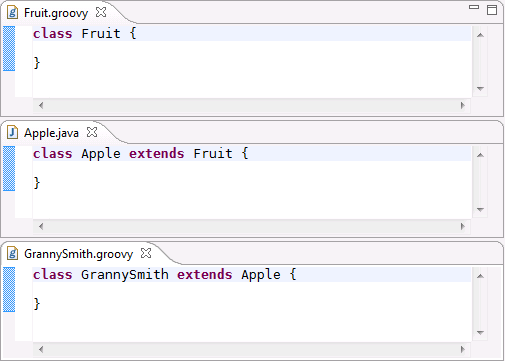
There is no right answer for 'what should get fully compiled first?' If the Groovy code is all compiled first it will fail to find the Apple Java type. If the Java code is compiled first it will fail to find the Fruit Groovy type. Clearly when joining the Eclipse compiler and groovyc together, they need to be aware of each other throughout the compilation process and able to ask each other questions (most importantly: can you resolve this type?). To support this approach there would likely need to be changes on both sides, to the Eclipse Compiler and to groovyc, but care would be taken to minimize these changes and hopefully the changes would be contributed back to the two compiler projects.
Alongside the 'simple task' of gluing two compilers together, there were also some additional requirements for the new version:
- enable the incremental compilation behaviour that Eclipse provides for Java to work for Groovy code.
- under no circumstances can there be a change in how the Eclipse compiler builds pure Java projects. It must be as fast and reliable as ever.
- try and avoid any introduction of groovy-specific dependencies into the Eclipse Compiler. Instead use an abstraction and extend Eclipse to support 'some other language', which in this first instance would be groovy.
Achieving the latter goal would leave us in a good position for contributing the Eclipse compiler changes back to Eclipse.
Not just about performance
Of course, optimizing how the compilers communicate should improve performance, and getting incremental compilation to work for Groovy would be great, but there was another very good reason to move to this new single builder strategy with the Eclipse Compiler in charge. If Eclipse can be made to better understand groovy then some features of Eclipse will just 'work'. A good example of this is the JUnit support. In order to run a testcase in Eclipse you typically use the context menus RunAs > JUnit or shortcut Alt+Shift+X, T. With the current version of the groovy plugin that won't work, Eclipse doesn't know what it is looking at in the editor. In the new world the integration layer between the compilers enables Eclipse to understand the shape of what is in that groovy file – it can see the test class, it can see any @Test annotation, it can even see any @RunWith annotation to select a test runner. And so JUnit launching just works. This is just one example of what could spring to life with zero effort. It is important to understand here that the Eclipse compiler is not being modified to directly process groovy code, it is always delegating to the groovy compiler to deal with groovy code, but the integration layer between the compilers enables eclipse to understand the results of that groovyc invocation.
The internal structure
What made the integration layer feasible in a short amount of time was the existing flexible structure of the two compilers. The various stages of compilation are clearly visible and accessible in the Eclipse Compiler and perhaps even clearer in groovyc (where they are called phases). Integrating the compilers together is basically defining a flow that coordinates and controls progression of each compiler through the various stages/phases. Although there are many stages in real compilation, it is easy to consider it just as a three stage process in order to understand the new design: parse/resolve/generate.
In the parse stage the input data is processed from the pure text form into some internal data structure – nothing is inferred about that structure.
In the resolve stage the actual entities referred to by names in the structure are chased down. For example, if 'Foo' is used in the source, it must be determined which Foo the user meant – and that is done using the appropriate resolution rules: What are my imports? What is in this package? What is on the classpath? and in the groovy case, extra rules like: What are my aliased imports?
In the generate stage the actual .class file is created.
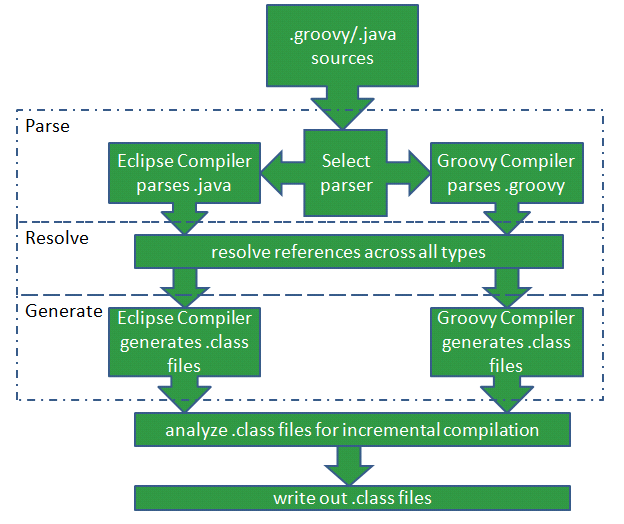
The diagram below shows the architecture of the new builder when it is called to compile a project. All the sources (both .java and .groovy) are passed to the Eclipse compiler. Depending on the file extension either the Eclipse Compiler parses the file itself or groovyc is asked to parse the file. Once that is complete, resolution runs across all the types (Groovy and Java types) that were discovered. The resolution strategy in both compilers is tweaked so that they can see each other's types. Finally post resolution, the generate stage runs to create the .class files.

Structure of the new compilation system
Normally after generating the .class files, the groovy compilation process would immediately write the files to disk, but instead in the new design they are returned to the Eclipse compiler. This final step is what enables incremental compilation to work. Eclipse analyzes the groovyc produced class files just like the class files it is creating itself. The information about references between classes is preserved in exactly the same structure as used for regular Java types – and that is what gives us incremental compilation support for Groovy 'for free'. Since this reference information is preserved in the same way as for Java types, it is automatically persisted for each project across eclipse restarts and other dependent projects can utilise it. These latter two features are still an issue for AspectJ because in AspectJ a different approach to Eclipse compiler modification was taken.
Incremental compilation
This really deserves a whole blog post to itself, but it is worth describing the basics here. Post-compilation the Eclipse compiler records the references amongst all types it processes. Incremental compilation is nothing more than consulting the list of references after something has been built, to see who is affected by the change. If no-one is affected then compilation ends. If some types did depend on what was just built, they are then compiled. The mechanism described here will even provide incremental compilation for a pure Groovy project.
Unexpected bonus?
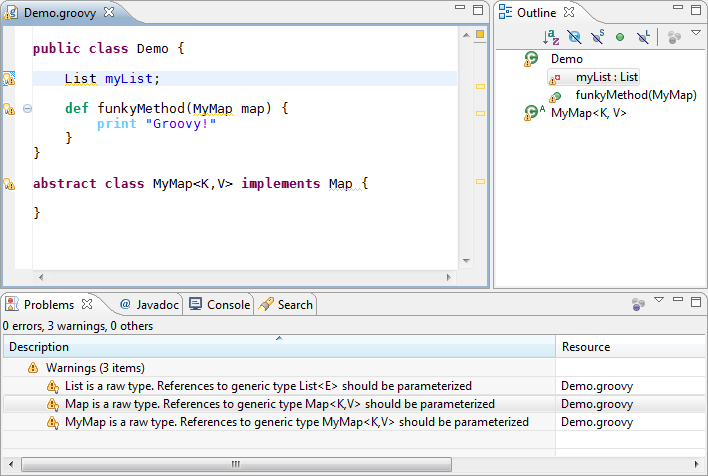
Something that became apparent pretty early on is that because Eclipse can now see the Java-like structure of groovy types, it checks that structure. Some checks are invalid for Groovy code since Groovy is more flexible in what it allows, but some are useful. Consider the endless amount of (configurable) generics-related warnings that the Eclipse compiler will report if code isn't quite correct in its exploitation of generics. This screenshot shows the Eclipse compiler actually checking the groovy code.

Generics warnings for groovy code
The value of these checks is still open to debate, but for now they have been left active.
The UI
Everything I've talked about so far is the underlying compilation strategy. In the Eclipse UI it only surfaces as the 'builder' used to compile mixed Java/Groovy projects. On top of this Andrew Eisenberg (also at the Vancouver SpringSource lab with me) has been doing great things bringing the UI to life:
- bringing across (and evolving) components of the existing plugin that are still needed in the new world, rebasing them on the new compilation infrastructure.
- developing/enhancing those features that users rely on in the IDE: the editor, outline view, code assist, navigation, debugging, etc.
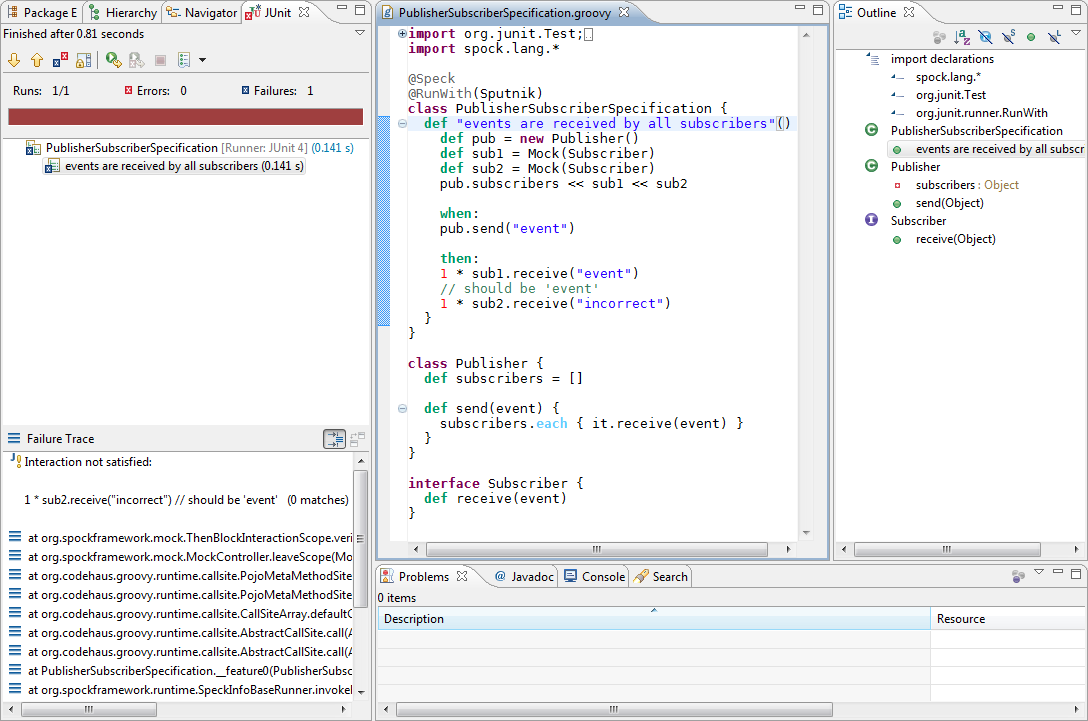
The end result is that the Eclipse UI when working with Groovy looks and behaves just like it does when working with Java. Here is the PublisherSubscriberSpecification example from the Spock test framework ( http://code.google.com/p/spock/ ). It can be executed directly as a JUnit test.

Executing a Spock example
Yes, for those 'in the know', that shot does indicate that groovy AST transformations are supported by this new builder, since that is how Spock is implemented.
Outside of the IDE
I know many people utilise the Eclipse compiler as the Java compiler in their build systems. This gives them added confidence in what the build system is doing because it is the same compiler that they are using in their IDE. There is nothing to stop the integrated Eclipse/Groovy compiler described in this article from being used in a similar way, either directly on the command line or through Ant. With the final release we'll be producing documentation on how to do this.
The alpha release
The result of all the work so far is now available for download. The download includes a patch for the Eclipse JDT compiler to expose appropriate extension points, a slightly modified Groovy 1.7 build, the integration code to join them together and finally the other plugins that provide the UI on top.
How well is it working? This is a pre-milestone 1 release so please understand it isn't production-ready! There are so many possible ways to define interactions between Groovy and Java types and although many have been tested, it may be the first thing you try that breaks it ! We urge you to help us by reporting any issues so we can improve the quality as we head for a first release. The FAQ at http://groovy.codehaus.org/Eclipse+Plugin+V2+FAQ provides more information, including the links for asking questions and raising issues. The only download available right now is for Eclipse 3.4.2. Eclipse 3.5 support will follow shortly. The recent focus has been on the compilation and incremental compilation story. We know that some parts of the UI are still a little sluggish (for example code assist) and will be actively working on speeding those up, the FAQ discusses why this is the case.
The Future
The first release of the Eclipse Plugin using this new compiler technology is intended to be the smallest consistent feature set that makes sense and provides value to the user, hence the theme of providing an optimized edit/save/compile/test experience. We feel this first release can be out within a couple of months. After the imminent first milestone release we will actively be providing more frequent development builds as we head for M2 and final. There may even be some Grails related features in the mix.
Similar Posts
- Update on Groovy and Grails Tools
- Write your Google App Engine applications in Groovy
- Upgrading Maven integration for SpringSource Tool Suite 2.8.0
- Grails and Maven: a Marriage of Inconvenience
- Using Bundlor in Eclipse


Pramatr says:
Added on July 30th, 2009 at 11:14 amThis is GREAT news, one of the biggest problems I'm having with adoption at the minute is the fact the IDE support just isn't there. Hopefully this will be the start of that……
Jos Bovet says:
Added on July 30th, 2009 at 11:23 amthanks guys! but Eclipse 3.5 not supported !!
via(http://groovy.codehaus.org/Eclipse Plugin V2 FAQ)
In order to achieve a deep level of integration between groovy and JDT, there are changes to the Eclipse JDT core bundle, these changes are specific to each version of Eclipse and must be ported to Eclipse 3.5. Eclipse 3.5 support will not be far off.
JS says:
Added on July 30th, 2009 at 11:57 amOMG I think I'm gonna cry … tears of joy that is! The JUnit support, cross-language references fixed, are among the biggest drawback developers won't use Groovy more actively. Can I say that the SpringSource acquisition of G2One is actually a blessing on the Groovy community? Thank you for your great work.
Dierk König says:
Added on July 30th, 2009 at 12:35 pmAwesome! Congratulations! Keep it up!
Greg says:
Added on July 30th, 2009 at 12:55 pmAnd…the fact that this may pave the way for other JVM-based language support in the IDE. Think about it: scala, clojure, anything!
John Bito says:
Added on July 30th, 2009 at 12:56 pmI'll definitely start working with this as soon as I can get it installed on Eclipse 3.5. I'm generating Groovy code from an Xtext (Eclipse 3.5 TMF) language, so working with Eclipse 3.4 would be a significant impediment.
yeah says:
Added on July 30th, 2009 at 1:35 pmF*@% Yeah! Now we might be able to sell the flipping management to use groovy, cause the require a step debugger for the f*@%-tards who can't debug with out ide support.
The biggest about selling groovy or grails is the ide support sucks .
Keep up the good work!
Matt Passell says:
Added on July 30th, 2009 at 2:25 pmAndy and Andrew, I've commented on your blog entries with regard to this, but I also wanted to say here how much I appreciate what you're doing. I consult for a company that's using Eclipse as their IDE and the state of the Groovy plug-in has been the main thing holding us back from expanding our use of Groovy. I'll try out the plug-in as soon as I can and with luck will get others in the organization to use it once it reaches M1.
Thanks,
Matt
Pedro says:
Added on July 30th, 2009 at 3:11 pmGreat job guys !!!! I´m waiting for eclipse 3.5 plugin available to beginning to test and use it !!
Herrera
Raphael says:
Added on July 30th, 2009 at 7:50 pmIDE support was totally holding G2 back. Thanks for the hard work Andy and Andrew and everyone who helped.
Anxiously expecting an E3.5 release.
The Count says:
Added on July 30th, 2009 at 9:23 pmHmm… I see a lot about Groovy, but not much about Grails. I spend very little time just writing in Groovy that I don't just use GroovyConsole for. My real code that I need to debug, etc. is all for Grails.
Also, something that's not mentioned is support for different versions of Groovy, much like Eclipse can currently specify a certain JDK for compiling java files in a project, will we be able to do the same for Groovy? Given the relative fluid nature of Groovy's rapid development, this would seem to be very necessary (and even more so for Grails versions).
Gerald Loeffler says:
Added on July 31st, 2009 at 3:33 amrarely have i seen such an impressive solution to a very important problem in the alternative-languages-on-the-JVM space: an uncompromisingly optimal engineering approach taken; tangible results achieved and released in a short timeframe; and all of this expertly communicated to the world. this should serve as a model to many!
Lars Vogel says:
Added on July 31st, 2009 at 4:51 amFantastic! Once Eclipse 3.5 is done, I'll update my little Groovy with Eclipse tutorial: http://www.vogella.de/articles/Groovy/article.html
Dominic Clifton says:
Added on July 31st, 2009 at 4:55 amGreat work, keep it up!
Marcel Overdijk says:
Added on July 31st, 2009 at 6:16 amQuote from post: "There may even be some Grails related features in the mix"
This would be great!
Christophe says:
Added on July 31st, 2009 at 7:52 amKudos guys. I had to switch to use IntelliJ, I can't wait to have it working in Eclipse.
Peter Mularien says:
Added on July 31st, 2009 at 9:22 amI've been following your progress on this Andrew. Thanks so much, this has got to have been a super interesting problem to solve that few will fully appreciate. At this point are you looking for bugs / feedback from this alpha release, or would that just be distracting? I know from your blog that "building Grails" was an important metric you were working with, but I'd imagine the number of hybrid Java/Groovy projects that are out in the public view are relatively small. I'm working with a reasonably large and very complex hybrid project, so if input from such a project would be helpful with regards to finding bugs, please get in touch with me. Thanks again!
Peter Ledbrook says:
Added on July 31st, 2009 at 9:24 amHi Andy,
Looks good. I loaded the Grails source code into Eclipse and it built – awesome! Any chance the editor may recognise tripe-quote strings in the near future?
Thanks,
Peter
Tomi Schütz says:
Added on July 31st, 2009 at 10:00 amGreat Job! Congratulations!
Thanks,
Tomi
Pavel Sapozhnikov says:
Added on July 31st, 2009 at 2:02 pmI am really really excited for this. Great job. Really looking forward to release for Eclipse 3.5.
Also I am having some funniness going on with subclipse when this is installed. It seems like when I change a file the icon which signifies that file on my local has been changed (the black icon) is now not at the file level but even more at the class level This is somewhat tedious because you open up a package and you don't know which file has been modified.
I know this is still Alpha. However, thanks to all of you who develops this. Great job and again thank you!
Thanks
Pavel
Andrew Eisenberg says:
Added on July 31st, 2009 at 2:37 pmHi Pavel,
The reason why you are not seeing the subclipse decorations is that I have not implemented the label provider for groovy files correctly. I'll sort this out and it should be fixed soon.
Pavel Sapozhnikov says:
Added on July 31st, 2009 at 2:40 pmAndrew
Thank you very much. I know this is still alpha. I've honestly been waiting for this moment since I started working with grails and now my dreams are coming true!!
Thank you very much for this great work.
-p
Neale says:
Added on July 31st, 2009 at 2:49 pmNice work boys!
If you haven't already, I'd post the patch for integration into the current JDT. API changes take a while, and it probably goes without saying that the sooner the "other language" API is nailed down, the better the prospects for other languages to be up to speed by the time Helios releases.
aclement (blog author) says:
Added on July 31st, 2009 at 3:28 pmThanks for the positive comments.
@TheCount
Right now we are tightly coupled to a groovy version because we have custom changes in it, but hopefully those will get pushed into base groovyc. We do want to make it easy to use whatever groovy version you want to use, but we aren't far along planning how to do that.
@Lars Vogel
That would be awesome!
@Peter Mularien
Fired you an email just now, yes I'd love to get feedback on larger codebases.
@Peter Ledbrook
I haven't had a chance to recheck grails built ok for a couple of weeks now.
Phew, glad that worked
—
And…. drum roll please… the update site for Eclipse 3.5 is available:
http://dist.codehaus.org/groovy/distributions/greclipse/snapshot/e3.5
Be aware, this is also an alpha, and on 3.5 it has had a bit less testing than on 3.4. All feedback appreciated. Feel free to use JIRA to report issues: http://jira.codehaus.org/browse/GRECLIPSE (please mention you are on the new version of the plugin and which eclipse variant: 3.4 or 3.5)
Lars Vogel says:
Added on July 31st, 2009 at 4:24 pm@Andy: Update of my tutorial is done: http://www.vogella.de/articles/Groovy/article.html
Martin says:
Added on August 1st, 2009 at 8:28 am"Run As -> Groovy" only seems to appear when you have a Groovy class that has a main method, and not when you simply have a script (with the implicit class etc..). This is on the 3.5 alpha. Is this the same on the 3.4 version?
Pavel Sapozhnikov says:
Added on August 1st, 2009 at 10:46 amHi
I installed snapshot 3.5 into Eclipse 3.5. My projects didn't actually have 'Add Groovy Nature' function and also it seems like this release doesn't actually have a groovy compiler while 3.4 release for Eclipse 3.4 actually has groovy compiler and 'Add Groovy Nature' function. I was wondering if everybody is also experiencing that.
Thanks
Pavel
aclement (blog author) says:
Added on August 1st, 2009 at 11:25 am@Martin
That's interesting. I believe RunAs>Groovy should work for a script. I am using the context menu (rightclick in the editor window or on the file in the package explorer) – are you trying something similar?. I just tried it in 3.4 and 3.5 and it worked ok. I'd recommend reporting a JIRA (see the FAQ) so we can track it. (Oh and are you on windows or mac/linux – I was testing on Windows7).
@Pavel
Did the install go OK? The 3.5 and 3.4 functionality is basically identical. As with 3.4, the 3.5 compiler patch will only install if you have precisely the right version of the eclipse compiler. So you must be on exactly 3.5.0 with a plugin in the plugins folder named something like "org.eclipse.jdt.core_3.5.0.v_963.jar". If you can't get it to work, please raise a JIRA.
Pavel Sapozhnikov says:
Added on August 1st, 2009 at 1:03 pm@aclement
Hi
Install did go well, at least to me it seems like it went well. There weren't any errors or anything. There was actually another update to the 3.5 plug in recently which I did apply that update. This one fixed the subclipse problem (Thank you!!). I do get some highlights but for example def is not being highlighted. But I do get like all closuers when I press what is it Alt Space? I know it's still alpha – so GREAT job. I really appreciate this work that you do.
Andrew Eisenberg says:
Added on August 1st, 2009 at 4:27 pm@Martin
Run As Groovy Script is working for many situations that we have tests for. It is possible that:
1. Your project does not/did not have the new groovy nature on it.
2. Your groovy script has some syntax in it that we have not yet written tests for. It may be that this syntax is somehow breaking our script searching mechanism.
I would like to figure out what is going on. I would suggest that you raise a JIRA for this:
http://jira.codehaus.org/browse/GRECLIPSE
or you can email me the file directly (and feel free to obfuscate in the name of privacy).
andrew dot eisenberg at springsource dot com
@Pavel
Yes, I put a new version out there that fixed the lack of subclipse decorations issue.
When 'def' is not highlighted that usually means that you are editing in a Java Editor, not Groovy Editor. Groovy files should be opening in the Groovy Editor by default, but in some odd circumstances, that changes. Look at the icon for the editor. Is it a Java icon or a Groovy icon? If it is a Java icon, you can change to a groovy editor like this:
1. close the editor.
2. right click on the file
3. Select Open With -> Groovy Editor
Please let me know if this addresses your problem.
Pavel Sapozhnikov says:
Added on August 1st, 2009 at 4:47 pmHi Andrew
Thank you very much for this tip. It actually worked, thank you. You were right in the project view or Project Explorer the icon of the .groovy file was actually 'g'. However, when I opened it and it gave me the file window the icon of the window was 'J', you were absolutely right, however, the icon in project explorer was still 'g'. Now opening it with Groovy Editor does the job, however, just clicking on it by default opens it with Java Editor unless I have already opened that file with Groovy Editor then it stays with Groovy Editor after closing that particular file.
Now I fixed that just by going to File Associations and setting it .groovy to Groovy Editor default. And this seems to have worked.
So thank you for this explanation. I am very happy with subclipse working again and the Groovy Editor. Yay, I feel like a kid in a candy store
-p
Pavel Sapozhnikov says:
Added on August 2nd, 2009 at 6:30 pmHi Andrew
I had another question. I tried getting a list of all closures in a specific service but inside a controller. I pressed type service. and nothing came up. I was wondering if this feature will be added in future release.
Thanks
Pavel
Andrew Eisenberg says:
Added on August 2nd, 2009 at 9:26 pm@Pavel,
We have not added any grails support in the plugin yet. We expect that we will start working on it as a separate plugin and will not be able to get to it for another few months.
Alex says:
Added on August 3rd, 2009 at 6:09 amHi,
are there any plans on bundling and shipping it together with SpringSource Tool Suite?
Cheers,
Alex
Andrew Eisenberg says:
Added on August 3rd, 2009 at 2:53 pm@Alex
Yes, the alpha version will be included in STS 2.1.0.
X says:
Added on August 4th, 2009 at 10:02 amdist.codehaus.org/groovy/distributions/greclipse/snapshot/e3.5 seems to be offline. Too big demand?
Andrew Eisenberg says:
Added on August 4th, 2009 at 10:16 amYes, it is offline now. We are working on the problem.
Fred says:
Added on August 5th, 2009 at 8:54 amHi,
I installed the plugin for 3.5 and I get neither the possibility to add Groovy nature to a project, nor the possibility to open files in the Groovy editor.
The plugin installed without errors but it does not seem to work at all.
Greetings,
Fred
Pavel Sapozhnikov says:
Added on August 5th, 2009 at 8:58 am@Fred
Hi Fred
I had the same issue if you read above. Apparently we do not get Add Groovy Nature. What I did was I created a new Groovy project from existing source. Now you will not by default get your .groovy open with Groovy Editor. For that go to File Associates and make it default there for .groovy. I think it is already there says that it's default but you should do it manually and you will get your .groovy files open with Groovy Editor.
Thanks
Pavel
Fred says:
Added on August 5th, 2009 at 9:14 amHi Pavel,
thanks for the response.
I read your posts before I posted my problem, but unfortunately they dont help me.
After installing the plugin, when creating a new project, I cannot create a new Groovy project, because it is not part of the listed possiblities. Except for the entry in the installed software page nothing seems to indicate that the plugin was installed at all.
In case it helps:
I am running Eclipse 3.5.0 on an Ubuntu platform.
Greetings,
Fred
Matt Passell says:
Added on August 5th, 2009 at 9:14 amTo everyone writing comments here, if you're interested in monitoring the progress of the plug-in, see problems others are having and suggestions for how to fix them, you should subscribe to the mailing list. If you look at the archives, you'll see that it's not a particularly high volume list and it has the advantage (relative to blog comments) that conversations can be threaded.
@Fred – have you looked at the Eclipse Error view to see if there were any possibly relevant messages? If so, it's possible to export the error log to a file and either paste in the relevant section (if it's short) or attach the file to an email.
Pavel Sapozhnikov says:
Added on August 5th, 2009 at 9:23 amFred
Good point. I am running Eclipse 3.5 on XP and everything (seems) to be fine. I do get Create New Groovy project. Haven't tried same on Ubuntu. Not sure why it wouldn't work on Ubuntu it seems to as it is still Java compiling this so I don't know. Are your running latest Java on Ubuntu? The other thing I would try is you can install XP in VirtualBox and try there.
Anyway, Good luck!
-p
Andrew Eisenberg says:
Added on August 5th, 2009 at 10:37 am@Fred,
It sounds like the plugin is not installed properly. Do you see any errors in the error log? I have confirmation that it is possible to run the plugin on Linux. You can try uninstalling and reinstalling the plugin.
@Matt,
Good point, it is much easier to provide help through a mailing list than through blog comments.
Greg says:
Added on August 6th, 2009 at 12:59 pmYou can hear a podcast interview Andy Clement about this release at http://pondjumpers.com/2009/08/02/episode-3-interview-about-the-groovier-eclipse/
Pavel Sapozhnikov says:
Added on August 12th, 2009 at 11:54 amHi
I am trying to install the new version of the plugin:
Groovy-Eclipse Sources Feature 2.0.0.20090811-1500-e35
Groovy-Eclipse Feature 2.0.0.20090811-1500-e35
JDT Core patch for Groovy-Eclipse plugin 2.0.0.20090811-1500-e35
and it's giving me an error:
An error occurred while collecting items to be installed
session context was:(profile=epp.package.jee, phase=org.eclipse.equinox.internal.provisional.p2.engine.phases.Collect, operand=, action=).
Artifact not found: osgi.bundle,org.codehaus.groovy,1.7.0.20090811-1500-e35.
http://dist.codehaus.org/groovy/distributions/greclipse/snapshot/e3.5/plugins/org.codehaus.groovy_1.7.0.20090811-1500-e35.jar
Artifact not found: osgi.bundle,org.codehaus.groovy.source,1.7.0.20090811-1500-e35.
http://dist.codehaus.org/groovy/distributions/greclipse/snapshot/e3.5/plugins/org.codehaus.groovy.source_1.7.0.20090811-1500-e35.jar
Artifact not found: osgi.bundle,org.eclipse.jdt.core,3.5.9.20090811-1500-e35.
http://dist.codehaus.org/groovy/distributions/greclipse/snapshot/e3.5/plugins/org.eclipse.jdt.core_3.5.9.20090811-1500-e35.jar
…
Andrew Eisenberg says:
Added on August 12th, 2009 at 12:09 pm@Pavel
Please try again. We were just uploading new versions of the plugins. They should be available now.
Hamlet D'Arcy says:
Added on August 13th, 2009 at 1:07 pmThanks for posting the details about how the new compiler works. This is cool info to read!
Dmitry says:
Added on August 14th, 2009 at 11:41 amI am also getting an Error trying to update from a previous build:
Cannot complete the install because of a conflicting dependency.
Software being installed: Groovy-Eclipse Feature 2.0.0.20090813-1600-e35 (org.codehaus.groovy.eclipse.feature.feature.group 2.0.0.20090813-1600-e35)
Software currently installed: Eclipse IDE for Java EE Developers 1.2.0.20090621-0820 (epp.package.jee 1.2.0.20090621-0820)
Only one of the following can be installed at once:
JDT Core patch for Groovy-Eclipse plugin 2.0.0.20090804-1900-e35-N (org.codehaus.groovy.jdt.patch.feature.jar 2.0.0.20090804-1900-e35-N)
JDT Core patch for Groovy-Eclipse plugin 2.0.0.20090813-1600-e35 (org.codehaus.groovy.jdt.patch.feature.jar 2.0.0.20090813-1600-e35)
Dmitry says:
Added on August 14th, 2009 at 11:47 amAnd now this:
An error occurred while collecting items to be installed
session context was:(profile=epp.package.jee, phase=org.eclipse.equinox.internal.provisional.p2.engine.phases.Collect, operand=, action=).
Problems downloading artifact: osgi.bundle,org.eclipse.jdt.groovy.core.source,1.0.0.20090813-1600-e35.
Downloaded stream not a valid archive. Check the server.
JK says:
Added on August 14th, 2009 at 1:46 pmCurrently getting this error trying to install to Eclipse 3.5:
An error occurred while collecting items to be installed
session context was:(profile=epp.package.java, phase=org.eclipse.equinox.internal.provisional.p2.engine.phases.Collect, operand=, action=).
No repository found containing: osgi.bundle,org.eclipse.jdt.core,3.5.9.20090813-1600-e35
No repository found containing: osgi.bundle,org.apache.commons.collections,3.2.1
No repository found containing: osgi.bundle,org.codehaus.groovy,1.7.0.20090813-1600-e35
No repository found containing: osgi.bundle,org.codehaus.groovy.eclipse.ant,2.0.0.20090813-1600-e35
No repository found containing: osgi.bundle,org.codehaus.groovy.eclipse.codeassist.completion,2.0.0.20090813-1600-e35
No repository found containing: osgi.bundle,org.codehaus.groovy.eclipse.codebrowsing,2.0.0.20090813-1600-e35
No repository found containing: osgi.bundle,org.codehaus.groovy.eclipse.core,2.0.0.20090813-1600-e35
No repository found containing: osgi.bundle,org.codehaus.groovy.eclipse.core.help,2.0.0.20090813-1600-e35
No repository found containing: osgi.bundle,org.codehaus.groovy.eclipse.cstviewer,2.0.0.20090813-1600-e35
No repository found containing: org.eclipse.update.feature,org.codehaus.groovy.eclipse.feature,2.0.0.20090813-1600-e35
No repository found containing: osgi.bundle,org.codehaus.groovy.eclipse.refactoring,2.0.0.20090813-1600-e35
No repository found containing: osgi.bundle,org.codehaus.groovy.eclipse.ui,2.0.0.20090813-1600-e35
No repository found containing: org.eclipse.update.feature,org.codehaus.groovy.jdt.patch,2.0.0.20090813-1600-e35
No repository found containing: osgi.bundle,org.eclipse.jdt.groovy.core,1.0.0.20090813-1600-e35
Andrew Eisenberg says:
Added on August 14th, 2009 at 1:49 pmPlease try this site:
http://dist.codehaus.org/groovy/distributions/greclipse/snapshot/e3.5Composite/
It is temporary and we hope it will be a more robust way of provisioning the plugin. If this works, it will replace the existing site.
JK says:
Added on August 14th, 2009 at 2:38 pmThe new location:
http://dist.codehaus.org/groovy/distributions/greclipse/snapshot/e3.5Composite/
…worked great for me. Thanks! Nice to see that the new plugin understands how to put a class into a newly created package.