REST in Spring 3: RestTemplate |

In an earlier post, I blogged about the REST capabilities we added to Spring @MVC version 3.0. Later, Alef wrote about using the introduced functionality to add an Atom view to the Pet Clinic application. In this post, I would like to introduce the client-side capabilities we added in Milestone 2.
RestTemplate
The RestTemplate is the central Spring class for client-side HTTP access. Conceptually, it is very similar to the JdbcTemplate, JmsTemplate, and the various other templates found in the Spring Framework and other portfolio projects. This means, for instance, that the RestTemplate is thread-safe once constructed, and that you can use callbacks to customize its operations.
RestTemplate Methods
The main entry points of the template are named after the six main HTTP methods:
| HTTP | RestTemplate |
|---|---|
| DELETE | delete(String, String...) |
| GET | getForObject(String, Class |
| HEAD | headForHeaders(String, String...) |
| OPTIONS | optionsForAllow(String, String...) |
| POST | postForLocation(String, Object, String...) |
| PUT | put(String, Object, String...) |
The names of these methods clearly indicate which HTTP method they invoke, while the second part of the name indicates what is returned. For instance, getForObject() will perform a GET, convert the HTTP response into an object type of your choice, and returns that object. postForLocation will do a POST, converting the given object into a HTTP request, and returns the response HTTP Location header where the newly created object can be found. As you can see, these methods try to enforce REST best practices.
URI Templates
Each of these methods takes a URI as first argument. That URI can be a URI template, and variables can be used to expand the template to a normal URI. The template variables can be passed in two forms: as a String variable arguments array, or as a Map
String result = restTemplate.getForObject("http://example.com/hotels/{hotel}/bookings/{booking}", String.class, "42", "21");
will perform a GET on http://example.com/hotels/42/bookings/21. The map variant expands the template based on variable name, and is therefore more useful when using many variables, or when a single variable is used multiple times. For example:
Map<String, String> vars = new HashMap<String, String>();
vars.put("hotel", "42");
vars.put("booking", "21");
String result = restTemplate.getForObject("http://example.com/hotels/{hotel}/bookings/{booking}", String.class, vars);
will also perform a GET on http://example.com/hotels/42/rooms/42.
HttpMessageConverters
Objects passed to and returned from the methods getForObject(), postForLocation(), and put() and are converted to HTTP requests and from HTTP responses by HttpMessageConverters. Converters for the main mime types and Java types are registered by default, but you can also write your own converter and plug it in the RestTemplate. In the example below, I will show you how that's done.
Using the RestTemplate to retrieve photos from Flickr
Rather than going through the various methods of the RestTemplate, I will show you how to use it for retrieving pictures from Flickr, Yahoo!s online photo-sharing application. This sample application searches Flickr for photos that match a given search term. It then shows these pictures using a simple Swing UI. To run the application yourself, you will need to create a Flickr account and apply for an API key.
Searching for photos
Flickr exposes various APIs to manipulate its vast library of photos. The flickr.photos.search method allows you to search for photos, by issuing a GET request on http://www.flickr.com/services/rest?method=flickr.photos.search&api+key=xxx&tags=penguins, where you enter your API key and the thing to search for (penguins in this case). As a result, you get back a XML document, describing the photos that conform to your query. Something like:
<photos page="2" pages="89" perpage="10" total="881"> <photo id="2636" owner="47058503995@N01" secret="a123456" server="2" title="test_04" ispublic="1" isfriend="0" isfamily="0" /> <photo id="2635" owner="47058503995@N01" secret="b123456" server="2" title="test_03" ispublic="0" isfriend="1" isfamily="1" /> <photo id="2633" owner="47058503995@N01" secret="c123456" server="2" title="test_01" ispublic="1" isfriend="0" isfamily="0" /> <photo id="2610" owner="12037949754@N01" secret="d123456" server="2" title="00_tall" ispublic="1" isfriend="0" isfamily="0" /> </photos>
Using the RestTemplate, retrieving such a document is quite trivial:
final String photoSearchUrl =
"http://www.flickr.com/services/rest?method=flickr.photos.search&api+key={api-key}&tags={tag}&per_page=10";
Source photos = restTemplate.getForObject(photoSearchUrl, Source.class, apiKey, searchTerm);
where apiKey and searchTerm are two Strings given on the command line. This method uses the SourceHttpMessageConverter to convert the HTTP XML response into a javax.xml.transform.Source (Note that the SourceHttpMessageConverter was introduced shortly after we released Spring 3.0 M2, so you will have to get a recent snapshot (or the upcoming M3) to use it. The sample project available below is set up to retrieve these via Maven).
Retrieving the photos
Next, we're going to use an XPath expression to retrieve all the photo elements of the document. For this, we are going to use the XPathTemplate from Spring Web Services. We are going to execute the //photo expressions, returning all photo elements occurring anywhere in the document. The NodeMapper is a callback interface, whose mapNode() method will be invoked for each photo element in the document. In this case, we are retrieving the server, id, and secret attributes of this element, and use those to fill up a Map. Finally, we use the RestTemplate again, to retrieve the photo as a java.awt.image.BufferedImage. Thus when the XPath evaluation is done, the resulting imageList will contain an image for each photo in the XML document.
List<BufferedImage> imageList = xpathTemplate.evaluate("//photo", photos, new NodeMapper() {
public Object mapNode(Node node, int i) throws DOMException {
Element photo = (Element) node;
Map<String, String> variables = new HashMap<String, String>(3);
variables.put("server", photo.getAttribute("server"));
variables.put("id", photo.getAttribute("id"));
variables.put("secret", photo.getAttribute("secret"));
String photoUrl = "http://static.flickr.com/{server}/{id}_{secret}_m.jpg";
return restTemplate.getForObject(photoUrl, BufferedImage.class, variables);
}
});
For instance, given the XML document given above, the imageList will contain 4 images. The URL for the first image retrieved will be http://static.flickr.com/2/2636_ a123456_m.jpg, the second is http://static.flickr.com/2/2635_ b123456_m.jpg, etc.
Converting the images
There is one more thing that needs to be done in order for the code to work: we will need to write a HttpMessageConverter that is able to read from the HTTP response, and create a BufferedImagefrom that. Doing so with the Java Image I/O API is fairly simple, we just need to implement the read() method defined in the HttpMessageConverter interface. Overall, our simple converter looks like this:
public class BufferedImageHttpMessageConverter implements HttpMessageConverter<BufferedImage> {
public List<MediaType> getSupportedMediaTypes() {
return Collections.singletonList(new MediaType("image", "jpeg"));
}
public boolean supports(Class<? extends BufferedImage> clazz) {
return BufferedImage.class.equals(clazz);
}
public BufferedImage read(Class<BufferedImage> clazz, HttpInputMessage inputMessage) throws IOException {
return ImageIO.read(inputMessage.getBody());
}
public void write(BufferedImage image, HttpOutputMessage message) throws IOException {
throw new UnsupportedOperationException("Not implemented");
}
}
Note that we didn't implement write() because we are not uploading images, just downloading them. Now we just have to plug this converter into the RestTemplate. We do that in the Spring application context:
<beans xmlns="http://www.springframework.org/schema/beans"
xmlns:xsi="http://www.w3.org/2001/XMLSchema-instance"
xsi:schemaLocation="http://www.springframework.org/schema/beans http://www.springframework.org/schema/beans/spring-beans.xsd">
<bean id="flickrClient" class="com.springsource.samples.resttemplate.FlickrClient">
<constructor-arg ref="restTemplate"/>
<constructor-arg ref="xpathTemplate"/>
</bean>
<bean id="restTemplate" class="org.springframework.web.client.RestTemplate">
<property name="messageConverters">
<list>
<bean class="org.springframework.http.converter.xml.SourceHttpMessageConverter"/>
<bean class="com.springsource.samples.resttemplate.BufferedImageHttpMessageConverter"/>
</list>
</property>
</bean>
<bean id="xpathTemplate" class="org.springframework.xml.xpath.Jaxp13XPathTemplate"/>
</beans>
Showing the photos
The final stage is to show the photos in a simple GUI. For this, we use Swing:
JFrame frame = new JFrame(searchTerm + " photos");
frame.setLayout(new GridLayout(2, imageList.size() / 2));
for (BufferedImage image : imageList) {
frame.add(new JLabel(new ImageIcon(image)));
}
frame.setDefaultCloseOperation(JFrame.EXIT_ON_CLOSE);
frame.pack();
frame.setVisible(true);
which gives us the following:
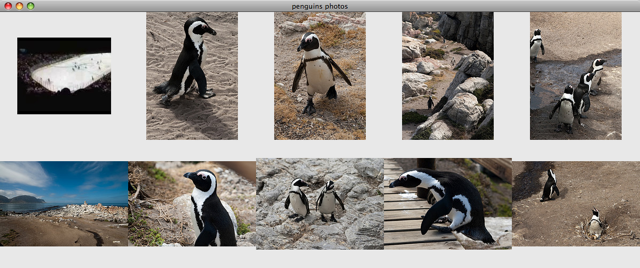
Overall, I hope this post showed you how simple it can be to use the RestTemplate to interact with HTTP servers. In just under 30 lines of Java code, we created a GUI that shows pictures of everybody's favorite bird: the penguin! Check out the RestTemplate and let us know what you think!
Downloads
A Maven project containing the code above can be downloaded here. Note that the project is based on a nightly snapshot build of Spring. The upcoming Milestone 3 of Spring will contain the necessary classes as well.
Similar Posts
- XPath Support in Spring Web Services
- POJO Aspects in Spring 2.0: A Simple Example
- Extending Spring Social's Service Provider Framework
- Annotated Web MVC Controllers in Spring 2.5
- Spring Security customization (Part 2 – Adjusting secured session in real time)


Thomas Risberg says:
Added on March 27th, 2009 at 10:26 amGreat blog Arjen. You did forget to mention how to run the app so I thought I'd save some of you a bit of Googling:
mvn exec:java -Dexec.mainClass="com.springsource.samples.resttemplate.Driver" -Dexec.args="[your key here] penguin"
-Thomas
Morten says:
Added on March 28th, 2009 at 7:46 pmLooks great, but I would like all my client side HTTP handling to be (ultimately) done by Apache's HttpClient 4.0… Can I make RestTemplate call into Apaches HttpClient 4.0?
Arjen Poutsma (blog author) says:
Added on March 29th, 2009 at 3:52 am@Morton
You can plug in Commons Http Client 3 into the template currently, since version 4 is still in beta. As soon as 4 is out, we might add support for it.
Pavel says:
Added on March 30th, 2009 at 7:12 amThis is an excellent client-side complement to the MVC framework REST extensions, love the XPathTemplate/NodeMapper!
Abdullah says:
Added on April 1st, 2009 at 9:13 amHi Arjen,
How do we do authentication with RestTemplate ?
Arjen Poutsma (blog author) says:
Added on April 1st, 2009 at 9:20 am@ Abdullah
You can plug in a Commons HTTP client into the constructor, and set authentication on that, see here and and here.
Harald Pehl says:
Added on April 2nd, 2009 at 6:29 amHi Arjen,
is there support for the OXM mapper in RestTemplate. I'd like to have something like
MyDomainObject foo = restTemplate.getForObject("http://server/foos/{id}", MyDomainObject.class, "42");
On the server I would have a marshaller configured to convert instances of MyDomainObject. How do I connect the marshaller with the template?
Thanks Harald
Arjen Poutsma (blog author) says:
Added on April 3rd, 2009 at 2:04 am@Harald
You can use a marshaller through the MarshallingHttpMessageConverter. This class didn't make it to M2 yet, so you will need to use a snapshot, or wait till M3.
Abdullah says:
Added on April 3rd, 2009 at 7:11 amHi Arjen,
I am working on openCRX, which have Rest Services, one of them is creating a Contact.
For Contact service, using Apache HttpClient, I am using the below code:
String url = "http://localhost:8080/opencrx-rest-CRX/org.opencrx.kernel.account1/provider/CRX/segment/Standard/account";
HttpClient client = new HttpClient();
PostMethod method = new PostMethod(request);
String contact = ""
""
"mr"
"abdullah"
"shaikh"
"";
method.setRequestBody(contact);
client.executeMethod(method);
But how should I do it using Spring's RestTemplate ?
I tried using the code below for RestTemplate:
HttpClient httpClient = new HttpClient();
ClientHttpRequestFactory requestFactory = new CommonsClientHttpRequestFactory(httpClient);
RestTemplate template = new RestTemplate(requestFactory);
String url = "http://localhost:8080/opencrx-rest-CRX/org.opencrx.kernel.account1/provider/CRX/segment/Standard/account";
Map vars = new HashMap();
vars.put("salutation", "mr");
vars.put("firstName", "test2");
vars.put("middleName", "test2");
vars.put("lastName", "test2");
vars.put("jobTitle", "test2");
URI uri = template.postForLocation(url, null, vars);
Thanks,
Abdullah
Abdullah says:
Added on April 3rd, 2009 at 7:16 amThe xml tags in contact variable got replace, the root tag is org.opencrx.kernel.account1.Contact>
Abdullah says:
Added on April 3rd, 2009 at 8:53 amhey I got it .. I guess I need to write http message converters and the code should be ..
Contact contact = new Contact();
contact.setFirstName("test2");
contact.setLastName("test2");
URI uri = template.postForLocation(url, contact);
Kris says:
Added on April 6th, 2009 at 12:46 amHi Arjen,
Are there some similar server side capabilities in Spring 3.0? We are using Spring 2.x for our upcoming site. When can we expect a final production ready Spring 3.0?
thanks in advance..
Kris says:
Added on April 6th, 2009 at 12:53 amI got my first answer from http://blog.springsource.com/2009/03/08/rest-in-spring-3-mvc/
can you please tell me when can we expect a final production ready Spring 3.0?
Arjen Poutsma (blog author) says:
Added on April 6th, 2009 at 7:01 am@Abdullah
There are a couple of XML converters available for handling XML. One of which is the MarshallingHttpMessageConverter, which can deal with JAXB2, Castor, XMLBeans, JiBX and XStream. The other option is to use the SourceHttpMessageConverter, which can deal with javax.xml.transform.Source objects, or more specifically DOMSource, StreamSource, and SAXSource.
Chris says:
Added on May 11th, 2009 at 8:20 pmAre you able to post the slides for you presentation at the spring one europe convention?
Arjen Poutsma (blog author) says:
Added on May 12th, 2009 at 2:32 am@Chris
I believe they will be available at the the SpringOne site soon.
Graham Zabel says:
Added on June 18th, 2009 at 8:20 amHi,
I've been using RestTemplate for a few weeks now. One thing I don't understand is why there is no method for a POST that returns a Response object, with a default Callback and Extractor?
The only way to execute a POST and process the response is to use execute() providing custom Callback and Extractor classes, which seems to be very elaborate.
Arjen Poutsma (blog author) says:
Added on June 18th, 2009 at 8:26 am@Graham
I kept the interface as simple as possible for the initial release, knowing that we would probably need to add more methods later, via user requests (like yourself
.
So feel free to create a JIRA issue, and I will add such a postForObject() method.
Graham Zabel says:
Added on July 6th, 2009 at 8:58 amHi Arjen,
We have a requirement to upload documents (Word, pdf, etc). The Request is expected to be a multipart/mixed MIME type, with the first section containing the Xml defining the document, and the second section containing the actual document.
Is there a way to create multipart requests using RestTemplate?
thanks,
Graham
Fray says:
Added on September 11th, 2009 at 9:09 pmHi Arjen
Your post on April 1st, 2009 at 9:20 am
@ Abdullah
You can plug in a Commons HTTP client into the constructor, and set authentication on that, see here and and here.
Can you please send out the snippet for this implement, to get the authentication like SSL. Currently I got the handshake error when trying to do a GET to the https: site.
Thanks
Fray
Brian Topping says:
Added on September 21st, 2009 at 6:15 pmHi Arjen,
This is great stuff, the code is well-written, thanks for your work on it. I'd like to expand the code to be able to work with OAuth. I've done this integration already with Restlets, but needed to make some changes, and figured I'd put the effort towards an active code base instead.
The only real effort that needs to be put into this is the ordering of the parameters and signing them. This seems to be something that could be managed by UriTemplate, but as the code is currently, it is statically instantiated inside RestTemplate.
I'm in the process of developing this code and am interested in contributing it. Does it sound like something you would be interested in?
Cheers, Brian
Arjen Poutsma (blog author) says:
Added on September 22nd, 2009 at 6:08 am@Brian,
Thanks!
Contributions are always welcome. Feel free to create a JIRA issue on http://jira.springframework.org/browse/SPR, and attach the code to that.
Note, however, that we are quite close to releasing 3.0 RC1, so your code will probably not make it into 3.0 as we are stabilizing.
Brian Topping says:
Added on September 22nd, 2009 at 9:16 amHi Arjen, thanks for your response. No problem on the timing, there's always another version and this code is isolated enough that I can run my own version until it's integrated.
A crash course on OAuth would be to say that the hierarchical part of the URI is left alone for signature purposes, but all the query attributes need to be sorted and a URL string generated before the hash is calculated. As well, in a form-based POST, the attributes of the form need to be included in that sort for the signature calculation.
Two approaches come to mind: The first would be to rewrite UriTemplate such that it can add a signature in-place as a part of the variable expansion. This is complicated by the fact that the sort for the signature also requires any form variables that may exist plus the method (GET, POST, etc.) to calculate the hash. In this case, it probably makes sense to refactor the UriTemplate.expand() code to a client responsibility, sending in a final java.net.URI. This has the least impact to the existing code.
The second approach would be to add authorization post-processing code to doExecute(). But in doing so, there is an efficiency cost since the query part of the URI needs to be re-parsed so it can be sorted. The advantage here is by the time the code is executed, we have all the form components and completed URI available to us, and in doing so, the existing functionality exposed to the client and managed by UriTemplate is unchanged.
WDYT? Feel free to respond off-list to my email address.
Brian Topping says:
Added on September 22nd, 2009 at 9:34 amOh, my bad, the third and possibly best option is creating a RequestCallback. It will be computationally the most expensive, but with the least (or no) impact to the current code. That way, you can have a stab at it and merge it into the code base as you are most comfortable with for long-term support.
Marius Munteanu says:
Added on September 27th, 2009 at 11:42 amGreat work for 3.0!
Unfortunately, the maven 3.0.0.* .pom files have weird dependencies configured such as:
org.apache.commons
com.springsource.org.apache.commons.logging
or
org.apache.log4j
com.springsource.org.apache.log4j
and many others…
It looks like the artifcatId is worng on all the external dependencies.
Am I missing something?
P.S.: I am using the milestone repo
SpringSource Enterprise Bundle Repositorys
http://repository.springsource.com/maven/bundles/milestone
Siddhartha says:
Added on October 13th, 2009 at 5:44 amHi ,
The above is very helpful.
I have a rest server in apache cxf with spring. I was looking for the list capture through rest template. I found the following code snippet is working well. Hopefully It would help others
SecurityCredentialBean[] res =(SecurityCredentialBean[])this.restTemplate.getForObject(uri, SecurityCredentialBean[].class, vars);
List securityCredentialBeans = Arrays.asList(res);
Thanks
–Siddhartha
Grzegorz Błaszczyk says:
Added on December 20th, 2009 at 5:01 pmI tried to compile a project that you provided as an example but it did not compile (interface had unimplemented methods). So I corrected it and added maven-dependency-plugin to gather all dependencies and copy to one place (i.e. target/lib) so the start of a java process will be as smooth as possible.
zip uploaded on filefactory:
http://www.filefactory.com/file/a127bhd/n/spring3-resttemplate-20091220.zip
link on the bottom of the page
Grzegorz Błaszczyk says:
Added on December 20th, 2009 at 5:08 pmI corrected the file for downloading and added maven-dependency-plugin for easier java process launching.
Ken McCracken says:
Added on January 5th, 2010 at 9:58 amI was looking at http://static.springsource.org/spring/docs/3.0.x/javadoc-api/org/springframework/web/client/RestTemplate.html#RestTemplate() and wondering why the "default settings" are not documented. I know I can look in the source code to see which implementation is currently used, but am concerned since it isn't documented that it might change?? Is there any reason not to specify a concrete ClientHttpRequestFactory implmentation as default in the Javadocs?
Deny Prasetyo says:
Added on March 21st, 2010 at 5:49 pmI'am stuck in accessing Secured url from RestTemplate.
This is My Security config.
and i can't get "http://localhost:8080/perusahaan.xml" from RestTemplate.
this is my Code
public static void main(String[] args) {
CommonsClientHttpRequestFactory fac = new CommonsClientHttpRequestFactory();
HttpClient client = new HttpClient();
Credentials defaultcreds = new UsernamePasswordCredentials("admin", "admin");
client.getState().setCredentials(new AuthScope(AuthScope.ANY_HOST, AuthScope.ANY_PORT, AuthScope.ANY_REALM), defaultcreds);
fac.setHttpClient(client);
RestTemplate restTemplate = new RestTemplate(fac);
String result = restTemplate.getForObject("http://localhost:8080/SpringRestMVC/perusahaan.xml", String.class);
System.out.println(result);
}
Is there something wrong with my code?
Deny Prasetyo says:
Added on March 21st, 2010 at 6:11 pmTHis is my Security Config
http auto-config="true" use-expressions="true">
form-login login-processing-url="/static/j_spring_security_check" login-page="/login"
authentication-failure-url="/login?login_error=t"/>
logout logout-url="/static/j_spring_security_logout"/>
!– Configure these elements to secure URIs in your application –>
intercept-url pattern="/perusahaan/**" access="isAuthenticated()"/>
intercept-url pattern="/perusahaan**" access="isAuthenticated()"/>
intercept-url pattern="/resources/**" access="permitAll"/>
intercept-url pattern="/static/**" access="permitAll"/>
intercept-url pattern="/**" access="permitAll"/>
/http>
Ritesh Rathore says:
Added on May 8th, 2010 at 9:33 amHi Arjen,
Now that http client 4.0 is no longer in beta, do we have the support for this version in RestTemplate?
Thanks!
Franky says:
Added on June 1st, 2010 at 2:55 amGot error when I use your sample. Any suggestion? Thanks.
String photoSearchUrl =
"http://www.flickr.com/services/rest?method=flickr.photos.search&api key={api-key}&tags={tag}&per_page=10";
Source photos = restTemplate.getForObject(photoSearchUrl, Source.class, apiKey, searchTerm);
Exception in thread "main" org.springframework.web.client.ResourceAccessException: I/O error: Connection reset; nested exception is java.net.SocketException: Connection reset
at org.springframework.web.client.RestTemplate.doExecute(RestTemplate.java:359)
at org.springframework.web.client.RestTemplate.execute(RestTemplate.java:307)
at org.springframework.web.client.RestTemplate.getForObject(RestTemplate.java:177)
at com.springsource.samples.resttemplate.FlickrClient.searchPhotos(FlickrClient.java:58)
at com.springsource.samples.resttemplate.FlickrClient.doIt(FlickrClient.java:50)
at com.springsource.samples.resttemplate.Driver.main(Driver.java:35)
Caused by: java.net.SocketException: Connection reset
at java.net.SocketInputStream.read(SocketInputStream.java:168)
at java.io.BufferedInputStream.fill(BufferedInputStream.java:218)
at java.io.BufferedInputStream.read1(BufferedInputStream.java:258)
at java.io.BufferedInputStream.read(BufferedInputStream.java:317)
at sun.net.www.http.HttpClient.parseHTTPHeader(HttpClient.java:687)
at sun.net.www.http.HttpClient.parseHTTP(HttpClient.java:632)
at sun.net.www.http.HttpClient.parseHTTP(HttpClient.java:652)
at sun.net.www.protocol.http.HttpURLConnection.getInputStream(HttpURLConnection.java:1072)
at java.net.HttpURLConnection.getResponseCode(HttpURLConnection.java:373)
at org.springframework.http.client.SimpleClientHttpResponse.getStatusCode(SimpleClientHttpResponse.java:47)
at org.springframework.web.client.DefaultResponseErrorHandler.hasError(DefaultResponseErrorHandler.java:42)
at org.springframework.web.client.RestTemplate.doExecute(RestTemplate.java:345)
… 5 more
jmart says:
Added on June 16th, 2010 at 9:45 pmHello,
So this is a good tutorial for doing Gets, but how do I do a simple Post? I cannot seem to find a good explanation on it. The best I've seen finishes off with a Location instance, but what do you do with that?
I have an XML that I am trying to Post to a http URL, receive and process the XML response, and I want to do it in Spring since the rest of my application is in Spring.
ty
Ali says:
Added on July 27th, 2010 at 7:35 amHello Arjen,
I need simple marshal, urmarshal example.
For example, i have a simple class "MyClass" and i want result in that type of object. Results coming are in XML, how it would be converted into "MyClass". I am trying to create simple desktop application, with the help of Apache's RestClient, and spring's RestTemplate.
GET request is as follows
MyClass myResult = restTemplate.getForObject("http://localhost:8080/SpringRestMVC/perusahaan.xml", MyClass.class);
Lili says:
Added on January 25th, 2011 at 9:45 pmAnyone got this working where the remote rest service uses self signed certificates?