Building Spring 3 |
|

UPDATE – Feb 21 '12: Spring Framework has moved to GitHub, and for 3.2.x development has moved from Ant to Gradle. Take a look at the building from source section of the README there for (greatly simplified!) instructions.
Introduction
As Juergen announced last week, Spring 3.0 Milestone 2 is now available. In this post, I'll show you in six steps how to download and build the latest Spring 3 sources and get a development environment up and running in Eclipse.
We'll wrap up by discussing the best ways to follow Spring 3 development, how to file bugs and improvement requests, and considerations for compiling against locally-built Spring 3 binaries in a Maven environment.
Prerequisites
Make sure you've got each of the following before beginning the steps below:
- Subversion client, version 1.5 or better
- Java 6 or better (Spring 3 requires Java 5 to run, but requires Java 6 to build)
- Ant 1.7 or better
- Eclipse (3.3 or 3.4 will do) or optionally, the latest SpringSource Tool Suite
Step 1: Check out the sources
As you may already be aware, Spring sources are now hosted at springsource.org and, unlike previous versions of Spring that were controlled under CVS, Spring 3 is now managed using Subversion.
Before we check out the sources, let's take a quick look at the layout of the repository.
cbeams@kaizen:~>$ svn ls https://src.springsource.org/svn/spring-framework
branches/
tags/
trunk/
As you can see, the repository is laid out in conventional Subversion form, with branches, tags and trunk directories. Should you need to sync up to a particular milestone or release, you can always find them in the tags/ directory:
cbeams@kaizen:~>$ svn ls https://src.springsource.org/svn/spring-framework/tags
spring-framework-3.0.0.M1/
spring-framework-3.0.0.M2/
Let's sync up to the latest and greatest under trunk/:
cbeams@kaizen:~>$ svn co https://src.springsource.org/svn/spring-framework/trunk spring-framework
...
When the checkout is complete, you'll find the following directory listing:
cbeams@kaizen:~>$ cd spring-framework
cbeams@kaizen:~/spring-framework>$ ls -1
build-spring-framework
build.properties
ci-build.properties
org.springframework.agent
org.springframework.aop
org.springframework.aspects
org.springframework.beans
org.springframework.config.java
org.springframework.context
org.springframework.context.support
org.springframework.core
org.springframework.expression
org.springframework.instrument
org.springframework.instrument.classloading
org.springframework.integration-tests
org.springframework.jdbc
org.springframework.jms
org.springframework.orm
org.springframework.oxm
org.springframework.samples.petclinic
org.springframework.spring-library
org.springframework.test
org.springframework.transaction
org.springframework.web
org.springframework.web.portlet
org.springframework.web.servlet
spring-build
spring-framework.ipr
spring-framework.psf
Experienced Spring hackers will notice right away that the directory structure looks a bit different than in previous versions. Spring's internal structure is much more modular now – each of the org.springframework.* directories represents an individual project or module, each with its own respective source directory, test suite and build artifact. This is good news when you're working on the framework: for example, a change to org.springframework.core can be unit tested independent of the thousands of unrelated unit tests in the other modules. This makes for a much more expedient and pleasurable development experience. It also means that finding existing unit tests tends to be a more intuitive process. Poke around for yourself and see what you think!
Step 2: Build
Along with many of the other Spring projects, Spring 3 is built using a combination of Ant and Ivy that we refer to simply as 'Spring Build'. Details of the build infrastructure aside, kicking off a build is simple:
cbeams@kaizen:~/spring-framework>$ cd build-spring-framework
cbeams@kaizen:~/spring-framework/build-spring-framework>$ ant
[...]
BUILD SUCCESSFUL
This initial build will take 20 minutes or more, depending on your connection speed. You'll notice that Ivy downloads all dependencies transitively and automatically from the SpringSource Enterprise Bundle Repository and this can take some time.
While the build progresses, move on and complete steps 3-5 to set up your Eclipse/STS workspace.
Step 3: Set up a new workspace (optional)
Because we'll be changing the default JRE and introducing a new classpath variable, it's recommended that you set up a new workspace in Eclipse dedicated to Spring 3, but it's not strictly required. If you wish to skip this step and use an existing workspace, move on to step 4.
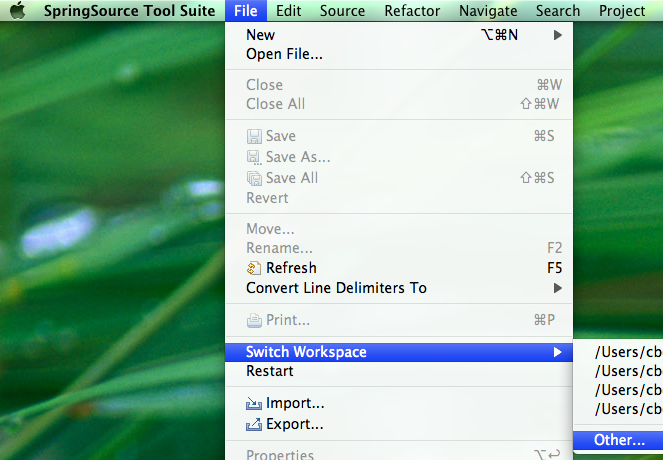
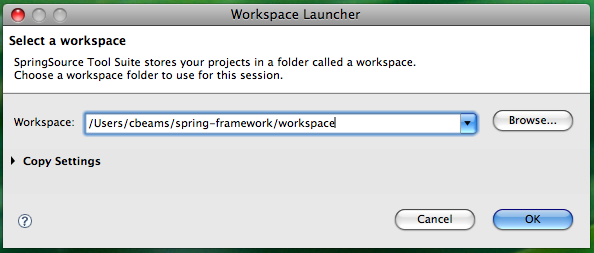
Go File > Switch Workspace > Other …

Specify a new location for your Spring 3 workspace. You may choose any directory; as you can see below, I've chosen to create a 'workspace' directory right within my spring checkout, just for convenience.
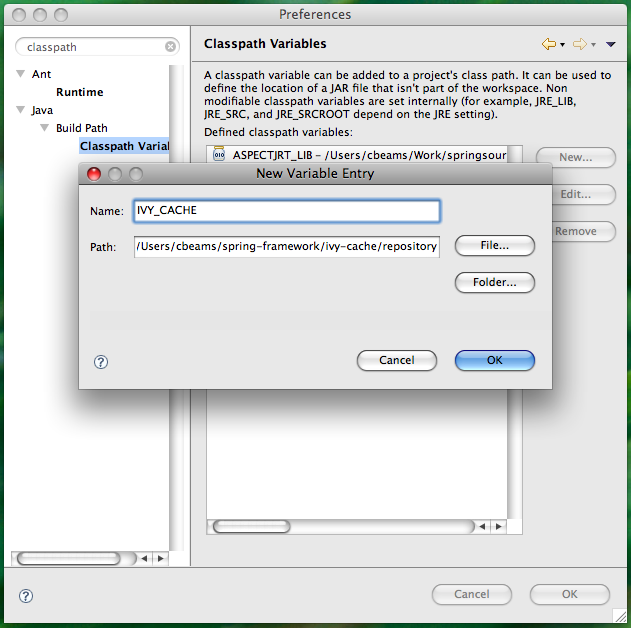
Step 4: Create the IVY_CACHE classpath variable
In this step, we'll create a classpath variable in Eclipse that the various Spring 3 projects will use to determine the location of the jars they depend on. As we noticed earlier when watching the Ant build progress, Ivy is downloading a number of jars – those jars are being downloaded into the ivy-cache/repository directory under the root of your Spring checkout.
Open the global Preferences dialog

Type 'classpath' to narrow the list of menu items and choose 'Classpath Variables'
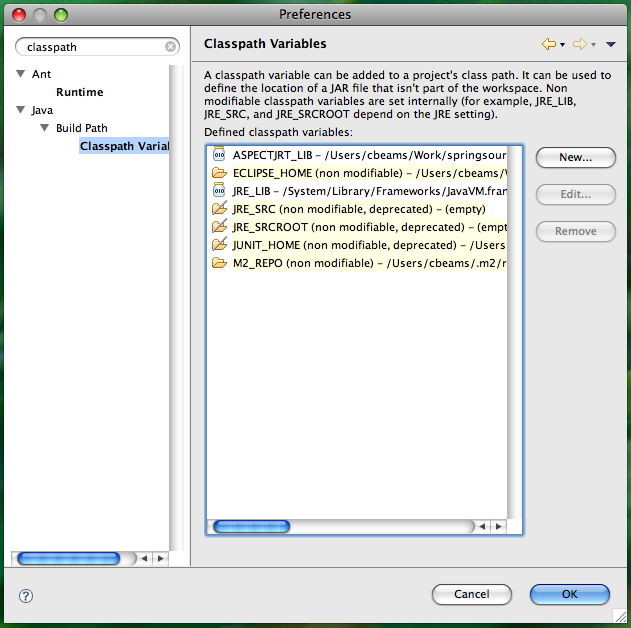
Click 'New' to create a new classpath variable, and type in the following values
Name: IVY_CACHE
Path: [your-checkout-root]/ivy-cache/repository
Step 5: Set the workspace default JRE to Java 6
As mentioned above, Spring 3 requires Java 6 to build. The easiest way to ensure this dependency is handled is to simply set the default JRE for your Eclipse workspace to Java 6. If this is already the case for your Eclipse installation, you may of course skip this step.
Once again, open the global Preferences dialog. This time, type in "installed JRE" to narrow down the options.
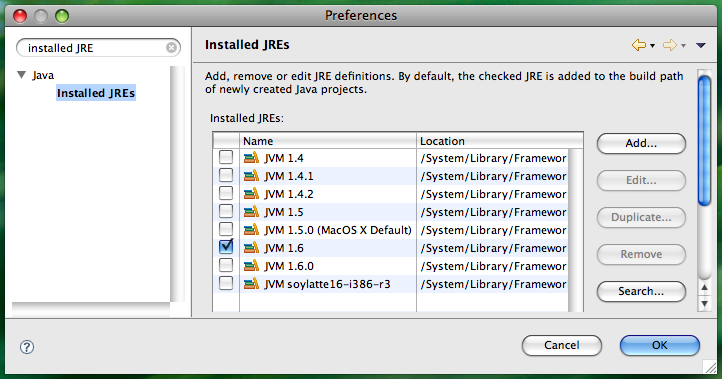
Make sure that a 1.6 JVM is selected. If there is no 1.6 JVM listed in your Installed JREs, click 'Add…' and point Eclipse to the location of Java 6 on your system.
Step 6: Import sources into Eclipse
We're almost ready to import Spring sources; first let's make sure the build is complete. Look back at the window in which you started the build. It may still be progressing; if so, wait until it completes. When it finishes you should see the following:

Remember, your time will vary depending on your connection speed. Don't be surprised if the initial build takes a while!
When the build is complete, import the projects into Eclipse:
Go File > Import and type in "existing" to narrow the options
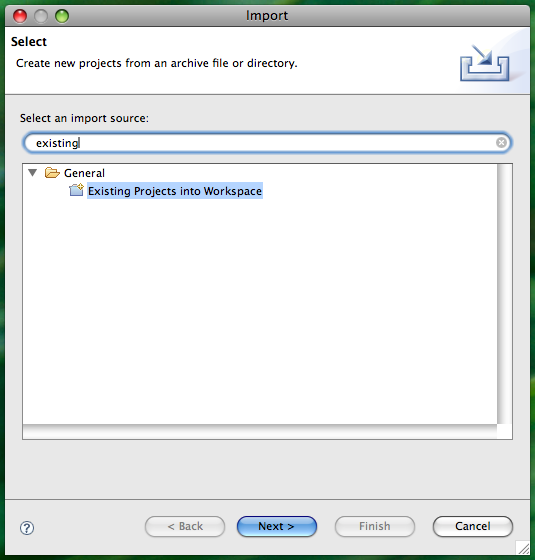
Choose "Existing Projects into Workspace". A file selection dialog will appear. Choose the root directory of your Spring 3 checkout. Eclipse will recurse through the directory and detect the .project files for each of the Spring 3 projects. When finished, you should see the following dialog:
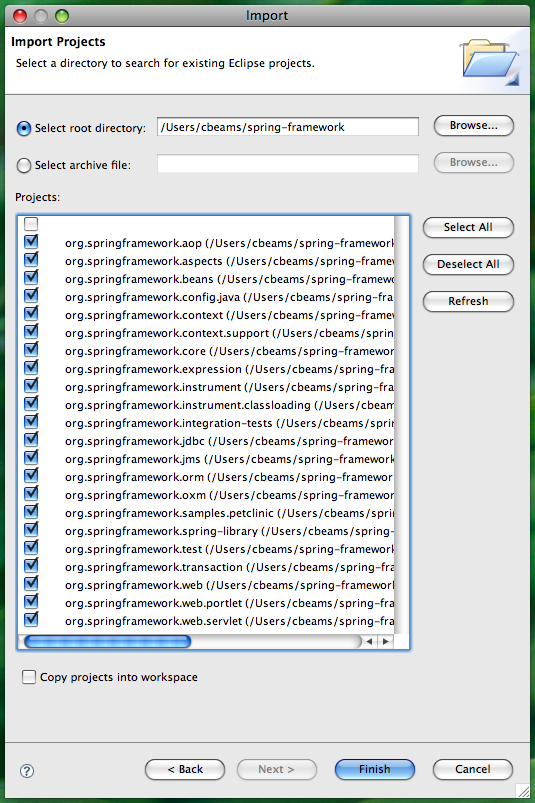
Uncheck the first, unlabeled checkbox and click Finish.
Wait while Eclipse imports the projects. When complete, you should see your Package Explorer populated as below, with 22 projects and no errors.
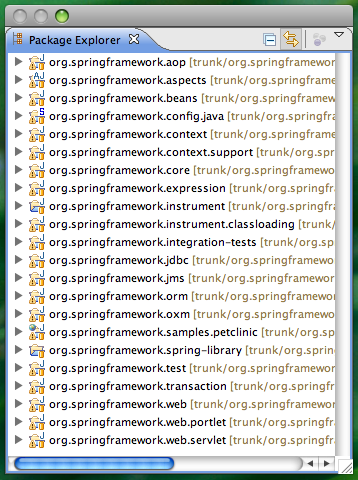
That's it! You've now got the Spring 3 sources at your fingertips and you can browse and edit at will. Have fun!
Following Spring 3 development
The best way to stay in touch with Spring development is to follow the subversion commits via RSS using SpringSource's Fisheye service.
Go to https://fisheye.springsource.org/browse/spring-framework/trunk, and click the RSS icon in the upper right.
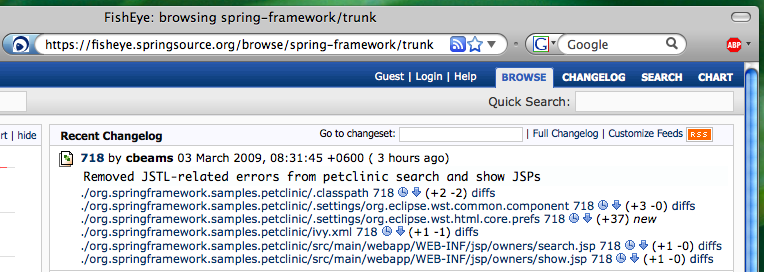
Note that you can subscribe to any node within the Spring source tree. So if there's a particular module or even individual package that you care about, you can receive notifications at any granularity you choose.
For quick reference, the RSS feed URL to follow all Spring 3 commits is https://fisheye.springsource.org/changelog/~rss/spring-framework/trunk/rss.xml. Add that to your feed reader and you're good to go.
Providing feedback on Spring 3
As the milestones progress and we get closer to Spring 3.0 GA, your feedback is ever more important. Should you find a bug or have an improvement request for an existing feature, please take a moment to visit http://jira.springsource.org and create a new issue against the Spring Framework project.
If possible, please attach a simple JUnit test case that reproduces any bug. In the absence of that, please provide detailed reproduction steps.
Also, when reporting bugs or improvements, please don't hesitate to take a shot at implementing the change yourself and attaching a patch file. We love getting contributions from the community!
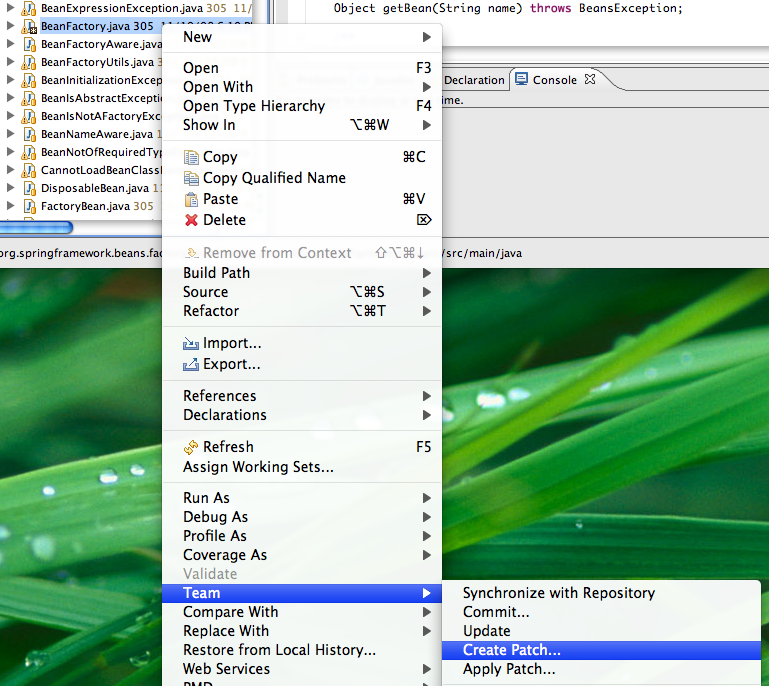
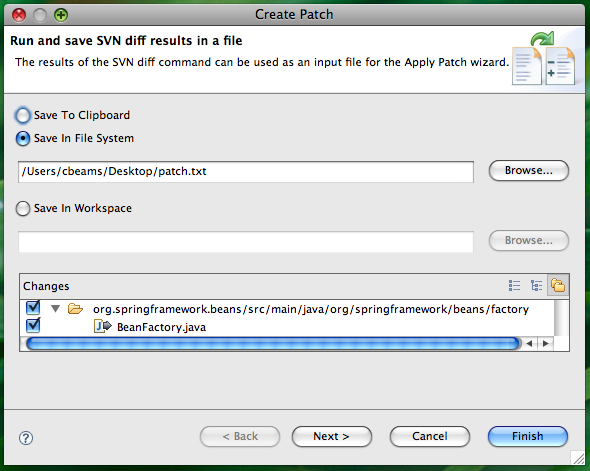
If you're using the Subclipse Subversion plugin for Eclipse, it's quite easy to generate patch files:
From the context menu in the package explorer, go Team > Create Patch…

In the Create Patch dialog, choose 'Save In File System' and specify a file
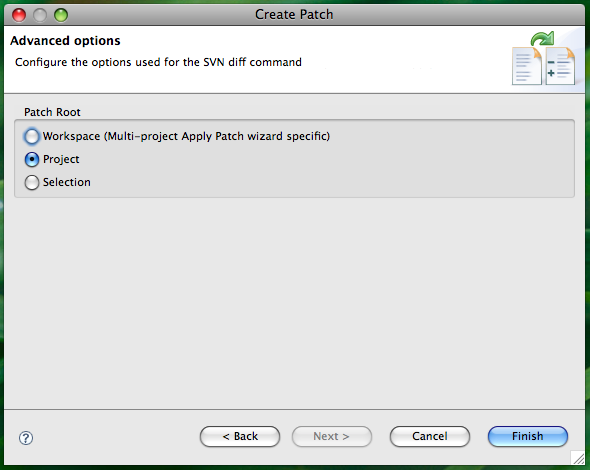
Click Next for advanced options and choose 'Project' as the patch root.
Then attach the resulting patch file to your JIRA issue. You can rest assured that issues with patches have a natural kind of precedence
Using locally built Spring 3 binaries in a Maven environment
As a final note, Maven users will want to know how to most effectively install their locally built Spring 3 binaries into their local Maven repository.
From the root of your Spring checkout directory, or from within any individual module, you can use the 'install-maven-central' target to automate copying artifacts from target/ to your local m2 repository.
cbeams@kaizen:~/spring-framework/org.springframework.core>$ ant install-maven-central
Buildfile: build.xml
[... snipped ...]
install-maven-central:
[maven:install] [INFO] Installing /Users/cbeams/spring-framework/org.springframework.core/target/artifacts/org.springframework.core.jar to /Users/cbeams/.m2/repository/org/springframework/org.springframework.core/3.0.0.BUILD-20090302225538/org.springframework.core-3.0.0.BUILD-20090302225538.jar
[maven:install] [INFO] Installing /Users/cbeams/spring-framework/org.springframework.core/target/artifacts/org.springframework.core-sources.jar to /Users/cbeams/.m2/repository/org/springframework/org.springframework.core/3.0.0.BUILD-20090302225538/org.springframework.core-3.0.0.BUILD-20090302225538-sources.jar
BUILD SUCCESSFUL
Total time: 4 seconds
You can combine the 'test' and 'install-maven-central' targets to achieve functionality roughly equivalent to 'mvn install':
cbeams@kaizen:~/spring-framework/org.springframework.core>$ ant test install-maven-central
Note: 'install-maven-central' assumes that your local repository is in the default location of $HOME/.m2/repository
Summary
I hope you've enjoyed this walk through the world of Spring 3 development, and I think you'll find that after the one-time setup detailed above it's easy to develop against Spring 3 sources. We encourage you to follow development and stay in touch with us via JIRA. Your feedback is and always has been the lifeblood of Spring, and we thank you for it. Keep it coming!
Similar Posts
- Debugging DSLD Scripts
- Spring Integration 1.0.3 Samples: just add Maven
- Spring Integration in 10 minutes
- Custom Project Templates in SpringSource Tool Suite
- Maven Artifacts


Kjetil Ødegaard says:
Added on March 3rd, 2009 at 5:05 amThanks for the update!
By the way, the Fisheye URLs give a certificate error since the certificate is only valid for the 'fisheye.springframework.org' hostname.
Grzegorz Borkowski says:
Added on March 3rd, 2009 at 6:11 amChris, I have a question about building Spring 3 with Maven. I've checked out the trunk sources, and I see that in submodules there are pom.xml files. So I would like to build it with Maven. But I wasn't able to find any parent pom file, to build it all at once. Then I tried to build one of submodules: cd org.springframework.core, mvn install – and I got error "Unable to download artifact org.springframework:org.springframework.parent:pom:3.0-M1-SNAPSHOT"
So there is some parent pom, but looks like it is not included in trunk sources?
BTW, more general question: some time ago I remember there was information about plans of porting Spring to be build with Maven 2: see e.g. this post: http://blog.springsource.com/2006/09/15/yes-i-know-its-now-the-most-voted-for-issue-in-the-jira/
Now it looks like it was dropped, and there is something called "Spring build", with not much information about it around, what actually it is. You say it is Ant Ivy, but what's more above it? And what was the reasons for switching back to Ant and dropping plans of Maven migration?
I don't like to start another discussion Ant vs Maven here, I would simply like to find some arguments behind Spring decision. Personally, I hate Maven for its many bugs, design flaws, stupid decisions, unhelpful exception etc. Maven is far far far away from being perfect build tool – but having experience with Ant and Maven, I still believe Maven is better choice than Ant for Java projects that don't have completely non-standard build process. (For example: I see Eclipse project files stored on SVN, so I can simply import it into Eclipse IDE. But if I want to use other IDE, say NetBeans, it's not that easy; if spring was build with Maven, I could open it and build easily from any IDE: Eclipse, Netbeans etc. I did it for SpringSecurity, which is based on Maven, and it actually worked perfectly: I was able to build it with ease both from Eclipse and Netbeans). So I'm always interested in finding the reasons for the decision of going with Ant against Maven, especially in case of such projects/companies like SpringSource, which seems to already have good experience with Maven, on the example of SpringSecurity and probably other subprojects too.
Dirk Dinger says:
Added on March 3rd, 2009 at 11:09 amFor me it would also be very interesting to know, what the reason was to build with Ivy now.
I would like to give the 3.0M2 version a try and change the spring dependencies within my pom.xml. Are the 3.0M2 arfiacts accessible from some maven repository ?
Chris Beams (blog author) says:
Added on March 3rd, 2009 at 12:45 pm@Kjetil – Regarding the certificate error, thanks. For the time being, I've changed the Fisheye links back to http://fisheye.springframework.org – they should work fine now.
@Grzegorz – Regarding maven POM files, good question. The presence of a POM file in each module root is misleading, I know. These are not intended to allow users to build with Maven. Rather, they contain just the dependency metadata necessary to allow transitive resolution to occur when we publish Spring artifacts to Maven repositories.
@Gregorz, @Dirk – Regarding the choice of Ivy over Maven, stay tuned. There were some compelling reasons, but I'll let the decision makers weigh in with their comments.
@Dirk – The good news is that M2 binaries are available via Maven within the SpringSource Enterprise Bundle Repository (a Maven2 compliant repo). You can follow the instructions I posted in a comment on the M1 announcement from December. Of course, you'll need to replace references to '3.0.0.M1' with '3.0.0.M2' throughout.
Nick says:
Added on March 3rd, 2009 at 2:18 pmI second Grzegorz. To me the reasoning behind the Ant/Ivy/Maven choice made by the Spring team would be more interesting than Eclipse configuration details.
ifnu says:
Added on March 5th, 2009 at 5:04 amStill using terminal? you may use iTerm fo better terminal in Mac
and yes ivy rocks
Brian DeHamer says:
Added on March 5th, 2009 at 12:49 pmI'm using the M2 binaries from the SpringSource Enterprise Bundle Repository and am a bit confused by some of the dependencies listed in the pom.xml files. For example, why does the core library have a dependency on "com.springsource.org.apache.commons.logging-1.1.1.jar"? I assume that this is just the plain ol' commons logging library, but why the Spring-specific artifact name? This is causing some problems when building my projects since I have other dependencies that include commons logging (with the more traditional artifact name) and I end-up with duplication JARs in the final build.
Oleg Zhurakousky (blog author) says:
Added on March 5th, 2009 at 5:51 pm@Brian
It is the same Commons Logging that you are using with one exception. We've modified the binary to include the OSGi MANIFEST headers so it could be used in OSGi environment. Outside of OSGi you can safely treat it as if you downloaded from ASF site.
Here is more info:
http://www.springsource.com/repository/app/faq#q11
Dan Revel says:
Added on March 9th, 2009 at 2:23 pmThanks for the helpful guide!
Using jdk1.6.0_10 and ant-1.7.1 to run the ant build in step 2 (build-spring-framework) I got:
BUILD FAILED
/home/dan/spring-3.0/spring-framework/spring-build/multi-bundle/artifact.xml:45: The following error occurred while executing this line:
/home/dan/spring-3.0/spring-framework/spring-build/multi-bundle/common.xml:71: The following error occurred while executing this line:
/home/dan/spring-3.0/spring-framework/spring-build/common/common.xml:81: java.lang.OutOfMemoryError: PermGen space
I resolved this issue by increasing the Permanent Generation size used by ant:
export ANT_OPTS="-XX:PermSize=128m -XX:MaxPermSize=128m"
Tareq says:
Added on March 11th, 2009 at 8:25 amHi,
I get to build Spring correctly with ant but when I import the projects, eclipse complains about jars not found under IVY_CACHE (commons dbcp, xmlUnit and several others). Am I supposed to copy those manually (sounds weird) or am I missing something?
Chris Beams says:
Added on March 12th, 2009 at 8:17 pm@Tareq,
I'm up-to-date with the latest sources and working against a clean IVY_CACHE and I don't see any such issues.
What project is complaining?
Check to see that you have $CHECKOUT_ROOT/ivy-cache/repository/org.custommonkey.xmlunit/com.springsource.org.custommonkey.xmlunit/1.2.0/com.springsource.org.custommonkey.xmlunit-1.2.0.jar
If you don't, then rebuild from the command line, minimally with `ant jar`. This will ensure that any missing deps are downloaded by ivy.
Colin Sampaleanu (blog author) says:
Added on March 12th, 2009 at 10:21 pmOne other thing to keep in mind is that this is a real, live, working codebase, and as shocking as it may sound,
, it's always possible for something to be accidentally broken. Right now (Mar 12, 8pm PDT) for example, the Eclipse project metadata for the org.springframework.orm project is slightly out of date w/regards to some openjpa and hibernate jars that got upgraded in the ivy definitions already, so importing that project would result in breakage.
For anybody that wants to practice with this build outside of head, as opposed to checking out of svn, you can also download the Spring 3.0 M2 release tarball and build that version, under the "projects" directory.
Colin
Chris Beams says:
Added on March 12th, 2009 at 10:24 pmDitto on Colin's comment above, and note that if you want to build something that is certain to adhere to my instructions above, you could simply change the svn checkout URL to https://src.springframework.org/svn/spring-framework/tags/spring-framework-3.0.0.M2 instead of /trunk.
Harv says:
Added on March 25th, 2009 at 1:00 pm[junit] Testsuite: org.springframework.aop.aspectj.autoproxy.AspectJAutoProxyCreatorTests
[junit] Tests run: 17, Failures: 1, Errors: 0, Time elapsed: 27.41 sec
[junit]
[junit] ————- Standard Output —————
[junit] 1943
[junit] 2283
[junit] 4426
[junit] ————- —————- —————
[junit] Testcase: testAspectsAndAdvisorNotAppliedToManySingletonsIsFastEnough(org.springframework.aop.aspectj.autoproxy.AspectJA
utoProxyCreatorTests): FAILED
[junit] Singleton creation took too long: 4426
[junit] junit.framework.AssertionFailedError: Singleton creation took too long: 4426
[junit] at org.springframework.aop.aspectj.autoproxy.AspectJAutoProxyCreatorTests.testAspectsAndAdvisorNotAppliedToManySingl
etonsIsFastEnough(AspectJAutoProxyCreatorTests.java:162)
[junit]
[junit]
[subant] Leaving directory: C:\spring-framework-3.0.0.M2\projects\org.springframework.context
Can someone help me resolve this issue
BUILD FAILED
C:\spring-framework-3.0.0.M2\projects\spring-build\multi-bundle\quality.xml:23: The following error occurred while executing this li
ne:
C:\spring-framework-3.0.0.M2\projects\spring-build\multi-bundle\common.xml:71: The following error occurred while executing this lin
e:
C:\spring-framework-3.0.0.M2\projects\spring-build\common\quality.xml:36: The following error occurred while executing this line:
C:\spring-framework-3.0.0.M2\projects\spring-build\common\quality.xml:190: Tests failed
Chris Beams says:
Added on March 25th, 2009 at 10:35 pm@Harv,
Certain tests in the Spring test suite are performance tests and fail if they don't finish within a particular number of milliseconds. Most of these tests, like the one that failed for you, have methods that end with '…IsFastEnough()'.
Seeing these tests fail doesn't mean that you've done anything wrong per se, but just that your machine wasn't able to run the tests as fast as our development machines and build server do.
You have a couple of options:
1) build the source without running the tests (ant jar)
2) shut down everything on your machine that's consuming significant CPU and try again
3) @Ignore the '…IsFastEnough' tests.
If you're interested in (3), you can use this bash script to add JUnit @Ignore annotations to those methods (assumes you're on a *nix platform):
$SPR_ROOT>$ find . -name *.java | xargs grep -l test.*FastEnough | xargs -Ifile sed -i. 's/public void/@org.junit.Ignore public void/' file
Steve says:
Added on May 5th, 2009 at 12:07 pmI got build failed on Mac (Leopard 10.5.6)
Java version "1.6.0_07" (Mac Officail Java Update 2)
Apache Ant version 1.7.1 (installed from port)
…
[s:javac] 897. ERROR in /Users/yang/work/spring3/spring-framework/org.springframework.core/src/main/java/org/springframework/util/xml/XMLEventStreamReader.java (at line 213)
[s:javac] private Attribute getAttribute(int index) {
[s:javac] ^^^^^^^^^
[s:javac] Attribute cannot be resolved to a type
[s:javac] ———-
[s:javac] 898. ERROR in /Users/yang/work/spring3/spring-framework/org.springframework.core/src/main/java/org/springframework/util/xml/XMLEventStreamReader.java (at line 231)
[s:javac] private Namespace getNamespace(int index) {
[s:javac] ^^^^^^^^^
[s:javac] Namespace cannot be resolved to a type
[s:javac] ———-
[s:javac] 898 problems (441 errors, 457 warnings)
[subant] Leaving directory: /Users/yang/work/spring3/spring-framework/org.springframework.core
BUILD FAILED
/Users/yang/work/spring3/spring-framework/spring-build/multi-bundle/artifact.xml:45: The following error occurred while executing this line:
/Users/yang/work/spring3/spring-framework/spring-build/multi-bundle/common.xml:71: The following error occurred while executing this line:
/Users/yang/work/spring3/spring-framework/spring-build/common/artifact.xml:28: The following error occurred while executing this line:
/Users/yang/work/spring3/spring-framework/spring-build/common/common.xml:142: The following error occurred while executing this line:
/Users/yang/work/spring3/spring-framework/spring-build/standard/common.xml:14: Compile failed; see the compiler error output for details.
Total time: 4 minutes 27 seconds
Keith Donald says:
Added on May 9th, 2009 at 9:42 amSteve,
On Leopard, make sure you switch your default JVM to Java 6 by going to Applications -> Utilities -> Java Preferences, then restart your terminal shell.
Keith
Stevo Slavic says:
Added on May 10th, 2009 at 4:18 amThanks for detailed info on how to build Spring 3. My initial build failed with OutOfMemoryError. Any recommended ANT_OPTS values?
Chris Beams (blog author) says:
Added on May 11th, 2009 at 12:18 am@Stevo:
cbeams@kaizen:~>$ cat .bashrc | grep ant
alias ant="ANT_OPTS='-XX:MaxPermSize=1024m -Xmx1024m' ant -Dtest.vm.args='-XX:MaxPermSize=512m -Xmx1024m' -Dcompiler.args='-enableJavadoc -warn:none'"
Joerg Bellmann says:
Added on May 12th, 2009 at 6:18 amHi all,
i have problems to build the framework. I googled around but did not find a solution. Whenever i tried to build the framework i got the following output:
joerg@belloStoneOne:~/DEVELOPMENT/WORK/SPRING/spring-framework-3.0.0.M3/build-spring-framework$ ant
…
…
…
BUILD FAILED
/home/joerg/DEVELOPMENT/WORK/SPRING/spring-framework-3.0.0.M3/spring-build/multi-bundle/artifact.xml:45: The following error occurred while executing this line:
/home/joerg/DEVELOPMENT/WORK/SPRING/spring-framework-3.0.0.M3/spring-build/multi-bundle/common.xml:71: The following error occurred while executing this line:
/home/joerg/DEVELOPMENT/WORK/SPRING/spring-framework-3.0.0.M3/spring-build/common/common.xml:87: impossible to configure ivy:settings with given file: /home/joerg/DEVELOPMENT/WORK/SPRING/spring-framework-3.0.0.M3/spring-build/common/ivysettings.xml : java.text.ParseException: failed to load settings from file:/home/joerg/DEVELOPMENT/WORK/SPRING/spring-framework-3.0.0.M3/spring-build/common/ivysettings.xml: impossible to define new type: class not found: org.springframework.aws.ivy.S3Resolver in [] nor Ivy classloader
I found some entries in the spring-forum that the problem can be a ivy.jar in $ANT_HOME/lib but i am sure, my ANT is ivy-free.
I have only "java" and "ant" in required versions in my path:
joerg@belloStoneOne:~/DEVELOPMENT/WORK/SPRING/spring-framework-3.0.0.M3/build-spring-framework$ echo $PATH
/usr/lib/jvm/java-6-sun-1.6.0.13/bin:/home/joerg/DEVELOPMENT/JAVA/apache-ant-1.7.1/bin:/usr/local/sbin:/usr/local/bin:/usr/sbin:/usr/bin:/sbin:/bin:/usr/games
What did i wrong?
Colin Sampaleanu (blog author) says:
Added on May 13th, 2009 at 11:20 amJoerg,
If you are sure your …/ant/lib dir does not have an old version of Ivy in it, also look inside your ~/.ant/lib directory. I started getting the same build issue actually, and something had actually placed an older version of Ivy there. When I removed the Ivy jar under that home location, the build worked fine.
Colin
Joerg Bellmann says:
Added on May 14th, 2009 at 4:26 amThank you Colin,
that was the problem. I found an ivy.jar in ~/.ant/lib. After removing it the build runs as expected. Don't know who placed it there.
Thank you again.
MfG
Jörg
Stevo Slavic says:
Added on May 14th, 2009 at 9:53 amThanks Chris for the ANT tips!
When I try "ant publish-maven-local" in an environment where mirror of central (a nexus repo manager instance) is configured in maven settings.xml, build error occurs (see [1]). After checking mirror of central repo, I've found only aws 1.2.2 pom file there, and not the jar. When I explicitly (via web browser) requested aws 1.2.2 jar on mirror of central repo it downloaded one from central as expected. If I comment out mirror in my settings.xml, error disappears and build is successful. With no mirror of central defined build downloads not only aws 1.2.2 pom but jar too to local repository, and of course every next build, with or without mirror of central defined, is successful.
It seems like request to "[maven:install-provider] Downloading: org/springframework/aws/spring-aws-maven/1.2.2/spring-aws-maven-1.2.2.jar from central" actually requested something else than what was logged, or the request didn't make it to the mirror of central repo. With aws 1.2.2 jar in mirror of central mirror (after that manual request via browser), I've deleted aws 1.2.2 pom and jar from local repository, and tried build again with mirror of central defined in settings.xml – build broke with same error, it couldn't find the aws 1.2.2 jar.
Maven 2.1.0 is installed on the system.
[1] Spring framework "ant publish-maven-local" build error
[CODE]
[maven:install-provider] Downloading: org/springframework/aws/spring-aws-maven/1
.2.2/spring-aws-maven-1.2.2.pom from central
[maven:install-provider] Downloading: org/springframework/aws/spring-aws-maven/1
.2.2/spring-aws-maven-1.2.2.jar from central
[maven:install-provider] An error has occurred while processing the Maven artifa
ct tasks.
[maven:install-provider] Diagnosis:
[maven:install-provider]
[maven:install-provider] Error downloading wagon provider from the remote reposi
tory: Missing:
[maven:install-provider] ———-
[maven:install-provider] 1) org.springframework.aws:spring-aws-maven:jar:1.2.2
[maven:install-provider]
[maven:install-provider] Try downloading the file manually from the project we
bsite.
[maven:install-provider]
[maven:install-provider] Then, install it using the command:
[maven:install-provider] mvn install:install-file -DgroupId=org.springfram
ework.aws -DartifactId=spring-aws-maven -Dversion=1.2.2 -Dpackaging=jar -Dfile=/
path/to/file
[maven:install-provider]
[maven:install-provider] Alternatively, if you host your own repository you ca
n deploy the file there:
[maven:install-provider] mvn deploy:deploy-file -DgroupId=org.springframew
ork.aws -DartifactId=spring-aws-maven -Dversion=1.2.2 -Dpackaging=jar -Dfile=/pa
th/to/file -Durl=[url] -DrepositoryId=[id]
[maven:install-provider]
[maven:install-provider] Path to dependency:
[maven:install-provider] 1) unspecified:unspecified:jar:0.0
[maven:install-provider] 2) org.springframework.aws:spring-aws-maven:jar:
1.2.2
[maven:install-provider]
[maven:install-provider] ———-
[maven:install-provider] 1 required artifact is missing.
[maven:install-provider]
[maven:install-provider] for artifact:
[maven:install-provider] unspecified:unspecified:jar:0.0
[maven:install-provider]
[maven:install-provider] from the specified remote repositories:
[maven:install-provider] central (https://nexus.foor.com/content/groups/foo-pu
blic)
[maven:install-provider]
[maven:install-provider]
[subant] Leaving directory: D:\work\java\workspaces\oss\spring\spring-framewo
rk\org.springframework.instrument
BUILD FAILED
D:\work\java\workspaces\oss\spring\spring-framework\spring-build\multi-bundle\pu
blish.xml:24: The following error occurred while executing this line:
D:\work\java\workspaces\oss\spring\spring-framework\spring-build\multi-bundle\co
mmon.xml:71: The following error occurred while executing this line:
D:\work\java\workspaces\oss\spring\spring-framework\spring-build\common\publish.
xml:57: Error downloading wagon provider from the remote repository: Missing:
———-
1) org.springframework.aws:spring-aws-maven:jar:1.2.2
Try downloading the file manually from the project website.
Then, install it using the command:
mvn install:install-file -DgroupId=org.springframework.aws -DartifactId=sp
ring-aws-maven -Dversion=1.2.2 -Dpackaging=jar -Dfile=/path/to/file
Alternatively, if you host your own repository you can deploy the file there:
mvn deploy:deploy-file -DgroupId=org.springframework.aws -DartifactId=spri
ng-aws-maven -Dversion=1.2.2 -Dpackaging=jar -Dfile=/path/to/file -Durl=[url] -D
repositoryId=[id]
Path to dependency:
1) unspecified:unspecified:jar:0.0
2) org.springframework.aws:spring-aws-maven:jar:1.2.2
———-
1 required artifact is missing.
for artifact:
unspecified:unspecified:jar:0.0
from the specified remote repositories:
central (https://nexus.foo.com/content/groups/foo-public)
[/CODE]
Adam Bell says:
Added on May 21st, 2009 at 7:05 amCould someone please help – I've been trying to integrate the Spring 3 build into my own maven build so I can use the new libraries.
What is the repository entry and dependency that I require – I've tried many ways – and this is not without trying -just becoming incredibly frustrated.
Adam Bell says:
Added on May 21st, 2009 at 7:40 amMAVEN download from the repository decides that the pom file is invalid.
Bamboo is unable to build using ant from the above reference.
And a direct ant call in the build directory runs out of permgen space.
I've been working with Spring for about 3 years now – and have never had this problem.
Adam Bell says:
Added on May 21st, 2009 at 8:07 am[s:javac] 10. WARNING in /trunk/org.springframework.core/src/main/java/org/springframework/core/BridgeMethodResolver.java (at line 203)
[s:javac] private static Method searchForMatch(Class type, Method bridgeMethod) {
[s:javac] ^^^^^
[s:javac] Class is a raw type. References to generic type Class should be parameterized
[s:javac] ———-
[s:javac] ———-
[s:javac] 11. ERROR in /trunk/org.springframework.core/src/main/java/org/springframework/core/CollectionFactory.java (at line 29)
[s:javac] import java.util.NavigableMap;
[s:javac] ^^^^^^^^^^^^^^^^^^^^^^
[s:javac] The import java.util.NavigableMap cannot be resolved
[s:javac] ———-
[s:javac] 12. ERROR in /trunk/org.springframework.core/src/main/java/org/springframework/core/CollectionFactory.java (at line 30)
[s:javac] import java.util.NavigableSet;
[s:javac] ^^^^^^^^^^^^^^^^^^^^^^
[s:javac] The import java.util.NavigableSet cannot be resolved
[s:javac] ———-
[s:javac] 13. WARNING in /trunk/org.springframework.core/src/main/java/org/springframework/core/CollectionFactory.java (at line 56)
[s:javac] private static final Set approximableCollectionTypes = new HashSet(10);
[s:javac] ^^^^^
[s:javac] Class is a raw type. References to generic type Class should be parameterized
[s:javac] ———-
[s:javac] 14. WARNING in /trunk/org.springframework.core/src/main/java/org/springframework/core/CollectionFactory.java (at line 56)
[s:javac] private static final Set approximableCollectionTypes = new HashSet(10);
[s:javac] ^^^^^
[s:javac] Class is a raw type. References to generic ty
Kamesh says:
Added on May 22nd, 2009 at 1:40 pm@Steve: Could you resolve the issue?
@Keith Donald: I am getting the same errors as Steve above.
[s:javac] private Namespace getNamespace(int index) {
[s:javac] ^^^^^^^^^
[s:javac] Namespace cannot be resolved to a type
[s:javac] ———-
[s:javac] 898 problems (441 errors, 457 warnings)
[subant] Leaving directory: /Developer/spring-framework-3-0/spring-framework-3.0.0.M3/org.springframework.core
BUILD FAILED
I tried the resolution you said but it doesn't work for me.
Any suggestions…anybody?
Thanks in advance..!
Kamesh says:
Added on May 23rd, 2009 at 12:34 amHi,
I had an additional JAVA_5_HOME in my PATH. Removed it and restarted the Terminal. Started the build and it moved ahead of the step it was causing errors at previously. This may compile now. Waiting for it finish building.
Thanks anyways
Kamesh says:
Added on May 23rd, 2009 at 1:01 pmcompile.init:
test.init:
test.do:
[mkdir] Created dir: /Developer/Spring3/trunk/org.springframework.integration-tests/target/test-classes
[s:javac] Compiling 18 source files to /Developer/Spring3/trunk/org.springframework.integration-tests/target/test-classes
[copy] Copying 3 files to /Developer/Spring3/trunk/org.springframework.integration-tests/target/test-classes
[copy] Copying 4 files to /Developer/Spring3/trunk/org.springframework.integration-tests/target/test-classes
[copy] Copied 4 empty directories to 1 empty directory under /Developer/Spring3/trunk/org.springframework.integration-tests/target/test-classes
[junit] Testsuite: org.springframework.aop.config.AopNamespaceHandlerScopeIntegrationTests
[junit] Tests run: 3, Failures: 0, Errors: 0, Time elapsed: 2.198 sec
[junit]
[junit] Testsuite: org.springframework.aop.framework.autoproxy.AdvisorAutoProxyCreatorIntegrationTests
[junit] Tests run: 8, Failures: 0, Errors: 0, Time elapsed: 0.707 sec
[junit]
[junit] Testsuite: org.springframework.context.annotation.ClassPathBeanDefinitionScannerScopeIntegrationTests
[junit] Tests run: 9, Failures: 0, Errors: 0, Time elapsed: 1.473 sec
[junit]
[junit] Testsuite: org.springframework.context.annotation.ltw.ComponentScanningWithLTWTests
[junit] Tests run: 1, Failures: 0, Errors: 0, Time elapsed: 0.749 sec
[junit]
[subant] Leaving directory: /Developer/Spring3/trunk/org.springframework.integration-tests
test.post:
[mkdir] Created dir: /Developer/Spring3/trunk/build-spring-framework/target/test-results/html
BUILD FAILED
/Developer/Spring3/trunk/spring-build/multi-bundle/quality.xml:30: java.lang.OutOfMemoryError: Java heap space
————————————————————————————————————–
This is happening for the latest code I checked out from trunk and trying to compile.
I incresed the JAVa heap and ANt heap too, but still could not get rid of this…
Kamesh says:
Added on May 23rd, 2009 at 9:44 pmfinally,
BUILD SUCCESSFUL.
Thanks everybody.
I have set all the required VM Options in my ANT_OPTS environment variable.
I compiled the latest source code on Mac OS X with Java 1.6.07 and Ant 1.7
Carlos Z says:
Added on June 3rd, 2009 at 2:54 pmChris, could explain how Ivy resolves the dependencies for the spring build, and how new dependencies are added/removed from the project.
I see Ivy is using S3, to store spring dependencies, is there a way to navigate then and see what's there already?
Thanks,
Carlos
Steve says:
Added on June 9th, 2009 at 7:51 ammaven-publish-local seems to miss several artificats. Afterwards my repo contains
org.springframework.aop
org.springframework.asm
org.springframework.aspects
org.springframework.beans
org.springframework.context
org.springframework.core
org.springframework.expression
org.springframework.instrument
org.springframework.instrument.classloading
org.springframework.jdbc
org.springframework.jms
org.springframework.oxm
org.springframework.transaction
org.springframework.web
but no web.servlet, web.portlet, orm etc
Graham Zabel says:
Added on June 24th, 2009 at 4:56 amAny news on RC1?
Phil says:
Added on July 2nd, 2009 at 4:35 amI find this way too much hassle, Chris. The installation procedure is way too complicated, and troublesome to maintain. After all, I don't want to add the Spring Jars to my SVN repository, which I would have to do if I followed your suggestions.
Why can't you just mavenize the whole thing? As long as Spring 3 isn't final, you could provide a dedicated Maven repository.
Chris Beams (blog author) says:
Added on July 6th, 2009 at 12:23 pm@Phil,
Sorry if there was confusion here. This post was intended to be instructions for those who actually wish to build Spring from source. If you simply want to compile against Spring 3.0M3, it is available via Maven. Just add the following to your pom:
<repositories>
<repository>
<id>com.springsource.repository.bundles.snapshot</id>
<name>SpringSource Enterprise Bundle Repository - SpringSource Bundle Snapshots</name>
<url>http://repository.springsource.com/maven/bundles/snapshot</url>
</repository>
<repository>
<id>com.springsource.repository.bundles.milestone</id>
<name>SpringSource Enterprise Bundle Repository - SpringSource Bundle Milestones</name>
<url>http://repository.springsource.com/maven/bundles/milestone</url>
</repository>
<repository>
<id>com.springsource.repository.bundles.release</id>
<name>SpringSource Enterprise Bundle Repository - SpringSource Bundle Releases</name>
<url>http://repository.springsource.com/maven/bundles/release</url>
</repository>
<repository>
<id>com.springsource.repository.bundles.external</id>
<name>SpringSource Enterprise Bundle Repository - External Bundle Releases</name>
<url>http://repository.springsource.com/maven/bundles/external</url>
</repository>
</repositories>
…
<dependency>
<groupId>org.springframework</groupId>
<artifactId>org.springframework.web.servlet</artifactId>
<version>3.0.0.BUILD-SNAPSHOT</version>
</dependency>
<dependency>
<groupId>org.springframework</groupId>
<artifactId>org.springframework.orm</artifactId>
<version>3.0.0.BUILD-SNAPSHOT</version>
</dependency>
<dependency>
<groupId>org.springframework</groupId>
<artifactId>org.springframework.test</artifactId>
<version>3.0.0.BUILD-SNAPSHOT</version>
</dependency>
<dependency>
<groupId>org.springframework</groupId>
<artifactId>org.springframework.context.support</artifactId>
<version>3.0.0.BUILD-SNAPSHOT</version>
</dependency>
<!-- and whatever other spring jars you need -->
As you can see, I've used the 3.0.0.BUILD-SNAPSHOT artifact here in order to grab the latest nightly build. If you want M3, just change that to 3.0.0.M3.
In order to see which artifacts are available, use S3Browse to explore our maven repo: http://s3browse.com/explore/repository.springsource.com/maven/bundles/
Tony Murphy says:
Added on July 9th, 2009 at 11:01 amtried http://repository.springsource.com/maven/bundles/milestone but got error
NoSuchKeyThe specified key does not exist.maven75FF1E2F1228FF523aGpuyEFq96RVii279MgcCA7aGzvPgOHA8N4moQGRzSwsA1cjsC7Cqc5Ed9mGoUO
now using
spring-milestone
Spring Portfolio Milestone Repository
http://s3.amazonaws.com/maven.springframework.org/milestone
Phil says:
Added on July 9th, 2009 at 2:24 pmThanks Chris, your POM snippets work, although HTTP repo browsing does not.
I'm trying to download the Spring-agent Jar via
org.springframework
org.springframework.agent
3.0.0.M3
but this fails, why?
Debasish says:
Added on July 24th, 2009 at 5:46 amHi All,
I am having the following issue.
Env: Win XP Prof., Java6
BUILD FAILED
D:\spring-framework\spring-build\multi-bundle\artifact.xml:45: The following error occurred while executing this line:
D:\spring-framework\spring-build\multi-bundle\common.xml:71: The following error occurred while executing this line:
D:\spring-framework\spring-build\common\artifact.xml:40: impossible to publish artifacts for org.springframework#org.springframework.instrument.classloading;working@A4MD09853: java.io.FileNotFoundException: D:\spring-framework\org.springframework.instrument.classloading\..\integration-repo\org.springframework\org.springframework
.instrument.classloading\3.0.0.BUILD-20090724104114.part \ org.springframework.instrument. classloading-3.0.0.BUILD-20090724104114.jar (The filename, directory name, or
volume label syntax is incorrect)
Thanks,
Debasish
Matt Benson says:
Added on August 28th, 2009 at 10:05 amFYI I got the wrong Ivy lib problem with having a newer Ivy version installed: actually a build of the latest 2.1.0 prerelease code. I haven't dug in to see whether this can be addressed.
Nikhil says:
Added on September 2nd, 2009 at 3:02 pmI am getting the following error resulting in BUILD FAILED
Env: STS, Ant 1.7, Win Vista Prof
[junit] Testsuite: org.springframework.beans.factory.config.PropertyPathFact
oryBeanTests
[junit] Tests run: 4, Failures: 0, Errors: 0, Time elapsed: 0.06 sec
[junit]
[junit] Testsuite: org.springframework.beans.factory.config.PropertyResource
ConfigurerTests
[junit] Tests run: 30, Failures: 0, Errors: 3, Time elapsed: 1.64 sec
[junit]
[junit] ————- Standard Error —————–
[junit] 3 Sep, 2009 1:20:10 AM java.util.prefs.WindowsPreferences openKey
[junit] WARNING: Could not open windows registry node Software\JavaSoft\Pref
s at root 0×80000002. Windows RegOpenKey(…) returned error code 5.
[junit] 3 Sep, 2009 1:20:11 AM java.util.prefs.WindowsPreferences
[junit] WARNING: Could not create windows registry node Software\JavaSoft\Pr
efs\my/System/Path at root 0×80000002. Windows RegCreateKeyEx(…) returned erro
r code 5.
[junit] 3 Sep, 2009 1:20:11 AM java.util.prefs.WindowsPreferences WindowsReg
OpenKey1
[junit] WARNING: Trying to recreate Windows registry node Software\JavaSoft\
Prefs\my/System/Path at root 0×80000002.
[junit] 3 Sep, 2009 1:20:11 AM java.util.prefs.WindowsPreferences openKey
[junit] WARNING: Could not open windows registry node Software\JavaSoft\Pref
s\my/System/Path at root 0×80000002. Windows RegOpenKey(…) returned error code
2.
[junit] 3 Sep, 2009 1:20:11 AM java.util.prefs.WindowsPreferences WindowsReg
OpenKey1
[junit] WARNING: Trying to recreate Windows registry node Software\JavaSoft\
Prefs\my/System/Path at root 0×80000002.
[junit] 3 Sep, 2009 1:20:11 AM java.util.prefs.WindowsPreferences openKey
[junit] WARNING: Could not open windows registry node Software\JavaSoft\Pref
s\my/System/Path at root 0×80000002. Windows RegOpenKey(…) returned error code
2.
[junit] 3 Sep, 2009 1:20:11 AM java.util.prefs.WindowsPreferences WindowsReg
OpenKey1
[junit] WARNING: Trying to recreate Windows registry node Software\JavaSoft\
Prefs\my/System/Path at root 0×80000002.
[junit] 3 Sep, 2009 1:20:11 AM java.util.prefs.WindowsPreferences openKey
[junit] WARNING: Could not open windows registry node Software\JavaSoft\Pref
s\my/System/Path at root 0×80000002. Windows RegOpenKey(…) returned error code
2.
[junit] 3 Sep, 2009 1:20:11 AM java.util.prefs.WindowsPreferences WindowsReg
OpenKey1
[junit] WARNING: Trying to recreate Windows registry node Software\JavaSoft\
Prefs\my/System/Path at root 0×80000002.
[junit] 3 Sep, 2009 1:20:11 AM java.util.prefs.WindowsPreferences openKey
[junit] WARNING: Could not open windows registry node Software\JavaSoft\Pref
s\my/System/Path at root 0×80000002. Windows RegOpenKey(…) returned error code
2.
[junit] 3 Sep, 2009 1:20:11 AM java.util.prefs.WindowsPreferences WindowsReg
OpenKey1
[junit] WARNING: Trying to recreate Windows registry node Software\JavaSoft\
Prefs\my/System/Path\mypath at root 0×80000002.
[junit] 3 Sep, 2009 1:20:11 AM java.util.prefs.WindowsPreferences openKey
[junit] WARNING: Could not open windows registry node Software\JavaSoft\Pref
s\my/System/Path\mypath at root 0×80000002. Windows RegOpenKey(…) returned err
or code 2.
[junit] 3 Sep, 2009 1:20:11 AM java.util.prefs.WindowsPreferences WindowsReg
OpenKey1
[junit] WARNING: Trying to recreate Windows registry node Software\JavaSoft\
Prefs\my/System/Path at root 0×80000002.
[junit] 3 Sep, 2009 1:20:11 AM java.util.prefs.WindowsPreferences openKey
[junit] WARNING: Could not open windows registry node Software\JavaSoft\Pref
s\my/System/Path at root 0×80000002. Windows RegOpenKey(…) returned error code
2.
[junit] 3 Sep, 2009 1:20:11 AM java.util.prefs.WindowsPreferences WindowsReg
OpenKey1
[junit] WARNING: Trying to recreate Windows registry node Software\JavaSoft\
Prefs\my/System/Path\myotherpath at root 0×80000002.
[junit] 3 Sep, 2009 1:20:11 AM java.util.prefs.WindowsPreferences openKey
[junit] WARNING: Could not open windows registry node Software\JavaSoft\Pref
s\my/System/Path\myotherpath at root 0×80000002. Windows RegOpenKey(…) returne
d error code 2.
[junit] 3 Sep, 2009 1:20:11 AM java.util.prefs.WindowsPreferences WindowsReg
OpenKey1
[junit] WARNING: Trying to recreate Windows registry node Software\JavaSoft\
Prefs\my/System/Path\mypath at root 0×80000002.
[junit] 3 Sep, 2009 1:20:11 AM java.util.prefs.WindowsPreferences openKey
[junit] WARNING: Could not open windows registry node Software\JavaSoft\Pref
s\my/System/Path\mypath at root 0×80000002. Windows RegOpenKey(…) returned err
or code 2.
[junit] ————- —————- —————
[junit] Testcase: testPreferencesPlaceholderConfigurer(org.springframework.b
eans.factory.config.PropertyResourceConfigurerTests): Caused an ERROR
[junit] Could not open windows registry node Software\JavaSoft\Prefs at root
0×80000002: Access denied
[junit] java.lang.SecurityException: Could not open windows registry node So
ftware\JavaSoft\Prefs at root 0×80000002: Access denied
[junit] at java.util.prefs.WindowsPreferences.openKey(WindowsPreferences
.java:496)
[junit] at java.util.prefs.WindowsPreferences.openKey(WindowsPreferences
.java:463)
[junit] at java.util.prefs.WindowsPreferences.openKey(WindowsPreferences
.java:449)
[junit] at java.util.prefs.WindowsPreferences.putSpi(WindowsPreferences.
java:595)
[junit] at java.util.prefs.AbstractPreferences.put(AbstractPreferences.j
ava:234)
[junit] at org.springframework.beans.factory.config.PropertyResourceConf
igurerTests.testPreferencesPlaceholderConfigurer(PropertyResourceConfigurerTests
.java:700)
[junit]
[junit]
[junit] Testcase: testPreferencesPlaceholderConfigurerWithCustomTreePaths(or
g.springframework.beans.factory.config.PropertyResourceConfigurerTests):
Caused an ERROR
[junit] Invalid bean definition with name 'tb' defined in null: Could not re
solve placeholder 'myName'
[junit] org.springframework.beans.factory.BeanDefinitionStoreException: Inva
lid bean definition with name 'tb' defined in null: Could not resolve placeholde
r 'myName'
[junit] at org.springframework.beans.factory.config.PropertyPlaceholderC
onfigurer.processProperties(PropertyPlaceholderConfigurer.java:269)
[junit] at org.springframework.beans.factory.config.PropertyResourceConf
igurer.postProcessBeanFactory(PropertyResourceConfigurer.java:75)
[junit] at org.springframework.beans.factory.config.PropertyResourceConf
igurerTests.testPreferencesPlaceholderConfigurerWithCustomTreePaths(PropertyReso
urceConfigurerTests.java:734)
[junit]
[junit]
[junit] Testcase: testPreferencesPlaceholderConfigurerWithPathInPlaceholder(
org.springframework.beans.factory.config.PropertyResourceConfigurerTests):
Caused an ERROR
[junit] Invalid bean definition with name 'tb' defined in null: Could not re
solve placeholder 'mypath/myName'
[junit] org.springframework.beans.factory.BeanDefinitionStoreException: Inva
lid bean definition with name 'tb' defined in null: Could not resolve placeholde
r 'mypath/myName'
[junit] at org.springframework.beans.factory.config.PropertyPlaceholderC
onfigurer.processProperties(PropertyPlaceholderConfigurer.java:269)
[junit] at org.springframework.beans.factory.config.PropertyResourceConf
igurer.postProcessBeanFactory(PropertyResourceConfigurer.java:75)
[junit] at org.springframework.beans.factory.config.PropertyResourceConf
igurerTests.testPreferencesPlaceholderConfigurerWithPathInPlaceholder(PropertyRe
sourceConfigurerTests.java:764)
[junit]
[junit]
[subant] Leaving directory: C:\JavaWork\springsource\spring-framework\org.spr
ingframework.beans
BUILD FAILED
C:\JavaWork\springsource\spring-framework\spring-build\multi-bundle\quality.xml:
23: The following error occurred while executing this line:
C:\JavaWork\springsource\spring-framework\spring-build\multi-bundle\common.xml:7
1: The following error occurred while executing this line:
C:\JavaWork\springsource\spring-framework\spring-build\common\quality.xml:36: Th
e following error occurred while executing this line:
C:\JavaWork\springsource\spring-framework\spring-build\common\quality.xml:194: T
ests failed
Total time: 5 minutes 10 seconds
Any Idea, what's happening?
Thanks,
Nikhil
Nikhil says:
Added on September 3rd, 2009 at 2:44 amIssue Fixed:- I turned off the User Access Control on my Vista OS and the Build was successful.
After importing the projects just had some minor build path issues, with IVY varibales pointing to non-existing jars [due to version mismatch], which i solved by pointing to the right jars from the IVY repository. If I remember correctly, those were the groovy, ehcache, jstl, junit jars
Thanks,
Nikhil
Graham Zabel says:
Added on September 10th, 2009 at 4:22 amWhat's happening with Spring 3? Everything has gone very quiet. We've been using the Milestone 3 release in our dev project since May, waiting for an official release, or even an RC. Can someone supply some timelines or plans for Spring 3?
thanks,
Graham
Amitava Shee says:
Added on October 7th, 2009 at 9:18 amIn case others are having problems building spring from source in macosx leopard (10.5.8) – (see Steve's post above in this thread)
[s:javac] 897. ERROR in /Users/yang/work/spring3/spring-framework/org.springframework.core/src/main/java/org/springframework/util/xml/XMLEventStreamReader.java (at line 213)
[s:javac] private Attribute getAttribute(int index) {
[s:javac] ^^^^^^^^^
[s:javac] Attribute cannot be resolved to a type
Settting JAVA_HOME explicitly resolves the problem. See below
export JAVA_HOME=/System/Library/Frameworks/JavaVM.framework/Versions/1.6/Home
I ran into PermGen issue as noted above and as suggested by Chris Beams above, used the following
alias ant="ANT_OPTS='-XX:MaxPermSize=1024m -Xmx1024m' ant -Dtest.vm.args='-XX:MaxPermSize=512m -Xmx1024m' -Dcompiler.args='-enableJavadoc -warn:none'"
Eric J. Van der Velden says:
Added on October 17th, 2009 at 1:55 amHi,
I did
$ svn co https://src.springsource.org/svn/spring-framework/tags/spring-framework-3.0.0.RC1 spring-framework
$ pwd
…/spring-framework/build-spring-framework
$ ant
I got
…/spring-framework/spring-build/common/common.xml:91: java.lang.OutOfMemoryError: PermGen space
What should I do?
Thanks.
Chris Beams says:
Added on October 17th, 2009 at 1:57 amHi Eric,
Search through the comments above, and you'll find a number of places where folks mention setting ANT_OPTS to solve this problem.
Regards,
- Chris
Eric J. Van der Velden says:
Added on October 17th, 2009 at 7:31 amHi Chris,
It works, thanks. Now I have another problem. I have done okay
ANT_OPTS="…" ant publish-maven-local
Now I want to use this to run Graig Wall's hello world. So I did
$ vi pom.xml
3.0.0.RC1
org.springframework
org.springframework.core
${spring.version}
compile
…
Now I do
$ mvn install
Missing:
———-
1) org.apache.commons:com.springsource.org.apache.commons.logging:jar:1.1.1
Where does this com.springsource comes from?
And how do I know which dependencies from spring I have to add?
I hope it is not too long. Thanks.
Chris Beams (blog author) says:
Added on October 17th, 2009 at 5:22 pmEric,
If you're simply looking to compile against the latest in Spring 3, please keep in mind you can just grab the binaries from Maven; there is no need to actually build the sources yourself.
Just add the following to your pom.xml:
<dependency>
<groupId>org.springframework</groupId>
<artifactId>org.springframework.context</artifactId>
<version>3.0.0.BUILD-SNAPSHOT</version>
</dependency>
...
<repositories>
<repository>
<id>com.springsource.repository.bundles.snapshot</id>
<name>SpringSource Enterprise Bundle Repository - SpringSource Snapshot Releases</name>
<url>http://repository.springsource.com/maven/bundles/snapshot</url>
</repository>
<repository>
<id>com.springsource.repository.bundles.milestone</id>
<name>SpringSource Enterprise Bundle Repository - SpringSource Milestone Releases</name>
<url>http://repository.springsource.com/maven/bundles/milestone</url>
</repository>
<repository>
<id>com.springsource.repository.bundles.external</id>
<name>SpringSource Enterprise Bundle Repository - External Releases</name>
<url>http://repository.springsource.com/maven/bundles/external</url>
</repository>
</repositories>
Eric J. Van der Velden says:
Added on October 18th, 2009 at 12:44 pmHi Chris,
Thanks again, it works. The mistake I had made was that I didn't had included the three repositories. Because when I did
$ mvn publish-maven-local
in ~/.m2/repository there appeared the pom file org.springframework.core-3.0.0.RC1.pom with a dependency with artifactId com.springsource.org.apache.commons.logging .
I thought this was wrong because of com.springsource namespace, but it is okay. Now I can start studying spring by going through the source code with a debugger.
fangzx says:
Added on October 23rd, 2009 at 9:16 pmBUILD FAILED!
I builded from trunk spring source:
test.do:
[mkdir] Created dir: D:\nextdoc\java\spring-framework_trunk\org.springframew
ork.core\target\test-classes
[s:javac] Compiling 84 source files to D:\nextdoc\java\spring-framework_trunk\
org.springframework.core\target\test-classes
[copy] Copying 4 files to D:\nextdoc\java\spring-framework_trunk\org.spring
framework.core\target\test-classes
[junit] Error occurred during initialization of VM
[junit] Could not create the Java virtual machine.
[junit] Could not reserve enough space for object heap
[subant] Leaving directory: D:\nextdoc\java\spring-framework_trunk\org.spring
framework.core
BUILD FAILED
jtreg says:
Added on November 11th, 2009 at 11:50 amHi, its all built with ant successfully but I still get some errors following the import into Eclipse. I did get more errors before I did 'clean' in Eclipse. Now I get 35 errors they appear to be missing some jars , here is the first one for example:
Description Resource Path Location Type
Project 'org.springframework.integration-tests' is missing required library: '/home/james/springdevelop/spring-framework/ivy-cache/repository/org.apache.openjpa/com.springsource.org.apache.openjpa.java5/1.0.2/com.springsource.org.apache.openjpa.java5-1.0.2.jar' org.springframework.integration-tests Build path Build Path Problem
anyone?
Qunhuan Mei says:
Added on December 15th, 2009 at 7:36 amMy machine: Win XP Pro. Java6. Ant 1.7. 2G Memory (with about 1.5 G available at run time)
Hi, I hit the following error when building STS from the trunk:
artefact.xml:45: …
common.xml:71:…
java.lang.OutOfMemoryError: PermGen space
Total time: 27 minutes …
I guess this is because the memory for PermGen specified in build.properties file is too small:
javadoc.max.memory=256M
test.vm.args=-Xmx1024M -XX:MaxPermSize=512M -XX: HeapDumpOnOutOfMemoryError
therefore I increased MaxPermSize from 512M to 1024, 1536, 2048, 4096 respectively, but each ends with the same error.
I also tried reducing the other memory size when I increase the MaxPermSize, such as this:
javadoc.max.memory=128M
test.vm.args=-Xmx256M -XX:MaxPermSize=4096M -XX: HeapDumpOnOutOfMemoryError
But still ends with exactly the same problem
I was wondering if anyone has successfully built the STS from source trunk under windows XP with 2G memory.
Could anyone suggest any clue or give any tip on my problem please?
Chris Beams says:
Added on December 15th, 2009 at 1:24 pm@Qunhuan – make sure you've set ANT_OPTS properly to increase the VM size. See http://blog.springsource.com/2009/03/03/building-spring-3/#comment-165987
Qunhuan Mei says:
Added on December 17th, 2009 at 10:42 amHi Chris,
Thank you so much for your help!
After some more tries, I eventually see this “BUILD SUCCESSFUL” on my Windows XP machine.
Here is the setting I used (My machine has 2G memory with 1.5G available at run-time):
1. Environmental variable (set for PermSize):
ANT_OPTS=-XX:MaxPermSize=256m -Xmx512m
2. Changed 2 memory related lines from build.properties file to increase the memory heap for test vm:
javadoc.max.memory=128M
test.vm.args=-Xmx768M -XX:MaxPermSize=512M -XX: HeapDumpOnOutOfMemoryError
Then after 45minutes of building and testing. I saw the following:
“BUILD SUCCESSFUL”
hantsy says:
Added on December 22nd, 2009 at 8:25 amBuild failed for 3.0.0 RELEASE.
BUILD FAILED
/home/hantsy/Source/spring-framework/spring-build/multi-bundle/artifact.xml:45: The following error occurred while executing this line:
/home/hantsy/Source/spring-framework/spring-build/multi-bundle/common.xml:71: The following error occurred while executing this line:
/home/hantsy/Source/spring-framework/spring-build/common/common.xml:91: impossible to configure ivy:settings with given file: /home/hantsy/Source/spring-framework/spring-build/common/ivysettings.xml : java.text.ParseException: failed to load settings from file:/home/hantsy/Source/spring-framework/spring-build/common/ivysettings.xml: impossible to define new type: class not found: org.springframework.aws.ivy.S3Resolver in [] nor Ivy classloader
Total time: 4 seconds
Jin Chun says:
Added on January 6th, 2010 at 7:50 pm@Qunhuan: thanks for posting your solution, did the trick for me
cheers!
Yang Gu says:
Added on January 14th, 2010 at 10:10 amIt's crazy, the maven2 build system was not support again within spring 3 and current can't build with maven2. I remember maven2 work good with the initial version of spring3. It take me so long time to build spring3 with ant and finally I have to cancel it. If I may, I strong suggest provide maven2 support for the spring build system.
Harish says:
Added on February 10th, 2010 at 5:49 pmI was able to build using ant in 22 minutes on Mac OS X Snow Leopard (10.6.2). I received OutOfMemory errors initially. I resolved it using the below command.
alias ant="ANT_OPTS='-XX:MaxPermSize=1024m -Xmx1024m' ant -Dtest.vm.args='-XX:MaxPermSize=512m -Xmx1024m' -Dcompiler.args='-enableJavadoc -warn:none'"
Bob Lauer says:
Added on March 3rd, 2010 at 2:41 am… I have just downloaded the source release, and it seems that the bootstrap ant script that builds the whole source tree is not bundled with that release. Do I have to check out Spring from Subversion in order to build it? Or is there a "shortcut" to build all the ivy packages in the source release?
Cheers,
Robert.
Chris Beams (blog author) says:
Added on March 3rd, 2010 at 9:13 amHi Bob,
Just so we're on the same page, what exactly did you download? From where?
Checking out from svn will certainly work, but you should be able to build the source dist, too. Let me know, thanks.
Bob Lauer says:
Added on March 3rd, 2010 at 9:21 am@Chris: I downloaded the "… with-dependencies" package from
http://www.springsource.com/download/community?project=Spring Framework
(on some page that I cannot find right now it said that the "… with-dependencies" should contain the source code and everything you need).
Chris Beams (blog author) says:
Added on March 3rd, 2010 at 1:22 pmBob,
Sorry for the confusion. Starting with Spring 3.0, there is no longer a complete 'with source and dependencies' distribution. There is simply the core zip file containing all Spring jars, and then the '-dependencies' zip containing all third-party dependencies. Thus, no ant buildfiles, etc. If you'd like to build the release from source, simply follow the instructions above, substituting the repository url with https://src.springframework.org/svn/spring-framework/tags/spring-framework-3.0.1.RELEASE-A
Evgeny says:
Added on March 30th, 2010 at 6:13 pm@Chris Beams:
I got BUILD FAILED
BUILD FAILED
C:\apache\spring\projects\spring-build\multi-bundle\artifact.xml:45: The following error occurred while executing this line:
C:\apache\spring\projects\spring-build\multi-bundle\common.xml:71: The following error occurred while executing this line:
C:\apache\spring\projects\spring-build\common\artifact.xml:42: impossible to publish artifacts for org.springframework#org.springframework.instrument.tomcat;working@dell2006: java.io.FileNotFoundException: C:\apache\spring\projects\org.springframework.instrument.tomcat\..\integration-repo\org.springframework\org.springframework.instrument.tomcat\3.0.1.BUILD-20100330225932.part\org.springframework.
instrument.tomcat-sources-3.0.1.BUILD-20100330225932.jar
Env: WinXP, Java6. SPRING FRAMEWORK 3.0.1 (February 2010)
Could you help?
Thank you.
panyuwu says:
Added on April 10th, 2010 at 10:05 amIt's crazy,I was able to build using ant in 22 minutes on win 7 ,..
bundlor:
Bundlor Warnings:
: The import of package org.springframework.model.alert does not sp
ecify a version.
: The import of package org.springframework.model.alert.support doe
s not specify a version.
: The import of package org.springframework.model.ui does not speci
fy a version.
[subant] Leaving directory: D:\data\down\dapan\spring\branches\binding\org.sp
ringframework.web.servlet
BUILD FAILED
D:\data\down\dapan\spring\branches\binding\spring-build\multi-bundle\artifact.xm
l:45: The following error occurred while executing this line:
D:\data\down\dapan\spring\branches\binding\spring-build\multi-bundle\common.xml:
71: The following error occurred while executing this line:
D:\data\down\dapan\spring\branches\binding\spring-build\common\artifact.xml:38:
The following error occurred while executing this line:
D:\data\down\dapan\spring\branches\binding\spring-build\common\artifact.xml:79:
Bundle transformer returned warnings. Please fix manifest template at 'D:\data\
down\dapan\spring\branches\binding\org.springframework.web.servlet/template.mf'
and try again.
Could you help?
Thank you.
Despot says:
Added on April 18th, 2010 at 11:06 amHi Chris,
After compiling classes and testing for a long time got BUILD FAILED:
[junit] Tests run: 15, Failures: 1, Errors: 0, Time elapsed: 1,25 sec
[junit]
[junit] Testcase: fixedDelayFirstExecution(org.springframework.scheduling.su
pport.PeriodicTriggerTests): FAILED
[junit] difference exceeds threshold: 109
[junit] junit.framework.AssertionFailedError: difference exceeds threshold: 109
[junit] at org.springframework.scheduling.support.PeriodicTriggerTests.a
ssertNegligibleDifference(PeriodicTriggerTests.java:211)
[junit] at org.springframework.scheduling.support.PeriodicTriggerTests.f
ixedDelayFirstExecution(PeriodicTriggerTests.java:42)
[junit]
[junit]
[subant] Leaving directory: F:\DEVELOPMENT\spring-framework\org.springframework.context
BUILD FAILED
F:\DEVELOPMENT\spring-framework\spring-build\multi-bundle\quality.xml:28
: The following error occurred while executing this line:
F:\DEVELOPMENT\spring-framework\spring-build\multi-bundle\common.xml:71:
The following error occurred while executing this line:
F:\DEVELOPMENT\spring-framework\spring-build\common\quality.xml:53: The
following error occurred while executing this line:
F:\DEVELOPMENT\spring-framework\spring-build\common\quality.xml:223: Tes
ts failed
Total time: 163 minutes 12 seconds
______________________________________________________________________
I ran into the previous problems with the space, but I fixed those. I was trying to find something on the net for this one (junit.framework.AssertionFailedError: difference exceeds threshold: 109), but no luck. So hopefully someone has some info on this issue.
I was doing the build on Windows XP 1GB Ram and I checked the latest from trunk which I think was Spring 3.0.3.
Thanks for the instructions,
Despot
lsk says:
Added on May 12th, 2010 at 1:18 amhi Chris:
I built spring3 SUCCESSFUL.
and when I import all projects into Eclipse , i got some errors like this:
Project 'org.springframework.integration-tests' is missing required library: 'D:\projects\spring\spring-3.0.2.RELEASE\ivy-cache\repository\com.sun.enterprise\com.springsource.com.sun.enterprise.loader\1.0.0\com.springsource.com.sun.enterprise.loader-1.0.0.jar'
Project 'org.springframework.integration-tests' is missing required library: 'D:\projects\spring\spring-3.0.2.RELEASE\ivy-cache\repository\org.apache.commons\com.springsource.org.apache.commons.pool\1.4.0\com.springsource.org.apache.commons.pool-1.4.0.jar'
Project 'org.springframework.orm' is missing required library: 'D:\projects\spring\spring-3.0.2.RELEASE\ivy-cache\repository\org.aspectj\com.springsource.org.aspectj.weaver\1.6.5.RELEASE\com.springsource.org.aspectj.weaver-1.6.5.RELEASE.jar'
can you help ?
Sergio says:
Added on May 18th, 2010 at 2:02 amsvn: Your .svn/tmp directory may be missing or corrupt; run 'svn cleanup' and try again
svn: Can't open file 'spring-framework\org.springframework.test\src\test\java\org\springframework\test\context\configura
tion\.svn\tmp\text-base\ContextConfigurationWithPropertiesExtendingPropertiesAndInheritedLoaderTests.java.svn-base': The
system cannot find the path specified.
jacky.leng says:
Added on August 29th, 2010 at 8:18 pmAt first,I had got the same error with "common.xml:91: java.lang.OutOfMemoryError: PermGen space",then i successed to fix it with poster's comments: "set ANT_OPTS=-XX:MaxPermSize=128m -Xmx256m",(windows platform) it can run now, but it seems test failed, error information below:
[junit] Tests run: 7, Failures: 0, Errors: 0, Time elapsed: 0.015 sec
[junit]
[junit] Testsuite: org.springframework.web.servlet.resource.ResourceHttpRequestHandlerTests
[junit] Tests run: 12, Failures: 1, Errors: 0, Time elapsed: 0.016 sec
[junit]
[junit] Testcase: modified(org.springframework.web.servlet.resource.ResourceHttpRequestHandlerTe
sts): FAILED
[junit] expected: but was:
[junit] junit.framework.AssertionFailedError: expected: but was:
[junit] at org.springframework.web.servlet.resource.ResourceHttpRequestHandlerTests.modified
(ResourceHttpRequestHandlerTests.java:141)
[junit]
[junit]
[subant] Leaving directory: D:\dev-area\projects\spring-framework\org.springframework.web.servlet
BUILD FAILED
D:\dev-area\projects\spring-framework\spring-build\multi-bundle\quality.xml:43: The following error
occurred while executing this line:
D:\dev-area\projects\spring-framework\spring-build\multi-bundle\common.xml:86: The following error o
ccurred while executing this line:
D:\dev-area\projects\spring-framework\spring-build\common\quality.xml:68: The following error occurr
ed while executing this line:
D:\dev-area\projects\spring-framework\spring-build\common\quality.xml:238: Tests failed
Total time: 5 minutes 29 seconds
anybody knows? thanks!
jacky.leng says:
Added on August 29th, 2010 at 8:25 pmfollow up
ps. springframework GA 3.0.4 and 3.0.5 RC.
Nabeel Ali Memon says:
Added on November 22nd, 2010 at 1:54 pmI checked out trunk from the svn repo and found that the entire "spring-build" folder is missing. Thus my build fails. Has anyone else noticed this too?
Nabeel Ali Memon says:
Added on November 24th, 2010 at 6:45 amOk that was an issue due to svn:externals and i was using git-svn so… I had to checkout svn repo too and then symlinked spring-build folder from svn copy to git-svn copy.
Thanks to Chris (@cbeams on twitter).
E H says:
Added on November 26th, 2010 at 5:29 amIs there an ant command to skip all the tests? Running the tests is taking a long time in my computer, and I just want to skip the tests overall.
Chris Beams (blog author) says:
Added on November 29th, 2010 at 3:09 amYou can simply run `ant jar` if you only wish to build and package. Tests will not be run. Also, `ant install-maven` will install those jars into your local .m2 cache.
Peter Fu says:
Added on January 4th, 2011 at 4:18 pmI'm making a build using the source code attached in spring-framework-3.0.5.RELEASE. But get a failure message as below.
[junit] Testsuite: org.springframework.jmx.access.RemoteMBeanClientIntercept
orTests
[junit] Tests run: 1, Failures: 0, Errors: 1, Time elapsed: 0,011 sec
[junit]
[junit] Testcase: testProxyClassIsDifferent(org.springframework.jmx.access.R
emoteMBeanClientInterceptorTests): Caused an ERROR
[junit] Unsupported protocol: jmxmp
[junit] java.net.MalformedURLException: Unsupported protocol: jmxmp
[junit] at javax.management.remote.JMXConnectorServerFactory.newJMXConne
ctorServer(JMXConnectorServerFactory.java:323)
[junit] at org.springframework.jmx.access.RemoteMBeanClientInterceptorTe
sts.onSetUp(RemoteMBeanClientInterceptorTests.java:45)
[junit] at org.springframework.jmx.AbstractMBeanServerTests.setUp(Abstra
ctMBeanServerTests.java:40)
[junit]
[junit]
[subant] Leaving directory: D:\springsource\spring-framework-3.0.5.RELEASE\pr
ojects\org.springframework.context
BUILD FAILED
D:\springsource\spring-framework-3.0.5.RELEASE\projects\spring-build\multi-bundl
e\quality.xml:43: The following error occurred while executing this line:
D:\springsource\spring-framework-3.0.5.RELEASE\projects\spring-build\multi-bundl
e\common.xml:86: The following error occurred while executing this line:
D:\springsource\spring-framework-3.0.5.RELEASE\projects\spring-build\common\qual
ity.xml:68: The following error occurred while executing this line:
D:\springsource\spring-framework-3.0.5.RELEASE\projects\spring-build\common\qual
ity.xml:238: Tests failed
Total time: 3 minutes 49 seconds
Environment:
Windows 7 Home Premium
JDK 1.6.0_23 (x64)
Ant 1.8.2
ANT_OPTS=-Xms512m -Xmx1024m -XX:PermSize=256m -XX:MaxPermSize=256m
Hoping get some hope on come over this error.
Thanks,
Peter
Razi says:
Added on January 10th, 2011 at 5:43 pmI have a question regarding an error that I am receiving building the source tree checked out by the following command:
svn co -r HEAD https://src.springframework.org/svn/spring-framework/trunk spring-framework
Build Project failed on module org.springframework.core
Error (More than 80 errors from org.springframework.core referencing org.springframework.asm
1st error message:
1. ERROR in /home/razi/Development/spring-framework/org.springframework.core/src/main/java/org/springframework/core/LocalVariableTableParameterNameDiscoverer.java (at line 31)
[s:javac] import org.springframework.asm.ClassReader;
Please be gentle this is my first attempt at building spring…
Diego Martins says:
Added on February 4th, 2011 at 8:40 amI had a problem building spring. I couldn't download anything of spring repository using the ant build (that uses ivy and jets3t) because I'm behind a http proxy.
The solution was update the jets3t properties file and change the configuration for proxy based on this document: http://jets3t.s3.amazonaws.com/toolkit/configuration.html#jets3t
The configuration file for this is at {spring-framework-trunk}/spring-build/lib/ivy/jets3t.properties.
My final archive is:
# Copyright 2010 SpringSource
#
# Licensed under the Apache License, Version 2.0 (the "License");
# you may not use this file except in compliance with the License.
# You may obtain a copy of the License at
#
# http://www.apache.org/licenses/LICENSE-2.0
#
# Unless required by applicable law or agreed to in writing, software
# distributed under the License is distributed on an "AS IS" BASIS,
# WITHOUT WARRANTIES OR CONDITIONS OF ANY KIND, either express or implied.
# See the License for the specific language governing permissions and
# limitations under the License.
## JetS3t Configuration Properties
# A full description of all configuration properties can be found at
# http://jets3t.s3.amazonaws.com/toolkit/configuration.html
# Proxy configuration
httpclient.proxy-autodetect=false
httpclient.proxy-host=yourproxy.something
httpclient.proxy-port=theproxyport
httpclient.proxy-user=theproxyusername (if necessary)
httpclient.proxy-password=theproxypassword (if necessary)
#httpclient.proxy-domain=
At last, remember to set the httpclient.proxy-autodetect to 'false', because the defaults is 'true' and when 'true', ignores the rest of the configuration.
Cheers.
Diego Martins says:
Added on February 4th, 2011 at 8:56 amif you have any problem while downloading ivy dependencies, use 3browse.springsource.com/browse/
I find problems while downloading com.springsource.util.osgi and com.springsource.bundlor.ant.
Cheers
Iogui says:
Added on February 18th, 2011 at 7:44 pmChris,
I'm getting an error trying to debug spring-mvc code.
I'm getting a javax.servlet.http.HttpServlet ClassNotFoundException when trying to start tomcat 6 in spring STS. See here (http://forum.springsource.org/showthread.php?t=103780).
Please, if you know what I'm doing wrong, let me know.
Thanks
Kai.Li says:
Added on March 3rd, 2011 at 9:53 amWhen i import spring source into my eclipse,my elclipse warn me "org.springframework.oxm.jaxb.test.FlightType"
"org.springframework.oxm.jaxb.test.Flight"
xm says:
Added on March 15th, 2011 at 10:30 pm[junit] Testsuite: org.springframework.core.env.EnvironmentTests
[junit] Tests run: 13, Failures: 1, Errors: 0, Time elapsed: 0.047 sec
[junit]
[junit] Testcase: getSystemEnvironment_withAndWithoutSecurityManager(org.springframework.core.env.EnvironmentTests
FAILED
[junit]
[junit] Expected: "42"
[junit] got: null
[junit]
[junit] junit.framework.AssertionFailedError:
[junit] Expected: "42"
[junit] got: null
[junit]
[junit] at org.springframework.core.env.EnvironmentTests.getSystemEnvironment_withAndWithoutSecurityManager(En
ronmentTests.java:263)
[junit]
[junit]
[subant] Leaving directory: E:\spring-framework\org.springframework.core
BUILD FAILED
E:\spring-framework\spring-build\multi-bundle\quality.xml:43: The following error occurred while executing this line:
E:\spring-framework\spring-build\multi-bundle\common.xml:86: The following error occurred while executing this line:
E:\spring-framework\spring-build\common\quality.xml:68: The following error occurred while executing this line:
E:\spring-framework\spring-build\common\quality.xml:238: Tests failed
crimson says:
Added on March 21st, 2011 at 2:48 amI'm making a build in spring-framework-3.0.5.RELEASE…
build is not success…
[junit] Testcase: testProxyClassIsDifferent(org.springframework.jmx.access.R
emoteMBeanClientInterceptorTests): Caused an ERROR
[junit] Unsupported protocol: jmxmp
ant version : ant-1.8.2
thanks….
Pandharinath says:
Added on March 26th, 2011 at 2:12 pmHi,
i am trying to build spring 3. But getting following error
framework/org.springframework.core/src/main/java/org/springframework/core/LocalVariableTableParameterNameDiscoverer.java (at line 31)
[s:javac] import org.springframework.asm.ClassReader;
I observed following things..
i have apache-ant and maven on my machine and have it in classpath but it gives above error at time of building..
when i give ant and maven path from SPRING STS installation folder in classpath it works
can anybody explain ? Thanks in advance
Chris Beams (blog author) says:
Added on March 28th, 2011 at 12:28 am@Pandharinath – this is not enough information to diagnose your problem. Take a look at this forum post and associated JIRA issue to get an idea of what it takes.
http://forum.springsource.org/showthread.php?t=91353&goto=newpost
https://jira.springsource.org/browse/SPR-8078
Mahesh says:
Added on April 3rd, 2011 at 5:55 pmPlease help. I get build failed error. The configuration is as follows.
JDK1.6.0_24
C:\spring-framework-3.0.0.RC2
apache-ant-1.8.2
derConfigurerTests
[junit] Tests run: 10, Failures: 1, Errors: 2, Time elapsed: 0.11 sec
[junit]
[junit] Testcase: resolveFromSystemProperties(org.springframework.beans.fact
ory.config.PropertyPlaceholderConfigurerTests): Caused an ERROR
[junit] Invalid bean definition with name 'test.beans.TestBean#0' defined in
null: Could not resolve placeholder 'otherKey'
[junit] org.springframework.beans.factory.BeanDefinitionStoreException: Inva
lid bean definition with name 'test.beans.TestBean#0' defined in null: Could not
resolve placeholder 'otherKey'
[junit] at org.springframework.beans.factory.config.PlaceholderConfigure
rSupport.doProcessProperties(PlaceholderConfigurerSupport.java:209)
[junit] at org.springframework.beans.factory.config.PropertyPlaceholderC
onfigurer.processProperties(PropertyPlaceholderConfigurer.java:220)
[junit] at org.springframework.beans.factory.config.PropertyResourceConf
igurer.postProcessBeanFactory(PropertyResourceConfigurer.java:84)
[junit] at org.springframework.beans.factory.config.PropertyPlaceholderC
onfigurerTests.resolveFromSystemProperties(PropertyPlaceholderConfigurerTests.ja
va:108)
[junit]
[junit]
[junit] Testcase: setSystemSystemPropertiesMode_toOverride_andResolveFromSys
temEnvironment(org.springframework.beans.factory.config.PropertyPlaceholderConfi
gurerTests): FAILED
[junit]
[junit] Expected: "p1SystemEnvVal"
[junit] got: "p1LocalPropsVal"
[junit]
[junit] junit.framework.AssertionFailedError:
[junit] Expected: "p1SystemEnvVal"
[junit] got: "p1LocalPropsVal"
[junit]
[junit] at org.springframework.beans.factory.config.PropertyPlaceholderC
onfigurerTests.setSystemSystemPropertiesMode_toOverride_andResolveFromSystemEnvi
ronment(PropertyPlaceholderConfigurerTests.java:148)
[junit]
[junit]
[junit] Testcase: nullValueIsPreserved(org.springframework.beans.factory.con
fig.PropertyPlaceholderConfigurerTests): Caused an ERROR
[junit] Invalid bean definition with name 'testBean' defined in null: Could
not resolve placeholder 'my.name'
[junit] org.springframework.beans.factory.BeanDefinitionStoreException: Inva
lid bean definition with name 'testBean' defined in null: Could not resolve plac
eholder 'my.name'
[junit] at org.springframework.beans.factory.config.PlaceholderConfigure
rSupport.doProcessProperties(PlaceholderConfigurerSupport.java:209)
[junit] at org.springframework.beans.factory.config.PropertyPlaceholderC
onfigurer.processProperties(PropertyPlaceholderConfigurer.java:220)
[junit] at org.springframework.beans.factory.config.PropertyResourceConf
igurer.postProcessBeanFactory(PropertyResourceConfigurer.java:84)
[junit] at org.springframework.beans.factory.config.PropertyPlaceholderC
onfigurerTests.nullValueIsPreserved(PropertyPlaceholderConfigurerTests.java:241)
[junit]
[junit]
[subant] Leaving directory: C:\spring-framework-3.0.0.RC2\spring-framework\or
g.springframework.beans
BUILD FAILED
C:\spring-framework-3.0.0.RC2\spring-framework\spring-build\multi-bundle\quality
.xml:43: The following error occurred while executing this line:
C:\spring-framework-3.0.0.RC2\spring-framework\spring-build\multi-bundle\common.
xml:86: The following error occurred while executing this line:
C:\spring-framework-3.0.0.RC2\spring-framework\spring-build\common\quality.xml:6
8: The following error occurred while executing this line:
C:\spring-framework-3.0.0.RC2\spring-framework\spring-build\common\quality.xml:2
38: Tests failed
Total time: 6 minutes 17 seconds
auf421 says:
Added on April 8th, 2011 at 5:16 amHi,
I am trying to build spring-framework-3.0.5.RELEASE. But getting following error
BUILD FAILED
E:\spring-framework\spring-build\multi-bundle\artifact.xml:60: The following err
or occurred while executing this line:
E:\spring-framework\spring-build\multi-bundle\common.xml:86: The following error
occurred while executing this line:
E:\spring-framework\org.springframework.asm\build.xml:33: The following error oc
curred while executing this line:
E:\spring-framework\org.springframework.asm\build.xml:53: java.lang.NoSuchMethod
Error: org.objectweb.asm.ClassReader.accept(Lorg/objectweb/asm/ClassVisitor;I)V
at com.springsource.bundlor.support.asm.AsmTypeArtefactAnalyser.analyse(
AsmTypeArtefactAnalyser.java:43)
at com.springsource.bundlor.support.StandardManifestGenerator.analyzeEnt
ry(StandardManifestGenerator.java:116)
at com.springsource.bundlor.support.StandardManifestGenerator.analyzeEnt
ries(StandardManifestGenerator.java:101)
at com.springsource.bundlor.support.StandardManifestGenerator.generate(S
tandardManifestGenerator.java:66)
at com.springsource.bundlor.ant.internal.AntBundlorExecutor.execute(AntB
undlorExecutor.java:73)
at com.springsource.bundlor.ant.Bundlor.execute(Bundlor.java:106)
at sun.reflect.NativeMethodAccessorImpl.invoke0(Native Method)
at sun.reflect.NativeMethodAccessorImpl.invoke(NativeMethodAccessorImpl.
java:39)
at sun.reflect.DelegatingMethodAccessorImpl.invoke(DelegatingMethodAcces
sorImpl.java:25)
at java.lang.reflect.Method.invoke(Method.java:597)
at org.apache.tools.ant.dispatch.DispatchUtils.execute(DispatchUtils.jav
a:106)
at org.apache.tools.ant.TaskAdapter.execute(TaskAdapter.java:154)
at org.apache.tools.ant.UnknownElement.execute(UnknownElement.java:291)
at sun.reflect.GeneratedMethodAccessor6.invoke(Unknown Source)
at sun.reflect.DelegatingMethodAccessorImpl.invoke(DelegatingMethodAcces
sorImpl.java:25)
at java.lang.reflect.Method.invoke(Method.java:597)
at org.apache.tools.ant.dispatch.DispatchUtils.execute(DispatchUtils.jav
a:106)
at org.apache.tools.ant.Task.perform(Task.java:348)
at org.apache.tools.ant.Target.execute(Target.java:390)
at org.apache.tools.ant.Target.performTasks(Target.java:411)
at org.apache.tools.ant.Project.executeSortedTargets(Project.java:1399)
at org.apache.tools.ant.helper.SingleCheckExecutor.executeTargets(Single
CheckExecutor.java:38)
at org.apache.tools.ant.Project.executeTargets(Project.java:1251)
at org.apache.tools.ant.taskdefs.Ant.execute(Ant.java:442)
at org.apache.tools.ant.taskdefs.CallTarget.execute(CallTarget.java:105)
at org.apache.tools.ant.UnknownElement.execute(UnknownElement.java:291)
at sun.reflect.GeneratedMethodAccessor6.invoke(Unknown Source)
at sun.reflect.DelegatingMethodAccessorImpl.invoke(DelegatingMethodAcces
sorImpl.java:25)
at java.lang.reflect.Method.invoke(Method.java:597)
at org.apache.tools.ant.dispatch.DispatchUtils.execute(DispatchUtils.jav
a:106)
at org.apache.tools.ant.Task.perform(Task.java:348)
at org.apache.tools.ant.Target.execute(Target.java:390)
at org.apache.tools.ant.Target.performTasks(Target.java:411)
at org.apache.tools.ant.Project.executeSortedTargets(Project.java:1399)
at org.apache.tools.ant.helper.SingleCheckExecutor.executeTargets(Single
CheckExecutor.java:38)
at org.apache.tools.ant.Project.executeTargets(Project.java:1251)
at org.apache.tools.ant.taskdefs.Ant.execute(Ant.java:442)
at org.apache.tools.ant.taskdefs.SubAnt.execute(SubAnt.java:302)
at org.apache.tools.ant.taskdefs.SubAnt.execute(SubAnt.java:221)
at org.apache.tools.ant.UnknownElement.execute(UnknownElement.java:291)
at sun.reflect.GeneratedMethodAccessor6.invoke(Unknown Source)
at sun.reflect.DelegatingMethodAccessorImpl.invoke(DelegatingMethodAcces
sorImpl.java:25)
at java.lang.reflect.Method.invoke(Method.java:597)
at org.apache.tools.ant.dispatch.DispatchUtils.execute(DispatchUtils.jav
a:106)
at org.apache.tools.ant.Task.perform(Task.java:348)
at org.apache.tools.ant.taskdefs.Sequential.execute(Sequential.java:68)
at org.apache.tools.ant.UnknownElement.execute(UnknownElement.java:291)
at sun.reflect.GeneratedMethodAccessor6.invoke(Unknown Source)
at sun.reflect.DelegatingMethodAccessorImpl.invoke(DelegatingMethodAcces
sorImpl.java:25)
at java.lang.reflect.Method.invoke(Method.java:597)
at org.apache.tools.ant.dispatch.DispatchUtils.execute(DispatchUtils.jav
a:106)
at org.apache.tools.ant.Task.perform(Task.java:348)
at org.apache.tools.ant.taskdefs.MacroInstance.execute(MacroInstance.jav
a:398)
reddog says:
Added on April 10th, 2011 at 12:51 amwhen building spring, one test case failed.
Do you know what's wrong with that?
[junit] Tests run: 1, Failures: 0, Errors: 0, Time elapsed: 0.047 sec
[junit]
[junit] Testsuite: org.springframework.core.env.EnvironmentTests
[junit] Tests run: 13, Failures: 1, Errors: 0, Time elapsed: 0.063 sec
[junit]
[junit] Testcase: getSystemEnvironment_withAndWithoutSecurityManager(org.spr
ingframework.core.env.EnvironmentTests): FAILED
[junit]
[junit] Expected: "42"
[junit] got: null
[junit]
[junit] junit.framework.AssertionFailedError:
[junit] Expected: "42"
[junit] got: null
[junit]
[junit] at org.springframework.core.env.EnvironmentTests.getSystemEnviro
nment_withAndWithoutSecurityManager(EnvironmentTests.java:264)
[junit]
[junit]
[subant] Leaving directory: E:\产品\Spring\springcore\org.springframework.cor
e
BUILD FAILED
E:\产品\Spring\springcore\spring-build\multi-bundle\quality.xml:43: The fol
g error occurred while executing this line:
E:\产品\Spring\springcore\spring-build\multi-bundle\common.xml:86: The foll
error occurred while executing this line:
E:\产品\Spring\springcore\spring-build\common\quality.xml:68: The following
r occurred while executing this line:
E:\产品\Spring\springcore\spring-build\common\quality.xml:238: Tests failed
Chris Beams (blog author) says:
Added on April 12th, 2011 at 8:51 pm@reddog: this is a known issue on Windows, but not yet resolved. Watch https://jira.springsource.org/browse/SPR-8245 to be notified of resolution. In the meantime, @Ignore that test.
reddog says:
Added on April 12th, 2011 at 9:35 pmHello,
Because ant compile on windows could meet unit test failure, like https://jira.springsource.org/browse/SPR-8245.
Then I want to ignore this unit test. How to type the ant command which could ignore the unit test?
Thanks.
BRs,
New comer
Chris Beams (blog author) says:
Added on April 12th, 2011 at 10:02 pm@reddog: if you wish to run all the tests, but simply ignore this one, add JUnit's @Ignore annotation to the test method that's failing. If you simply wish to build the Spring JARs locally and skip running all tests, simply run `ant jar`. It will compile and package the jars, but will not run any tests. Keep in mind that if you're trying to populate a local Maven repository, you can run `ant install-maven`. This will compile the code, package the JARs and copy them into the correct locations within your local ~/.m2/repository cache.
Muky says:
Added on May 31st, 2011 at 10:12 amI am confuse, all the spring framework tutorials (http://static.springsource.org/docs/Spring-MVC-step-by-step/part1.html#step1.1 for example) require jars from the lib folder, but any framework that I'm downloading from spring source (http://www.springsource.org/download) is missing the lib folder. What am I missing?
Scott Frederick says:
Added on July 1st, 2011 at 8:47 pmI was getting the "Unsupported protocol: jmxmp" error too, looks like this is the work-around: https://jira.springsource.org/browse/SPR-8093
jbbarquero says:
Added on July 28th, 2011 at 1:46 pmHello:
At last the BUILD worked in my MacBookPro (i5 with 4GB in Mac OS X Snow Leopard 10.6.8 with Java 1.6.0_26, Ant 1.8.2 and STS 2.7.1)
I had to declare the environment variable ANT_OPTS with the value '-XX:MaxPermSize=1024m -Xmx1024m'.
The build failed using the ant within the STS, but it succeed from the command line.
jbbarquero says:
Added on July 28th, 2011 at 2:01 pmHello:
It worked in my MAC (Snow Leopard, i5 and 4GB) but it didn't in a DELL with windows Vista in Core2Duo with 3 GB (less than 2GB available)
I tried with several values for %ANT_OPTS%, test.vm.args and javadoc.max.memory.
The best attempt was with:
javadoc.max.memory=512M
test.vm.args=-Xmx1024M -XX:MaxPermSize=512M -XX: HeapDumpOnOutOfMemoryError
C:\>echo %ANT_OPTS%
-XX:MaxPermSize=512m -Xmx768m
But the BUILD FAILED twice:
1) The first due to:
[junit] junit.framework.AssertionFailedError: Prototype creation took too long: 4024 at org.springframework.context.annotation.AnnotationProcessorPer
formanceTests.testPrototypeCreationWithOverriddenAutowiredPropertiesIsFastEnough (AnnotationProcessorPerformanceTests.java:148)
I just edited this test and I change the assertTrue value from 4000 to 8000
2) I can't solve the second:
[junit] Testcase: marshalJaxp14StaxResultEventWriter(org.springframework.oxm.jibx.JibxMarshallerTests): Caused an ERROR
[junit] Unable to access binding 'binding'
[junit] Make sure classes generated by the binding compiler are available at runtime
[junit] java.lang.ClassNotFoundException: org.springframework.oxm.jibx.JiBX_bindingFactory
[junit] at java.net.URLClassLoader$1.run(URLClassLoader.java:200)
[junit] at java.security.AccessController.doPrivileged(Native Method)
[junit] at ava.net.URLClassLoader.findClass(URLClassLoader.java:188)
[junit] at java.lang.ClassLoader.loadClass(ClassLoader.java:307)
[junit] at sun.misc.Launcher$AppClassLoader.loadClass(Launcher.java:301)
[junit] at java.lang.ClassLoader.loadClass(ClassLoader.java:252)
[junit] at org.jibx.runtime.BindingDirectory.getFactory(BindingDirectory.java:237)
[junit] at org.jibx.runtime.BindingDirectory.getFactory(BindingDirectory.java:292)
[junit] at org.springframework.oxm.jibx.JibxMarshaller.afterPropertiesSet(JibxMarshaller.java:224)
[junit] at org.springframework.oxm.jibx.JibxMarshallerTests.createMarshaller(JibxMarshallerTests.java:38)
[junit] at org.springframework.oxm.AbstractMarshallerTests.setUp(AbstractMarshallerTests.java:58)
Any help with this issue?
jbbarquero says:
Added on August 1st, 2011 at 9:40 amIt also failed in UBUNTU (10.10 in Intel Core 2 Quad Q6600, 2.40GHz and 8GB RAM)
NOTE: at the end it succeed, but allow me to put the steps that I followed to achieve the build.
BESIDES: the import existing project didn't work. It seems STS 2.7.1 in UBUNTU can't read recursively from the root directory.
I imported manually one by one instead. It came out with these two errors:
- Build path is incomplete. Cannot find class file for org/springframework/core/enums/ShortCodedLabeledEnum (ImportXmlWithAopNamespace-context.xml)
/org.springframework.context/src/test/java/org/springframework/context/annotation/configuration line 8 Spring AOP Problem
- Build path is incomplete. Cannot find class file for org/springframework/core/Ordered (ImportXmlWithAopNamespace-context.xml)
/org.springframework.context/src/test/java/org/springframework/context/annotation/configuration line 12 Spring AOP Problem
REGARDING the BUILDING, these were the steps that I followed:
It seems there's something wrong with the images: obtained application/octet-stream instead of image/jpeg.
[junit] Testcase: writeMultipart(org.springframework.http.converter.FormHttpMessageConverterTests): FAILED
[junit] expected: but was:
[junit] junit.framework.AssertionFailedError: expected: but was:
[junit] at org.springframework.http.converter.FormHttpMessageConverterTests.writeMultipart(FormHttpMessageConverterTests.java:154)
I could edit org.springframework.http.converter.FormHttpMessageConverterTests, changing the line 154: assertEquals("image/jpeg", item.getContentType()); but it's not very logical.
I'd rather use the @org.junit.Ignore in the writeMultipart() method.
Then write() in org.springframework.http.converter.ResourceHttpMessageConverterTests failed as well:
[junit] Testcase: write(org.springframework.http.converter.ResourceHttpMessageConverterTests): FAILED
[junit] Invalid content-type expected: but was:
[junit] junit.framework.AssertionFailedError: Invalid content-type expected: but was:
[junit] at org.springframework.http.converter.ResourceHttpMessageConverterTests.write(ResourceHttpMessageConverterTests.java:68)
[junit]
Then, the same error at:
[junit] Tests run: 16, Failures: 0, Errors: 1, Time elapsed: 0.522 sec
[junit]
[junit] ————- Standard Error —————–
[junit] 2011-08-01 13:17:02.799::INFO: jetty-6.1.9
[junit] 2011-08-01 13:17:02.801::INFO: Started SocketConnector@0.0.0.0:1142
[junit] 2011-08-01 13:17:02.946::WARN: Error for /multipart
[junit] org.junit.ComparisonFailure: expected: but was:
…
[junit] ————- —————- —————
[junit] Testcase: multipart(org.springframework.web.client.RestTemplateIntegrationTests): Caused an ERROR
[junit] 500 expected: but was:
[junit] org.springframework.web.client.HttpServerErrorException: 500 expected: but was:
[junit] at org.springframework.web.client.DefaultResponseErrorHandler.handleError(DefaultResponseErrorHandler.java:77)
[junit] at org.springframework.web.client.RestTemplate.handleResponseError(RestTemplate.java:486)
[junit] at org.springframework.web.client.RestTemplate.doExecute(RestTemplate.java:443)
[junit] at org.springframework.web.client.RestTemplate.execute(RestTemplate.java:401)
[junit] at org.springframework.web.client.RestTemplate.postForLocation(RestTemplate.java:257)
[junit] at org.springframework.web.client.RestTemplateIntegrationTests.multipart(RestTemplateIntegrationTests.java:235)
[junit]
I added the @org.junit.Ignore annotation to the multipart() in org.springframework.web.client.RestTemplateIntegrationTests
All the previous classes belong to the org.springframework.web project.
The org.springframework.web project.servlet has the same problem:
[junit] Testsuite: org.springframework.web.servlet.resource.ResourceHttpRequestHandlerTests
[junit] Tests run: 12, Failures: 1, Errors: 0, Time elapsed: 0.016 sec
[junit]
[junit] Testcase: getResourceWithHtmlMediaType(org.springframework.web.servlet.resource.ResourceHttpRequestHandlerTests): FAILED
[junit] expected: but was:
[junit] junit.framework.AssertionFailedError: expected: but was:
[junit] at org.springframework.web.servlet.resource.ResourceHttpRequestHandlerTests.getResourceWithHtmlMediaType(ResourceHttpRequestHandlerTests.java:78)
I applied the @org.junit.Ignore annotation to getResourceWithHtmlMediaType() in org.springframework.web.servlet.resource.ResourceHttpRequestHandlerTests
At the end:
BUILD SUCCESSFUL
Total time: 12 minutes 13 seconds
ACTUALLY: 2 hours and 12 minutes and…
John K says:
Added on November 17th, 2011 at 10:39 amGreat post Chris! The instructions were thorough and provide ability to download and build the artifacts.
Couple points.
1) "ant publish-maven-local" does not appear to be a valid target:
BUILD FAILED
Target "publish-maven-local" does not exist in the project "org.springframework.asm".
2) In 'Step 2' of the instructions you reference the new directory structure of the springframework modules. Does this new structure reflect the desired maven artifact directories? In the past, we have referred to spring related dependencies using a GAV=groupId/artifactId/version like 'org.springframework/spring-orm/3.1.0.RC1', so now are we encouraged to use 'org.springframework/org.springframework.orm/3.1.0.RC1'?
java.lang.NoSuchMethodError: org.springframework.beans.BeanUtils.instantiateClass(Ljava/lang/Class;Ljava/lang/Class;)Ljava/lang/Object;
at org.springframework.test.context.ContextLoaderUtils.resolveContextLoader(ContextLoaderUtils.java:87)
at org.springframework.test.context.ContextLoaderUtils.buildMergedContextConfiguration(ContextLoaderUtils.java:298)
at org.springframework.test.context.TestContext.(TestContext.java:100)
at org.springframework.test.context.TestContextManager.(TestContextManager.java:117)
at org.springframework.test.context.junit4.SpringJUnit4ClassRunner.createTestContextManager(SpringJUnit4ClassRunner.java:119)
at org.springframework.test.context.junit4.SpringJUnit4ClassRunner.(SpringJUnit4ClassRunner.java:108)
at sun.reflect.NativeConstructorAccessorImpl.newInstance0(Native Method)
at sun.reflect.NativeConstructorAccessorImpl.newInstance(NativeConstructorAccessorImpl.java:39)
at sun.reflect.DelegatingConstructorAccessorImpl.newInstance(DelegatingConstructorAccessorImpl.java:27)
at java.lang.reflect.Constructor.newInstance(Constructor.java:513)
at org.junit.internal.builders.AnnotatedBuilder.buildRunner(AnnotatedBuilder.java:31)
at org.junit.internal.builders.AnnotatedBuilder.runnerForClass(AnnotatedBuilder.java:24)
at org.junit.runners.model.RunnerBuilder.safeRunnerForClass(RunnerBuilder.java:57)
at org.junit.internal.builders.AllDefaultPossibilitiesBuilder.runnerForClass(AllDefaultPossibilitiesBuilder.java:29)
at org.junit.runners.model.RunnerBuilder.safeRunnerForClass(RunnerBuilder.java:57)
at org.junit.internal.requests.ClassRequest.getRunner(ClassRequest.java:24)
at org.eclipse.jdt.internal.junit4.runner.JUnit4TestReference.(JUnit4TestReference.java:32)
at org.eclipse.jdt.internal.junit4.runner.JUnit4TestClassReference.(JUnit4TestClassReference.java:25)
at org.eclipse.jdt.internal.junit4.runner.JUnit4TestLoader.createTest(JUnit4TestLoader.java:41)
at org.eclipse.jdt.internal.junit4.runner.JUnit4TestLoader.loadTests(JUnit4TestLoader.java:31)
at org.eclipse.jdt.internal.junit.runner.RemoteTestRunner.runTests(RemoteTestRunner.java:452)
at org.eclipse.jdt.internal.junit.runner.RemoteTestRunner.runTests(RemoteTestRunner.java:683)
at org.eclipse.jdt.internal.junit.runner.RemoteTestRunner.run(RemoteTestRunner.java:390)
at org.eclipse.jdt.internal.junit.runner.RemoteTestRunner.main(RemoteTestRunner.java:197)
Chris Beams (blog author) says:
Added on November 17th, 2011 at 12:32 pm@John,
Regarding 'publish-maven-local', thanks for pointing this out. The name of that target changed some time ago. I've updated the post to reflect the new name 'install-maven-central'.
Regarding artifact naming, org.springframework/spring-orm/3.1.0.RC1 is the GAV format used in Maven Central. You'll find that's what gets installed to ~/.m2/repository when you successfully invoke `mvn install-maven-central` as above.
John K says:
Added on November 17th, 2011 at 1:33 pm@Chris,
Thanks for the quick response.
Did you mean 'ant install-maven-central' (vs. mvn install-maven-central)?
Chris Beams (blog author) says:
Added on November 17th, 2011 at 1:57 pm@John,
Heh – yes, I did. Thanks
Salvatore Bachand says:
Added on September 13th, 2012 at 8:29 pmmdpqtxbtbivt, Tramadol, bGDEcHk.
Jason Taylor says:
Added on October 12th, 2012 at 1:11 pmHey Chris– great job with the build, very simple procedure!
I had a weird problem where our versioning system (P4) doesn't hold empty directories and the build wouldn't work until I created them. If empty directories are necessary for the build to run, you may want to do a mkdir to make sure they're there. But I suppose it's not a typical problem to have.
Glad to see you are doing so well these days.
-JT