Get ahead
VMware offers training and certification to turbo-charge your progress.
Learn moreThis is the first part of what I hope will become a multipart series of small posts showing practical examples around Spring Security customization. The requirements for these customizations are not imaginary and all came from the field. . .
Assume you have the following requirement. You have a list of roles where each role contains list of business functions applicable to this role (see below):
ROLE_ADMIN BF_QUOTE_CREATE BF_POLICY_CREATE BF_POLICY_DELETE
ROLE_AGENT BF_QUOTE_CREATE BF_POLICY_CREATE
ROLE_USER BF_QUOTE_CREATE
The trick is to be able to make authorization decisions based on either.
For example:
User who has a role ROLE_ADMIN should be given access to any resource protected by this role.
<sec:authorize ifAllGranted="ROLE_ADMIN">
<p><a href="http://www.google.com">Google</a>
</sec:authorize>
or
@Secured("ROLE_ADMIN")
public void foo()
    . . .
}
The same user should be given access to any resource protected by the corresponding business function.
<sec:authorize ifAllGranted="BF_POLICY_DELETE">
<p><a href="http://www.google.com">Google</a>
</sec:authorize>
or
@Secured("BF_POLICY_DELETE")
public void foo()
    . . .
}
There are actually several ways for handling this requirement. One of them would be to create a RoleHierarchy and use RoleHierarchyVoter to traverse hierarchy of roles. The downside of this approach is that in the current implementation of Spring Security 2.0.4, taglibs (security: authorize . . . ) do not go through AccessDecisionManager to make a decision, thus no Voters are playing any role while making decisions about protecting HTML elements. However given the amazing flexibility and customization power of Spring Security, accomplishing this requirement is still quite simple. One of the biggest benefits of Spring Security is customizations around how Principal (UserDetails object) is created. When UserDetails object is created it is populated with the list of GrantedAuthorities. This list is later inspected to match against GrantedAuthority protecting a resource. One of the customization we can do is to customize the list of GrantedAuthorities during the creation of UserDetails object.
In the supplied example there are two property files (for simplification I am using property files, however you can easily modify it to use DB or LDAP).
One file users.properties maps user to roles
oleg=powder,ROLE_ADMIN
while the other one role-to-bf.properties maps roles to the list of business functions
ROLE_ADMIN=BF_QUOTE_CREATE,BF_POLICY_CREATE,BF_POLICY_DELETE
Our goal is to create a UserDetails object which contains a list of GrantedAuthorities representing both roles and business functions.
For example: for the user oleg the list of GrantedAuthorities should be:
ROLE_ADMIN,BF_QUOTE_CREATE,BF_POLICY_CREATE,BF_POLICY_DELETE
So all we need is define a custom implementation of UserDetailsService where by using both property files (could be DB or LDAP in real life) we will create custom list of GrantedAuthorities and then inject them into the final UserDetails object. This is quite simple and we can reuse the existing implementation of GrantedAuthority interface such as GrantedAuthorityImpl. However, we also want to make sure that we can trace (for debugging or any other purpose) the parent GrantedAuthority for each GrantedAuthority that represents a business function.
In order to accomplish both of these goals we will extend GrantedAuthorityImpl by defining a BusinessFunctionGrantedAuthority class which simply contains a list of all parent GrantedAuthority objects which define such business function.
public class BusinessFunctionGrantedAuthority extends GrantedAuthorityImpl {
    private List<GrantedAuthority> parentAuthorities;
        . . .
}
Then we will create a custom implementation of UserDetailsService and implement loadUserByName(..) method where we will perform the following:
1. Create UserAttribute object based on contents of users.properties file. UserAttribute will contain the list of GrantedAuthorities representing roles.
2. Iterate through the list of role-GratedAuthorities and for each role-GrantedAuthority create a BusinessFunctionGrantedAuthority and add it to the overall list of already created GrantedAuthorities
2.1 Add parent GrantedAuthority to each BusinessFunctionGrantedAuthority
3. Create final UserDetails object which contains the full list of GrantedAuthorities.
Then define your AuthenticationProvider in you Spring Security configuration:
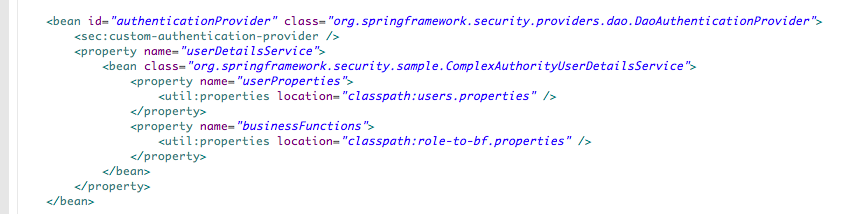
NOTE: we are injecting AuthenticationProvider with custom UserDetailsService implemented by ComplexAuthorityUserDetailsService class.(see sample code for more details)
Secure your resources, deploy and access application: http://localhost:8080/spring-security-sample-grantedAuthority/index.jsp
After Logging on you should see the list of GrantedAuthorities being displayed along with other properties of the Principal:
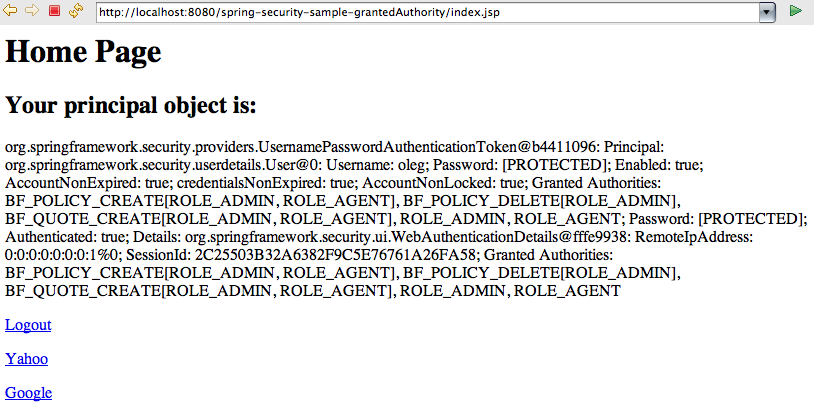
You can clearly see that GrantedAuthority representing business function also shows the list of parent GratedAuthorities defining such business function. Inspect index.jsp and observe how security:authorize tag is using both roles and business functions to protect HTML elements That is all. You can clearly see how with few minor customizations you can easily extend and customize the structure of the Principal and apply declarative protection based on custom GrantedAuthorities without polluting your business code with custom security code.
Sample code could be downloaded here: spring-security-sample-grantedauthority

VMware offers training and certification to turbo-charge your progress.
Learn moreTanzu Spring Runtime offers support and binaries for OpenJDK™, Spring, and Apache Tomcat® in one simple subscription.
Learn moreCheck out all the upcoming events in the Spring community.
View all